

XOR in Calligra Sheets: Test Odd Boolean Parity
Learn Calligra Sheets XOR with exact arguments, reproducible inputs, independently checked results and implementation-specific cautions.
Verification status: See the evidence and test scope described in this guide. How formula examples are checked
Quick answer
XOR(value1; value2; …) is true when an odd number of supplied values convert to true. With two arguments that means exactly one is true. With three arguments, three true values also produce true: XOR is not an “exactly one selected” validator for an arbitrary list.
Syntax and accepted inputs
=XOR(value1; value2; ...)
At least one argument is required, and ranges are accepted. The implementation walks the supplied values, counts those that convert to Boolean true, and tests whether that count is odd. Numeric zero is false; nonzero numeric values are true under the generic converter. Prefer actual Boolean conditions when building business rules so text-parsing coercion does not decide their meaning.
Reproduce the parity rule
| Formula | Expected result | True count |
|---|---|---|
=XOR(TRUE();FALSE()) |
true | 1 |
=XOR(TRUE();TRUE()) |
false | 2 |
=XOR(TRUE();TRUE();TRUE()) |
true | 3 |
=XOR(0;2;-1) |
false | 2 |
For a range check, enter 1 in A2:A4 and use =XOR(A2:A4): all three values are nonzero, so the independent parity expectation is true. Replacing A4 with 0 leaves two true values and changes the expected result to false.
These expectations follow counted parity and the inspected numeric-to-Boolean conversion. The KDE XOR entry describes exclusive OR; the odd-count implementation explains the multi-argument extension.
Practical example: two mutually exclusive options
Suppose B2 and C2 hold Boolean choices for Collect and Deliver. =IF(XOR(B2;C2);"One option selected";"Select exactly one") works for those two options: both false and both true fail, while either single selection passes.
If a third option is added, do not simply extend XOR and retain that label. Three selected options would pass the odd-parity test. For exactly one selection among explicit Boolean checks, count individual true conditions and compare the count with one. Define the allowed input values before using numeric totals as a proxy for selection counts.
Errors and limits
XOR()has too few arguments.- It is logical parity, not a bitwise exclusive-OR operation on integer bit patterns.
- The wrapper explicitly returns a direct error argument before counting. Do not use XOR as an error-clearing function.
- Text and empty cells follow conversion rules rather than a universal human notion of “selected.” Use consistent Boolean cells or explicit comparisons.
- Range handling, error propagation and text coercion can differ across products. Recheck these rather than assuming the shared name guarantees identical behavior.
Availability and verification
- Release checked: Calligra Sheets 26.08.2, using KDE’s release source package and release information, inspected on October 18, 2026. Relevant locations:
sheets/functions/logic.cpplines 60–63, 81–84, 109–113 and 257–270;sheets/engine/ValueConverter.cppBoolean conversion. - Introduced: The original introduction version is not established by these sources. Current registration establishes presence in 26.08.2, not the first release.
- Lifecycle: Registered in the inspected release; no retirement or deprecation marker was found in this function’s registration. Retirement (removed support) and deprecation (discouraged but retained support) are different claims; neither is asserted here.
- Native testing: Selected cases were recalculated and saved in Calligra Sheets 25.04.2. The source discussion concerns 26.08.2. Unlisted examples and edge cases remain source-derived or independently calculated.
Related guides and sources
- AND
- OR
- NOT
- IF
- Calligra function guide index
- KDE formula entry instructions, checked October 18, 2026. Examples use leading
=and semicolons, with a period for decimal numbers. Confirm regional separators in your installation before pasting.
Selected native results and screenshot
These results were observed in Calligra Sheets 25.04.2, after loading a corrected ODS input, recalculating and saving. Formula references and results were read back from the saved workbook. This is not a 26.08.2 native test or certification of XLSX import behavior. Other examples and unlisted edge cases remain separate source or mathematical evidence.
| Native formula | Observed display |
|---|---|
=XOR(TRUE();FALSE()) |
true |
=XOR(TRUE();TRUE()) |
false |
=XOR(TRUE();TRUE();TRUE()) |
true |
=XOR(0;2;-1) |
false |
=XOR(A2:A4) |
true |
Three true arguments returned true, directly illustrating odd parity rather than an exactly-one rule.
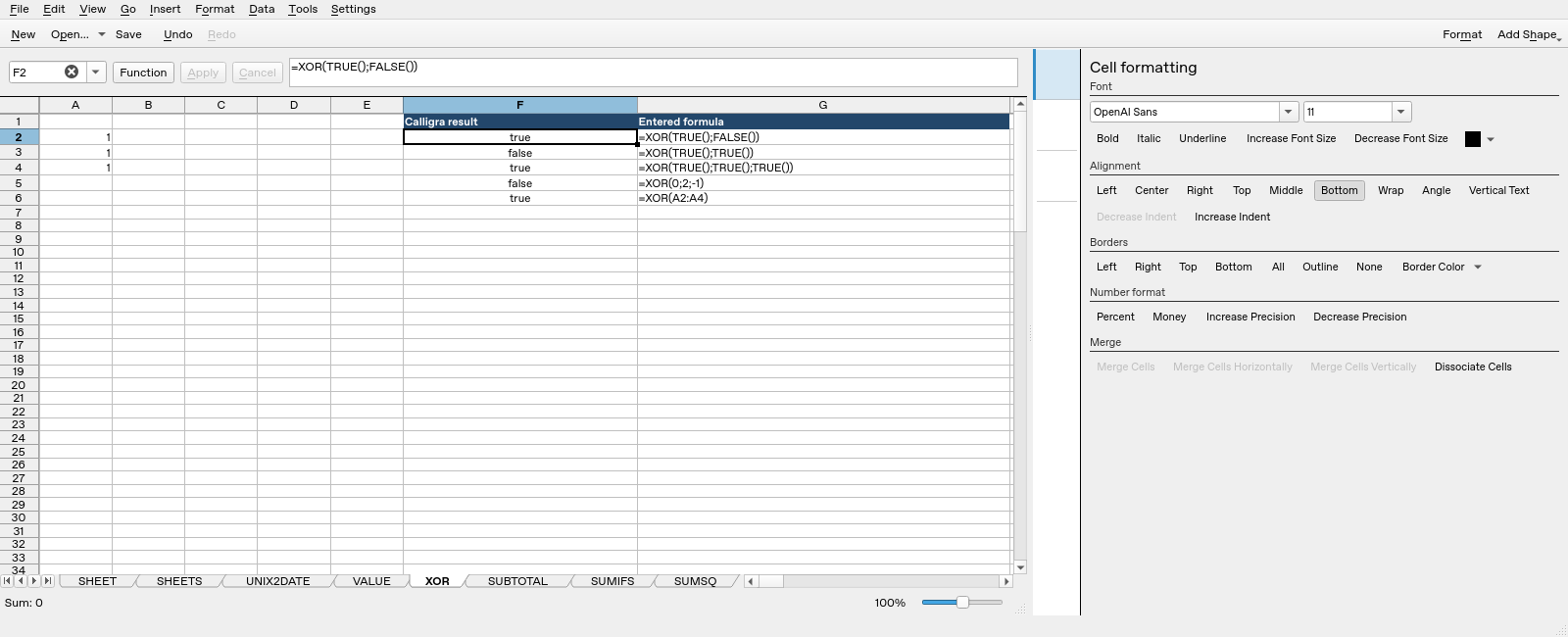
Screenshot: Genuine native 25.04.2 capture. Selected F2 contains =XOR(TRUE();FALSE()) and displays true. Column F contains application results; column G contains descriptive formula labels. The selected formula is visible in the formula bar; long labels in other rows may be clipped by the panel.