

YIELDMAT Function (Calligra Sheets)
Calculate yield for interest-paid-at-maturity securities in Calligra Sheets with explicit accrued-interest and day-fraction examples.
Verification status: See the evidence and test scope described in this guide. How formula examples are checked
Quick answer: =YIELDMAT(DATE(2025;4;1);DATE(2025;7;1);DATE(2025;1;1);0.06;99;0) is independently expected to return approximately 0.0995024875622.
Availability and verification scope
- Introduced: Original introduction release is not established. A checked release is not an introduction date.
- Source checked: Calligra Sheets 26.08.2, first-party implementation retrieved on October 18, 2026.
- Retired or deprecated: Neither is established. The function remains registered in the inspected source.
- Numerical evidence: The selected formulas below were executed in Calligra Sheets 25.04.2 on October 18, 2026, and their formulas and results read back from native-saved ODS files. Independent calculations provide separate checks. Version 26.08.2 was source-checked only; no general import/export or cross-version runtime compatibility is established.
- Entry style: English names, semicolon separators, decimal points and
DATE(year;month;day)values. Brackets in syntax indicate optional arguments; do not type them.
Purpose and syntax
YIELDMAT calculates annualized yield for a security whose interest is paid at maturity. It distinguishes interest accrued since issue from the purchaser’s remaining time to maturity. The output is a decimal annual rate, not the total interest payment or a currency price.
=YIELDMAT(settlement; maturity; issue; rate; price[; basis])
| Argument | Meaning and default |
|---|---|
| settlement | Purchase/settlement date |
| maturity | Final payment date, strictly after settlement |
| issue | Original issue date used to calculate total and accrued interest |
| rate | Positive annual interest rate, e.g. 0.06 for 6% |
| price | Positive clean price per 100 |
| basis | Optional year-fraction convention, default 0 |
The registration accepts five or six arguments. Use basis 0 for US 30/360, 1 for actual/actual, 2 for actual/360, 3 for actual/365 and 4 for European 30/360. These labels do not establish that every function uses the same underlying day-count implementation. Date boundaries, leap days and coupon schedules need their own checks. Use actual spreadsheet dates rather than ambiguous text such as 1/4/25.
Step-by-step: settle after interest has begun accruing
- On a fresh worksheet put
=DATE(2025;1;1)in A2 for issue. - Put
=DATE(2025;4;1)in B2 for settlement and=DATE(2025;7;1)in C2 for maturity. - Put 0.06 in D2 and 99 in E2.
- Enter
=YIELDMAT(B2;C2;A2;D2;E2;0)in F2. - The independent result is 0.0995024875622, or 9.95024875622%.
With basis 0 the issue-to-maturity fraction is 0.5, issue-to-settlement is 0.25 and settlement-to-maturity is 0.25. Interest paid at maturity is 100 × 0.06 × 0.5 = 3. The maturity receipt is therefore 103. Accrued interest at settlement is 100 × 0.06 × 0.25 = 1.5, so the model’s acquisition amount is 99 + 1.5 = 100.5. The remaining-period gain ratio is 103/100.5 − 1; dividing by 0.25 gives the annualized yield.
The source evaluates this directly, with a separate YEARFRAC call for each interval:
A = YEARFRAC(issue; maturity; basis)
B = YEARFRAC(issue; settlement; basis)
C = YEARFRAC(settlement; maturity; basis)
yield = ((1 + rate*A)/(price/100 + rate*B) − 1)/C
The price/100 term is why a quoted price of 99 must be entered as 99, not 0.99. Rate 6% must be entered as 0.06, not 6. Mixing these two units can produce a numeric answer with no useful economic meaning.
Advanced comparison: changing the day-count basis
For the same dates with basis 3, A is 181/365, B is 90/365 and C is 91/365. Substitute those fractions into the equation rather than assuming each interval is exactly a quarter or half year. The comparison table shows the resulting yield. The maturity interest and accrued settlement interest both change, as does the annualizing denominator.
At clean price 100 with basis 0, the yield is 0.0591133004926, or 5.91133004926%, rather than exactly the 6% coupon rate. The purchaser’s cost includes accrued interest, and the remaining simple yield is measured relative to that larger amount. This is an important reconciliation point when price appears to be “at par.”
For another security, reconstruct the issue, settlement and maturity cash flows first. Use the function only when its single maturity-interest structure matches the contract; a regular coupon bond needs a different cash-flow model. Fees and tax treatment are outside this expression.
Validation, errors and compatibility limits
The source explicitly rejects nonpositive rate, nonpositive price and settlement on or after maturity with internal errorVALUE. Unlike a model that permits a zero-rate bill, this function’s guard rejects rate 0. The zero-rate comparison below displayed #VALUE! in the native application.
The wrapper does not enforce issue before settlement or issue before maturity. YEARFRAC swaps reversed date pairs to calculate a positive fraction. Consequently an incorrectly ordered issue date may still produce a plausible number instead of a clear date-order error. Enforce issue <= settlement < maturity in your own input checks; absence of an error does not validate the chronology.
Unsupported basis integers reach YEARFRAC’s default US/NASD 30/360 branch rather than a comprehensive basis-validation guard. Use documented basis 0–4. This function’s YEARFRAC path differs from PRICEMAT’s simplified day-count helper in the inspected source, so do not promise that the two functions are exact inverses on every boundary date or basis. The explicit cash-flow equation is the safer check.
Reproducible comparison cases
Enter each formula on a fresh worksheet. Format numeric results with at least ten decimal places before comparing; percentage formatting multiplies the displayed number by 100. The displayed errors for these selected formulas were also observed in the native application.
| Formula | Independent or source-derived expectation |
|---|---|
=YIELDMAT(DATE(2025;4;1);DATE(2025;7;1);DATE(2025;1;1);0.06;99;0) |
0.09950248756218906 |
=YIELDMAT(DATE(2025;4;1);DATE(2025;7;1);DATE(2025;1;1);0.06;99;3) |
0.09963220147269226 |
=YIELDMAT(DATE(2025;4;1);DATE(2025;7;1);DATE(2025;1;1);0.06;100) |
0.059113300492610835 |
=YIELDMAT(DATE(2025;4;1);DATE(2025;7;1);DATE(2025;1;1);0;99) |
#VALUE! |
Native results in Calligra Sheets 25.04.2
The following selected formulas were recalculated in the native application. Display rounding can differ from the independent values above.
| Formula | Native displayed result |
|---|---|
=YIELDMAT(DATE(2025;4;1);DATE(2025;7;1);DATE(2025;1;1);0.06;99;0) |
0.0995024876 |
=YIELDMAT(DATE(2025;4;1);DATE(2025;7;1);DATE(2025;1;1);0.06;99;3) |
0.0996322015 |
=YIELDMAT(DATE(2025;4;1);DATE(2025;7;1);DATE(2025;1;1);0.06;100) |
0.0591133005 |
=YIELDMAT(DATE(2025;4;1);DATE(2025;7;1);DATE(2025;1;1);0;99) |
#VALUE! |
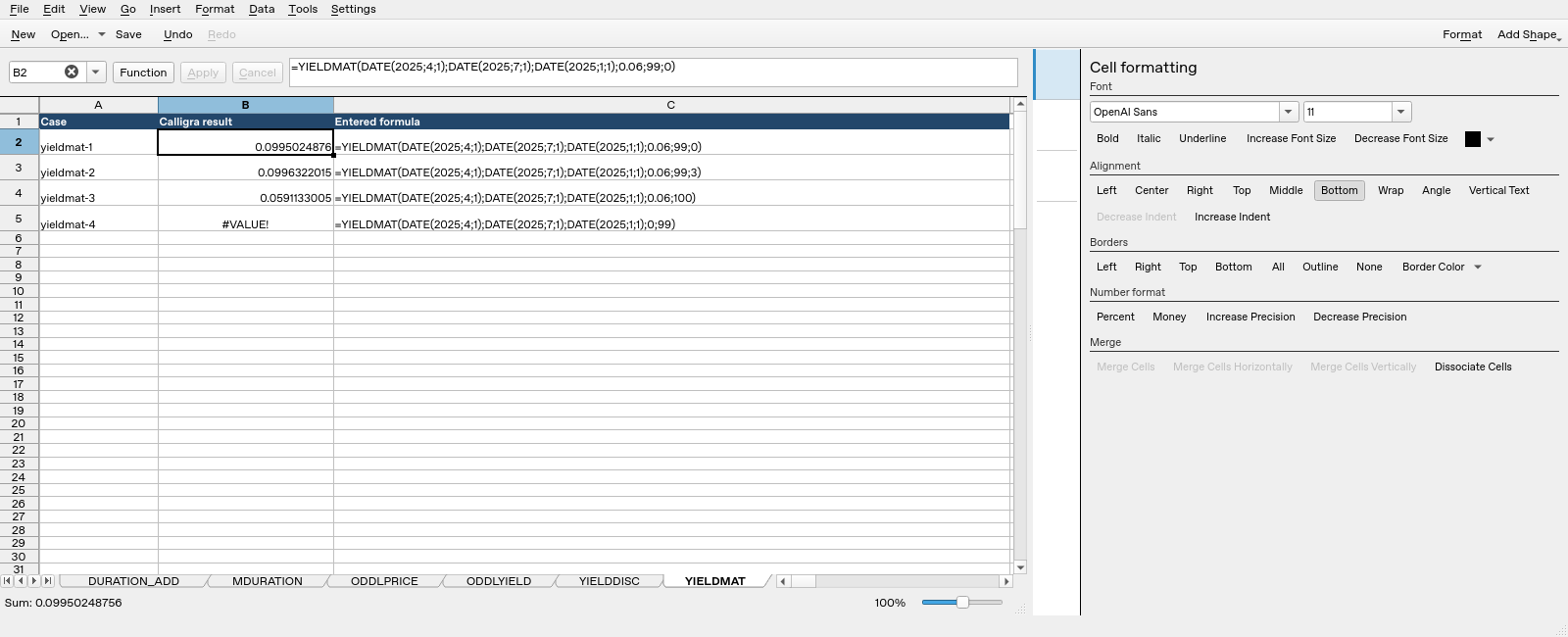
Calligra Sheets 25.04.2: selected cell B2 evaluates =YIELDMAT(DATE(2025;4;1);DATE(2025;7;1);DATE(2025;1;1);0.06;99;0) to 0.0995024876. Column B contains calculated results and column C shows entered formula text.
Compatibility and related functions
The registered alternate spelling is COM.SUN.STAR.SHEET.ADDIN.ANALYSIS.GETYIELDMAT. It uses the same handler; it is not a separate calculation. Matching names in other spreadsheet products do not guarantee matching argument order, day counts, validation or file-import behavior. This guide does not establish general XLSX/ODS round-trip compatibility. Check a small workbook with known results before relying on a migrated model.
Related guides: DURATION and PDURATION cover compound-growth periods; PMT handles equal periodic payments; DATE constructs date values. Bond duration and annualized yield are different quantities.
First-party references
- Calligra released function implementation, including the actual argument reads and return expressions.
- Calligra function descriptions, useful for terminology but subordinate to the inspected implementation where they differ.
- Calligra year-fraction implementation, relevant to basis-dependent year fractions.
References checked October 18, 2026. Numerical examples are spreadsheet calculations, not a recommendation to buy, sell or price a particular security without checking its contractual terms.