

Microsoft Excel · Automation and productivity · Intermediate
Review Copilot-Created Analysis Before Using It in Excel
Use Copilot Chat only mode for a bounded analysis, then independently verify its ranges, arithmetic, and changed-input conclusions.
Official documentation reviewed; synthetic fixtures checked independently; not executed in Excel · Editorial standards
Quick answer: Switch Copilot to Chat only before asking for analysis, specify the exact data range and question, and verify the answer against the original cells. A confident explanation is not proof that every record was included or that its interpretation follows from the data.
Scope and availability
Use English Excel for Microsoft 365 desktop on Windows with an already entitled account and supported build showing Copilot and the current Chat only mode. Eligibility depends on license and, for work accounts, tenant configuration; not every Microsoft 365 subscriber has the same experience. This guide does not ask you to buy a subscription, change privacy settings, connect an account, or enable another model provider.
Use only a wholly synthetic workbook for practice. No Copilot request or API call was made to produce this tutorial, and no observed Copilot response is reproduced. Your returned wording and results will vary. If the required mode is unavailable, stop rather than using an editing mode as if it were read-only analysis.
Build a four-record control case
On a sheet named Practice, enter A1:C5:
Record	Region	Units
E1	East	10
E2	East	20
W1	West	15
W2	West	5
Convert A1:C5 to a table with headers. Before asking Copilot, calculate the answer independently: East has two records totaling 30; West has two totaling 20; the grand total is 50 across four records. East exceeds West by 10. These facts are the answer key, not a generated response.
For worksheet controls outside the source table, put =SUM(C2:C5) in E2 and =COUNT(C2:C5) in F2. Expect 50 and 4. Keep A:C reserved for the data and do not accidentally include the check formulas as additional observations.
Choose the nonediting mode
Select the Copilot icon in Excel’s lower-right corner. Open the mode selector labeled Allow editing and select Chat only. Microsoft’s current instructions say editing is the default; Plan prepares an approach before editing and is not the same as keeping responses in chat.
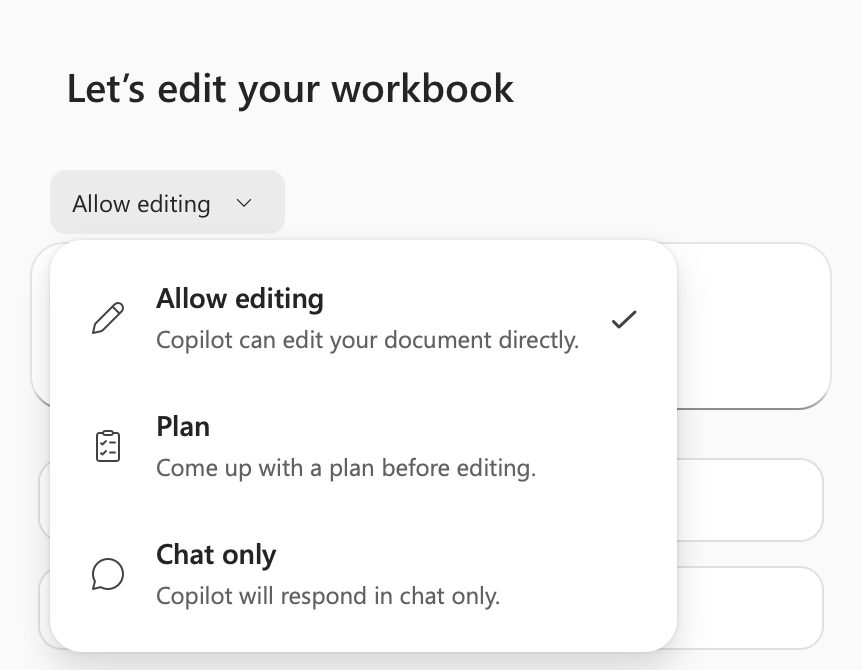
Microsoft documentation illustration, retrieved October 20, 2026, from Get started with Copilot in Excel. This is an unaltered official documentation image, not a capture of this exercise or evidence of application testing. The checkmark in the image is on Allow editing; choose Chat only for this task.
In the prompt box, enter and send:
Using only Practice!A1:C5, total Units for each Region, identify the larger total, and cite the cells used. Do not modify this workbook or use external sources. Distinguish facts in these four records from explanations the data cannot establish.
Review the actual answer
Check the response against five questions:
- Did it use four records and exclude headers and the E2/F2 control cells?
- Does East include C2=10 and C3=20, totaling 30?
- Does West include C4=15 and C5=5, totaling 20?
- Does the grand total reconcile to 50 and the difference to 10?
- Does the explanation stay within these records, without inventing dates, missing transactions, growth rates, or reasons for East’s higher total?
A correct total with incorrect cell citations still needs correction. A causal statement such as a region having better marketing cannot be established from Region and Units alone. Request a narrower correction referencing the exact discrepancy; do not paste an unverified answer into a report simply because it is well written.
Change one input and recheck
Change C5 from 5 to 25. East remains 30; West becomes 40; the total becomes 70; there are still four records. West now exceeds East by 10. Ask for a fresh analysis of the same range after the edit, then independently check all five questions again. An answer that still names East as larger may be using an earlier state or the wrong range.
Save the workbook and keep only reviewed conclusions in a separate review log or clearly labeled sheet. Reopen and verify C5=25, total 70, and the current conclusion. If the workbook changed unexpectedly, stop and inspect the mode and file history before continuing. See SUM and COUNT for the independent numeric controls.