

ASC Function (Gnumeric)
Convert fullwidth inventory labels with Gnumeric ASC. Learn syntax, katakana handling, leading-zero text, locale effects, and error checks.
Verification status: See the evidence and test scope described in this guide. How formula examples are checked
Quick answer
Use =ASC(A2) to convert fullwidth ASCII letters, digits and katakana in a text label to their halfwidth counterparts. For example, SKU-42 ガラス becomes SKU-42 ガラス.
ASC is useful when supplier labels mix character widths. It is not a general conversion to ASCII, a translator, or a complete Unicode normalization tool. Keep the original labels in a separate column so you can inspect the changes before using the results as identifiers.
Syntax
=ASC(text)
The single argument is the text to convert, supplied as a quoted string or a cell reference. The result is text. Characters outside the function’s mappings are copied rather than transliterated.
These examples use the stored formula syntax of the tested XLSX files. They do not establish how every localized Gnumeric interface accepts formula entry.
Worked example: normalize a supplier label
- Put
SKU-42 ガラスin A2 as text. - Put
=ASC(A2)in B2. - Check that B2 returns
SKU-42 ガラス. - Change A2 to
SKU-99 ガラス, leaving B2’s formula unchanged. The recalculated result isSKU-99 ガラス.
Both the original example and the changed input were checked through native Gnumeric recalculation. The first six characters become ordinary SKU-42 or SKU-99, and the ordinary space remains unchanged.
The katakana part is worth inspecting carefully. The precomposed character ガ becomes two characters: halfwidth KA, U+FF76, followed by the halfwidth voiced mark, U+FF9E. ラ becomes U+FF97 and ス becomes U+FF7D. A font can make different character sequences look similar, so appearance alone is not a reliable identifier check.
An already narrow input, SKU-42 ガラス, remained unchanged in the tested example. Do not assume that width conversion makes previously distinct supplier identifiers safe to merge: inspect the original and converted labels together.
Download and try the practice workbook
Download the Gnumeric ASC practice workbook (.xlsx). It contains one sheet, ASC practice, with four live ASC formulas and the saved results calculated by Gnumeric 1.12.62.
The workbook uses different cells from the small A2/B2 example above:
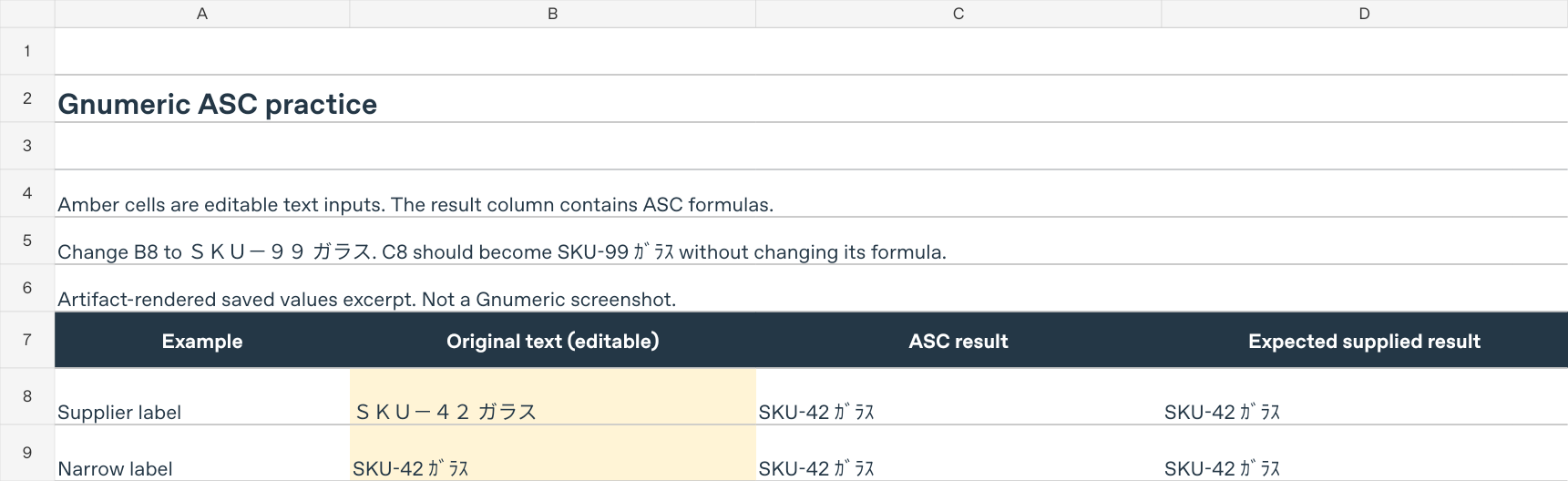
- Open a working copy and select ASC practice. The editable inputs are B8:B11; C8:C11 contains the ASC formulas. Column D gives the expected results for the supplied inputs, not for your later edits.
- Check B8,
SKU-42 ガラス, and C8,=ASC(B8). The supplied result isSKU-42 ガラス. - Replace B8 with
SKU-99 ガラスand recalculate without changing C8’s formula. C8 should becomeSKU-99 ガラス; D8 deliberately remains the original supplied expectation. - Clear B8’s contents while keeping C8’s formula, then recalculate. C8 should return an empty string rather than
0. This is a calculation check, not an instruction to delete a worksheet row. - To reset the exercise, reopen a fresh copy of the downloaded workbook. B8 and C8 then have the original SKU42 input and saved result. The original-input fixture was separately recalculated and matched the baseline; GUI Undo behavior was not tested.
Row 9 contains the already narrow label. Rows 10 and 11 compare fullwidth 0012 with stored text 0012; both results should be text 0012. Keep these inputs as text and preserve a copy of the originals.
The downloadable file’s baseline, SKU99, blank and original-input recalculation cases were checked with Gnumeric 1.12.62 / GOFFICE 0.10.61 on Linux through the CLI, using C.UTF-8 and UTC. These workbook checks do not establish GUI entry or behavior in other spreadsheet programs or locales. The article’s separate locale findings below come from additional fixtures, not this download.
View the saved-values preview of the supplier-label rows (.png). This is an artifact-rendered excerpt of saved native calculation values, not a Gnumeric screenshot. It shows A1:D9 only. The preview renderer misdisplays leading-zero text in the lower rows, so those rows are excluded; the downloadable workbook retains the correct stored 0012 strings. Preview gridlines and fonts are not proof of Gnumeric’s GUI appearance.
Preserve leading zeros as text
In the tested cell-reference examples, text 0012 remained text 0012, and fullwidth text 0012 became text 0012. ASC did not remove the leading zeros from either stored text input.
The distinction is the input’s underlying type, not simply its appearance. Use a text input for a code whose zeros matter. ASC is not a way to reconstruct a leading zero that was already lost when an identifier became a number.
Numbers, formatting and locale
ASC can receive numeric and Boolean cell values, but their conversion to text needs care. The following are observed results from the same XLSX fixtures recalculated with Gnumeric 1.12.62:
| Input value | C.UTF-8 / ja_JP.utf8 result | fr_FR.utf8 result |
|---|---|---|
| Number 42 | 42 |
42 |
| Number 12.5 | 12.5 |
12,5 |
| Number 0.125 | 0.125 |
0,125 |
| Boolean true | TRUE |
VRAI |
| Boolean false | FALSE |
FAUX |
All these ASC results are text. A numeric 0.125 cell with percentage formatting produced 0.125 in the C/Japanese runs and 0,125 in French, not a percentage string. A currency-formatted 12.5 cell likewise produced the decimal value without copying its currency formatting. ASC is not a display-format preservation tool.
The French Boolean results are version-specific: the corresponding Gnumeric 1.12.57 tests returned TRUE and FALSE, while 1.12.62 returned VRAI and FAUX. Do not rely on ASC to produce locale-independent Boolean labels for an export or lookup key.
Empty inputs and errors
These boundaries were checked with native recalculation:
=ASC("")returns an empty string.- A reference to a genuinely blank cell returns an empty string, not the text
0. - A reference to a cell containing the formula
=""also returns an empty string. - A reference to a cell containing
=1/0propagates#DIV/0!.
An empty-string result can look blank without being a genuinely empty cell. If an error appears, inspect and fix the referenced calculation first; changing character width does not repair the source error.
Troubleshooting unexpected conversions
Some Japanese characters or spaces do not change
The tested string containing hiragana, kanji and an ideographic space, U+3000, was unchanged. ASC is not a whitespace-cleaning tool, and not every wide-looking character has a conversion here. Check the actual characters before assuming the formula failed.
Similar-looking voiced katakana produces different text
Precomposed ガ and the sequence カ followed by combining voiced mark U+3099 do not produce identical codepoint sequences. The latter was converted to halfwidth KA followed by the original combining U+3099, rather than the halfwidth voiced mark U+FF9E. Preserve the input and investigate the character sequence when a visually plausible conversion still fails an exact comparison.
A yen symbol becomes a backslash
In the tested Gnumeric version, fullwidth yen ¥ (U+FFE5) becomes a backslash (U+005C). Review currency and path labels before applying ASC broadly. This conversion is not evidence that an amount or path retains its intended meaning.
Decimal or Boolean labels differ between machines
Check both the Gnumeric version and calculation locale. The locale-dependent numeric and Boolean results above are a reason to keep inventory identifiers as text and to test representative exports in the environment that will consume them.
Tested version and scope
The reported results were checked on Linux, Debian 13 x86_64, with Gnumeric 1.12.62 and GOFFICE 0.10.61, using the headless ssconvert command-line tool to recalculate XLSX fixtures without cached formula results. The exact A2/B2 label workflow used C.UTF-8; the coercion checks used C.UTF-8, ja_JP.utf8 and fr_FR.utf8. Month-name controls confirmed locale-sensitive calculation in those runs.
These checks cover calculation and saved XLSX result values, not interactive GUI entry, input methods, font rendering or screenshots. They do not establish identical behavior in other spreadsheet programs, operating systems or Gnumeric versions. No native GUI screenshot is available for this example.
Official references
- Gnumeric ASC function reference.
- Gnumeric 1.12.62 source archive, particularly the ASC help, mapping and implementation in
plugins/fn-string/functions.c.