

CHOLESKY Function (Gnumeric)
Factor a symmetric positive-definite matrix in Gnumeric with CHOLESKY, lower-triangular array output and covariance reconstruction checks.
Verification status: Gnumeric 1.12.57 ssconvert: specified CHOLESKY fixtures and separately captured worked-example GUI. Gnumeric 1.12.62 source inspected separately. How formula examples are checked
CHOLESKY factors a real symmetric positive-definite matrix A into a lower-triangular matrix L satisfying A = L × TRANSPOSE(L). It is useful for structured linear algebra and for transforming independent, unit-variance inputs into correlated inputs with a specified covariance matrix. It is not a general-purpose decomposition of an arbitrary rectangular or nonsymmetric table.
Syntax and array entry
=CHOLESKY(matrix)
matrix is the sole required argument, with no optional parameters or defaults. Supply an n-row by n-column numeric range. The result is also n rows by n columns. In Gnumeric, select the entire destination range, type the formula, and confirm as an array formula with Ctrl+Shift+Enter. Do not type braces around the formula. A single-cell display is not evidence that the remaining factor entries are zero.
Keep row labels and column labels outside the range. Matrix arithmetic needs positions to retain their meaning; do not assume that text or missing entries are dropped as they might be in a statistical sample function. Use explicitly numeric data and verify the dimensions before calculation.
Worked example: a two-variable covariance matrix
Enter the following numbers in A1:B2:
| A | B | |
|---|---|---|
| 1 | 4 | 2 |
| 2 | 2 | 3 |
Select D1:E2 and array-enter =CHOLESKY(A1:B2). The expected factor is:
| D | E | |
|---|---|---|
| 1 | 2 | 0 |
| 2 | 1 | 1.414213562373095 |
The final entry is √2. Independently, the algorithm gives L11 = √4 = 2, L21 = 2/2 = 1 and L22 = √(3−1²) = √2. This matrix is positive definite: its first leading principal minor is 4 and its determinant is 8, both positive.
Select G1:H2 and array-enter =MMULT(D1:E2,TRANSPOSE(D1:E2)). The expected reconstructed matrix is exactly the input mathematically, with small floating-point differences possible. The reconstruction is a useful check against accidentally transposing the factor or choosing the wrong output shape.
Advanced use: transform a fixed input vector
Put 1 in J1 and -1 in J2. Select L1:L2 and array-enter =MMULT(D1:E2,J1:J2). The expected output is 2 and 1−√2, approximately -0.414213562373095. This is a deterministic illustration of the transformation, not a random simulation.
If the input vector were instead composed of independent, zero-mean, unit-variance random variables, the transformed vector would have covariance L×TRANSPOSE(L), equal to A. The order of variables must match both rows and columns of the covariance matrix. Reordering only one axis changes the problem. If you need correlations rather than covariances, construct a symmetric positive-definite correlation matrix first.
Input conditions, errors and troubleshooting
- A nonsquare or empty matrix produces
#VALUE!in the examined callback. Verify that the input does not include an extra header row. - Positive definiteness is required. A zero determinant or a negative pivot can make the factorization invalid; do not interpret a partly numerical array as a valid factor without checking reconstruction.
- Gnumeric’s retained implementation averages matching off-diagonal entries before decomposition. This may accommodate tiny rounding differences, but it can also mask a genuinely nonsymmetric input. For deliberate nonsymmetry, correct the model rather than relying on the averaging.
- The help describes
#NUM!on algorithm failure. The retained low-level routine does not itself return a failure status for every invalid pivot, so this guide does not promise one uniform error token for every indefinite or singular input. - Near-singular covariance matrices can be numerically delicate. Keep sufficient precision in the input and inspect the reconstructed matrix; formatting more decimals cannot recover information already rounded away.
- Use the lower-triangular orientation shown. Multiplying TRANSPOSE(L)×L generally gives a different matrix.
Version and verification scope
The retained official NEWS records CHOLESKY as added in Gnumeric 1.9.12. The inspected implementation is from retained 1.12.62 source; this is not a claim that every intervening release was tested or that any retirement date is known. Expected results were checked independently by exact algebra. Native engine evidence, if present, is separately scoped below; the separate GUI screenshot below covers only the worked factor.
Related functions
Official sources
Native evidence note
On 17 October 2026, Gnumeric 1.12.57 recalculated a synthetic workbook through ssconvert in the C.UTF-8 locale. The 1 recorded CHOLESKY fixture cases matched the independently computed numerical results or the source-predicted error cases within floating-point precision. The recorded native case was the complete 2×2 factor in D1:E2; the reconstruction and transformed-vector examples are algebraic checks, not additional recorded native runs. These records are engine tests; the separately captured worked-example screenshot is scoped below. It does not certify other versions, locales, workbook formats or untested edge cases.
Native application screenshot
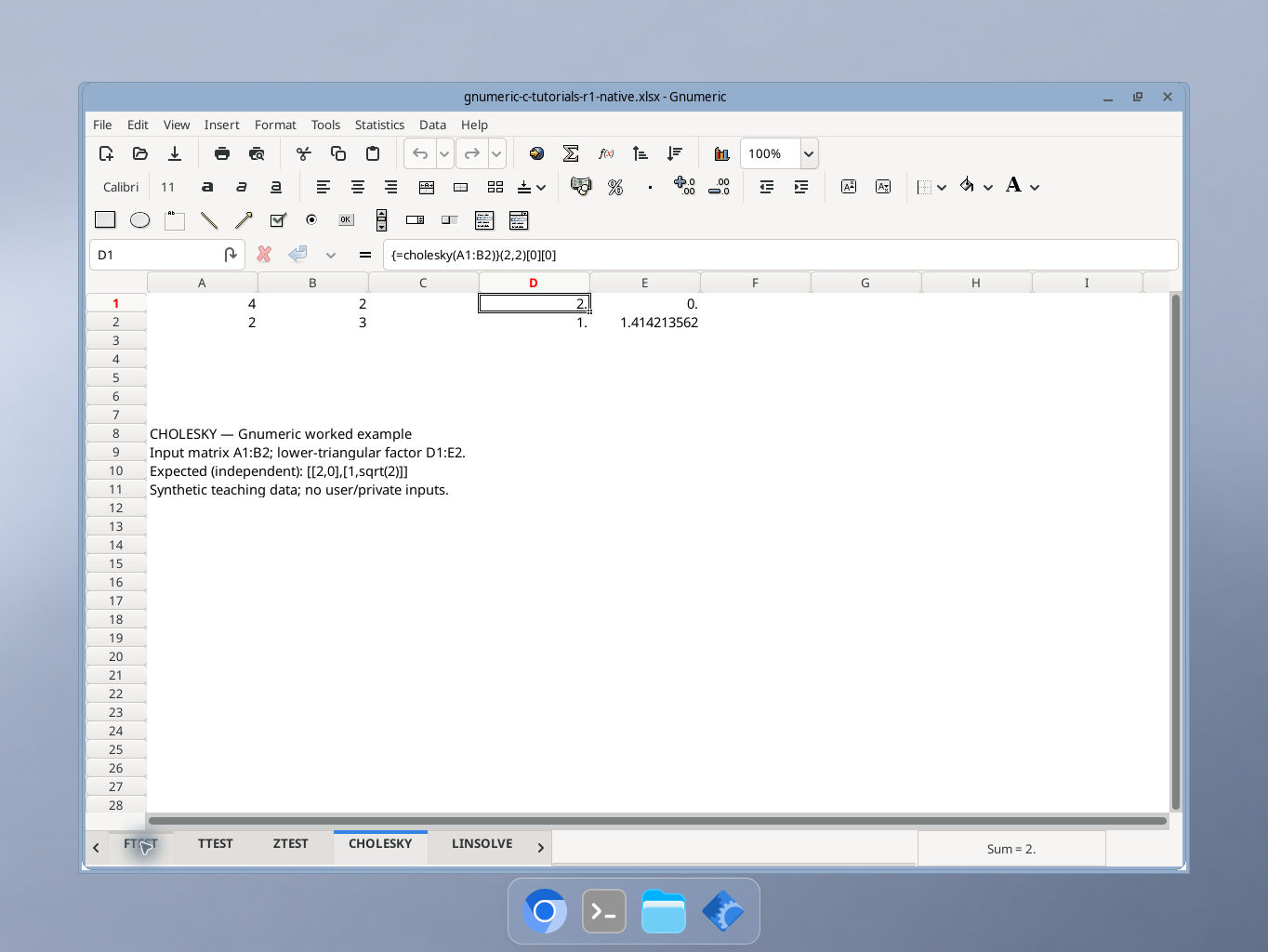
Gnumeric 1.12.57, captured 17 October 2026. Input matrix A1:B2; lower-triangular factor D1:E2. The selected cell D1 shows the formula in the formula bar. Display precision is shorter than the independent reference values; integer cells may show a trailing decimal point. GUI locale was not independently recorded.