

CONVERT Function (Gnumeric)
Convert compatible measurement units in Gnumeric with CONVERT, exact unit symbols, verified examples and incompatible-unit errors.
Verification status: See the evidence and test scope described in this guide. How formula examples are checked
CONVERT changes a numerical measurement from one supported unit to another. It returns a number, so the result can feed arithmetic without stripping a unit label from text. The unit codes must represent the same physical quantity; this is not a currency-exchange or arbitrary text-conversion function.
Syntax and unit codes
CONVERT(x, from, to)
x is the measurement, from is its existing unit code, and to is the destination code. Quote literal codes, or keep them in cells and reference those cells. Gnumeric’s unit matching is case-sensitive.
Useful supported codes include m (metre), in (inch), ft (foot), g (gram), lbm (pound mass), sec (second), hr (hour), C (Celsius), F (Fahrenheit), and K (kelvin). Recognized metric prefixes permit codes such as cm and kg; do not assume every prefix works with every unit family. The official implementation’s unit and prefix tables are the authoritative list for this pinned version.
A potentially costly distinction is ozm for an ounce of mass versus oz for a fluid ounce. Similarly, U.S. and Imperial liquid measures have different codes and conversion factors. Specify the intended convention rather than relying on a label such as “ounce” or “gallon.”
Worked example: normalize measurements
Create this input table:
| Cell | Value | Cell | Value | Cell | Value |
|---|---|---|---|---|---|
| A2 | 12 | B2 | in | C2 | ft |
| A3 | 2.5 | B3 | m | C3 | cm |
| A4 | 100 | B4 | C | C4 | F |
| A5 | 1 | B5 | kg | C5 | g |
Enter =CONVERT(A2,B2,C2) in D2 and fill down through D5. The expected results are 1, 250, 212, and 1000 respectively. Add a heading such as “Converted value” to D1, and retain the destination code in column C so that readers know what the numbers mean.
Temperature conversions include an offset: 100 degrees Celsius becomes 212 degrees Fahrenheit. A single multiplication factor is therefore not a general substitute for CONVERT. Also distinguish an absolute temperature from a temperature difference; converting a difference with an absolute-temperature formula introduces the offset incorrectly.
Advanced use: compare dimensions before aggregating
For a shipment sheet, normalize all lengths to metres in one helper column before comparing them or summing them. Keep mass in a different column and normalize it separately. The formula prevents an unsupported cross-family conversion, but it cannot detect that someone has mislabeled a numeric input.
Use a round-trip check such as =CONVERT(CONVERT(12,"in","ft"),"ft","in") when testing a workbook template. Expect approximately 12, allowing for floating-point rounding. Round for presentation at the end, not at every intermediate conversion, particularly when many converted quantities are aggregated.
Errors and troubleshooting
=CONVERT(1,"m","g")returns#NUM!in Gnumeric 1.12.57 because the recognized source unit cannot convert to that target family.- An unrecognized code, such as
=CONVERT(1,"bogus","m"), returns#N/Ain the native test. The built-in help broadly promises#N/A!for incompatible types, but the actual implementation and native m-to-g test differ: do not rely on one universal error code for every invalid unit pair. - Check capitalization, stray spaces, and whether a code refers to mass, volume, area, or length before replacing errors with zero.
- Bare unit names without quotes may be interpreted as defined names.
"m"is a literal code; an unquotedmis not equivalent. - Negative inputs are not a substitute for physical-domain validation. Ensure that your application permits the measurement before converting it.
Version and verification
This guide uses the unit tables and calculation branches in Gnumeric 1.12.57. The first release containing CONVERT is not established here, and newer releases are not assumed to have identical tables. No retirement is indicated by this evidence. Official source was retrieved on 17 October 2026. The four measurement conversions, two error cases, and round-trip example were recalculated in Gnumeric 1.12.57 under C.UTF-8. The round trip yielded 12.000000000000002, illustrating floating-point rounding. These multi-case checks are headless engine testing. The selected inch-to-foot example was additionally displayed in the actual application, as shown below.
Related guides
Official references
Native application screenshot
This separate screenshot worksheet uses A2 = 12; B2 = in; C2 = ft. In D2, =CONVERT(A2,B2,C2) returns 1. The screenshot layout is independent of the cell positions in the earlier tutorial. Only this selected example is GUI-verified; the other checks retain their stated engine-test scope.
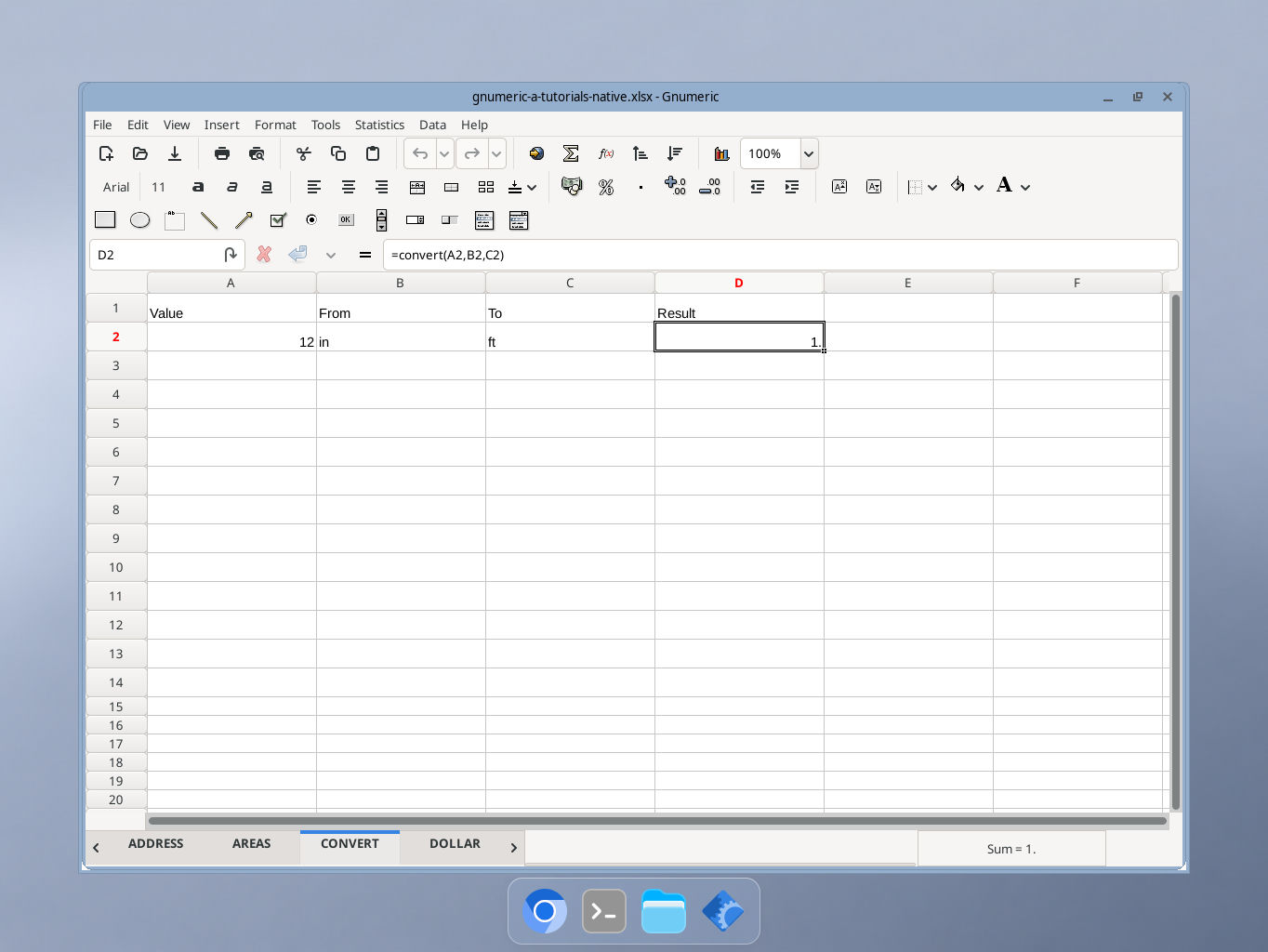
Actual Gnumeric 1.12.57 application, captured 17 October 2026. GUI locale was not independently recorded.