

GET.LINK Function (Gnumeric)
Extract a styled cell hyperlink target with Gnumeric GET.LINK, including a verified GUI example, empty-link behavior and reference errors.
Verification status: See the evidence and test scope described in this guide. How formula examples are checked
GET.LINK reads the target of a hyperlink attached to a cell. It is useful for auditing link destinations independently of their visible labels. A cell can display “Documentation” while its attached link points to a complete URL; GET.LINK returns that target as text.
Syntax and what is inspected
GET.LINK(cell)
cell is a reference to one cell. Gnumeric looks for the hyperlink associated with that cell and returns the target when one is present. If there is no attached link, it returns an empty value. A reference spanning multiple cells returns #REF! in the pinned implementation.
A URL-looking cell value is not itself proof that a hyperlink is attached. Likewise, a friendly label does not reveal the destination. This function inspects the link metadata rather than searching the visible text for something that resembles an address.
Worked example: inspect an attached link
In a blank worksheet, enter Sample in A1. Select A1 and use Insert → Hyperlink. Choose Web Link and enter https://example.invalid as the target. Confirm the hyperlink attachment without opening the destination. In B1 enter =GET.LINK(A1).
The native result is https://example.invalid, not Sample. The screenshot below shows the selected B1 formula and the extracted target. The synthetic destination was never visited. A saved native workbook and its hyperlink metadata separately confirm that A1 contains an attached URL-link object.
The attachment step is essential: merely typing the label and the formula is not a complete setup. This positive case verifies a manually attached web link in Gnumeric 1.12.57; it does not certify every imported-link representation or a link produced by another formula.
For the basic checks, enter the literal number 30 in A4 and leave it without a hyperlink:
| Formula | Native result in 1.12.57 |
|---|---|
=GET.LINK(A4) |
empty |
=GET.LINK(A1:A2) |
#REF! |
These distinguish the no-link case from an invalid multi-cell reference. They complement the separately verified positive attached-link example above.
Advanced use: audit destinations without following them
An audit column can place GET.LINK next to each linked label so that a reviewer can compare the visible text with the actual target. Reading the destination does not require visiting it, and the returned string is not evidence that the destination is safe, reachable, or still the intended document.
Keep the original label visible during review. A destination may be technically valid yet wrong for the row, or a familiar-looking label may conceal a different host. For external links, review the scheme and host deliberately before opening them.
The official help warns that changing an attached link does not automatically update the reported value: recalculation is required. After editing a link target, force workbook recalculation and confirm the audit result before relying on it. Do not assume a stale extracted target means that the link editor failed to save the change.
Errors and troubleshooting
- An empty result means no target was found by this inspection; check whether an actual hyperlink is attached.
- A URL-looking text constant is different from hyperlink metadata. Verify the source cell’s link configuration.
- Use one cell at a time;
A1:A2is not a request to return a list of two targets. - If an edited target is not reflected, recalculate before further diagnosis.
- A link created by a formula or imported from another file format may be represented differently. Test the actual workbook rather than generalizing from a manually attached link.
Version and verification
The official release notes record GET.LINK as added in Gnumeric 1.9.18. Its implementation remains registered in 1.12.57. The no-link and multi-cell cases were recalculated in the actual 1.12.57 engine under C.UTF-8 on 17 October 2026. A separate actual 1.12.57 GUI test on the same date inserted the synthetic hyperlink in A1 and verified its extracted target in B1. The native workbook, hyperlink metadata, exported result and actual screenshot were retained. No destination was activated, and other hyperlink types or imported formats remain outside this positive test. No retirement or last-supported-release claim is made.
Related guides
ISFORMULA distinguishes formula cells from constants. CONCATENATE combines text after extraction but does not inspect or validate hyperlink metadata.
Official references
Native application screenshot
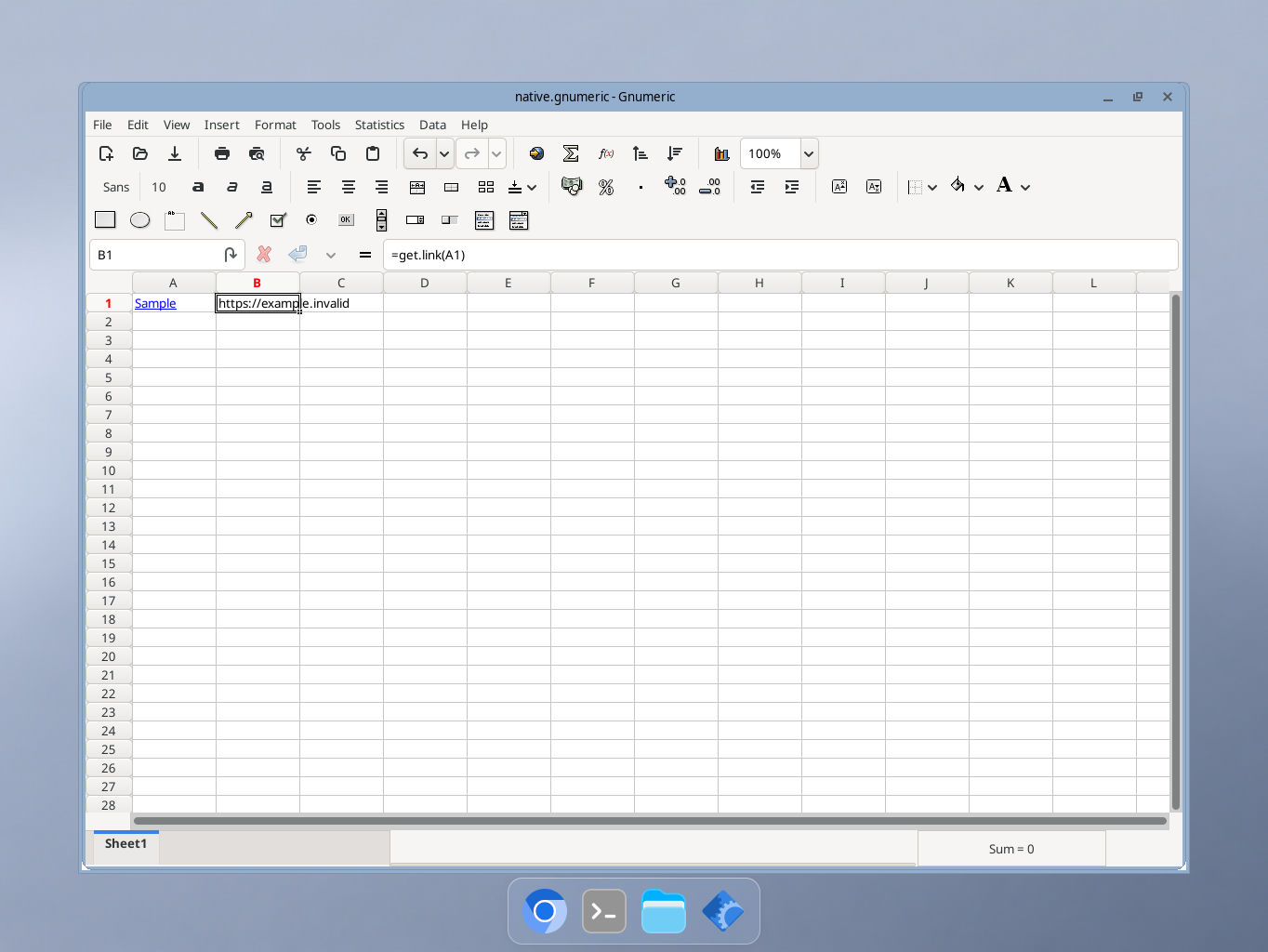
Actual Gnumeric 1.12.57 on 17 October 2026. B1 extracts https://example.invalid from A1 without opening the link. GUI locale was not independently recorded.