

INDIRECT Function in Gnumeric: Syntax, Examples and Compatibility
Use INDIRECT in Gnumeric. Turn an A1 or R1C1 address stored as text into a usable reference. Includes native 1.12.57 examples and version-scoped 1.12.62 source checks.
Verification status: See the evidence and test scope described in this guide. How formula examples are checked
Quick answer: Turn an A1 or R1C1 address stored as text into a usable reference.
Evidence boundary: The examples explicitly labelled native below were calculated in Gnumeric 1.12.57 on October 18, 2026. The argument explanations also cite pinned 1.12.62 source and the official manual. There was no native 1.12.62 run, and these cases do not certify every release, locale or file-import scenario.
Availability and version history
- Introduced: Documented by 1.12.62; original introduction not established.
- Availability: Supported in Gnumeric 1.12.62, based on the function-specific registration.
- Scope: Desktop; the fn-lookup function module must be included and enabled.
- Checked: October 18, 2026. Bounded native 1.12.57 run; pinned 1.12.62 source reviewed separately. Original introduction remains unestablished.
Syntax and reference style
=INDIRECT(ref_text, [format])
ref_text must describe a valid cell or range. Gnumeric calls the optional Boolean argument format; some guides call it a1.
- Omit the argument or pass TRUE for A1-style references such as
"B3". - Pass FALSE for R1C1-style references such as
"R3C2". - Text that is invalid for the selected style returns #REF!.
The quotes matter. "B3" is the address text; B3 without quotes asks the spreadsheet to evaluate B3 first. A cell holding address text can be supplied directly.
Set up the input table
Enter 10 in B2, 42 in B3 and 15 in B4. Enter the text B3 in B5, without an equals sign. Keep output formulas elsewhere, for example in column F.
Worked example: the same cell in both styles
=INDIRECT("B3")
=INDIRECT("B3",TRUE)
=INDIRECT("R3C2",FALSE)
All three returned 42 in native Gnumeric 1.12.57. In the third call, R3C2 identifies row 3, column 2, the same cell as B3. This example uses absolute numbered R1C1 coordinates, not bracketed relative offsets.
=INDIRECT(B5)
This also returned 42, because B5 contains the address text B3. The function follows that text to the referenced cell; it does not return the literal characters B3. This pattern is useful when a control cell chooses among a small set of references.
Worked example: turn a text range into a sum
=SUM(INDIRECT("B2:B4"))
Native result: 67, because the text becomes a reference to the three values 10, 42 and 15. INDIRECT supplies the reference; SUM performs the aggregation. Keep that distinction in mind when a larger range is returned: the result is not a comma-separated text list.
A mismatched style produces an error
=INDIRECT("B3",FALSE)
Native result: #REF!. The first argument is A1-style text, while FALSE asks for R1C1 interpretation. Correct either the text or the flag. The pinned 1.12.62 help and implementation describe the same invalid-style reference error.
If a formula unexpectedly fails, inspect the address text itself, including the sheet name and punctuation, rather than only the cell where the final value should appear. A hard-coded address string can become stale after a structural edit; prefer an ordinary reference when it would meet the need more clearly. Test any rename or row/column insertion workflow before relying on text-built references to track it.
Compatibility and scope
The examples demonstrate same-sheet references and the TRUE/FALSE mapping. External workbooks, quoted sheet names, defined names, relative R1C1 expressions and structural edits were not executed in this fixture. Their behavior should not be inferred from the six passing cases. After migrating a workbook, check both the formula’s reference-style argument and the text it receives.
Native screenshot and calculation evidence
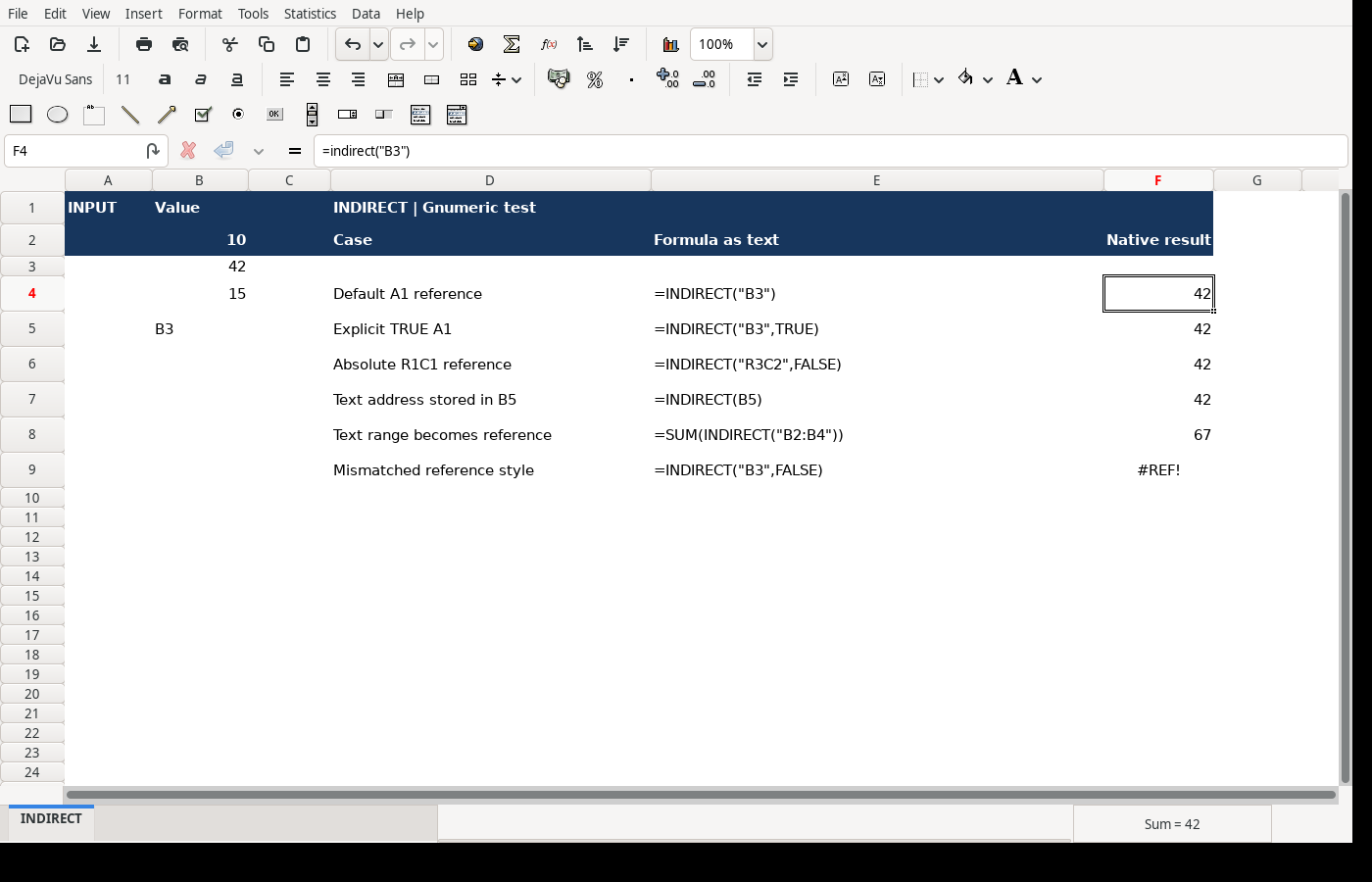
The image is an unmodified capture of the actual Gnumeric window opening the cache-free fixture. The formula-text column is a reading aid; the result column contains live formulas. The fixture was also recalculated and saved by ssconvert 1.12.57 through Gnumeric’s native workbook format, then read back as XLSX to inspect its formulas and values. The screenshot is from the GUI opening the original fixture; it is not a screenshot of a different application or a constructed illustration.
Formula examples use English function names and comma argument separators. Entry separators can vary with locale; the native run does not establish other locale conventions.
Related guides and official documentation
-
Gnumeric documentation for INDIRECT — function syntax and current vendor information.
Editorial verification: Cache-free input formulas, native-saved formula/value readback, actual errors and raw screenshots were retained for these bounded cases. Source/manual checks and runtime results remain version-separated. See the editorial testing standards for the evidence policy.