

LINEST Function (Gnumeric)
Learn the LINEST function in Gnumeric: Calculates parameters of the linear regression as an array.
Verification status: See the evidence and test scope described in this guide. How formula examples are checked
LINEST returns least-squares coefficients as an array. It is useful when a worksheet needs both a prediction equation and regression diagnostics, or when more than one predictor is involved. With one predictor the model is y = m × x + b. Coefficients describe association in the supplied data, not causal effects.
Syntax and arguments
=LINEST(known_ys,[known_xs],[affine],[stats])
known_ys is a required vector of dependent observations. known_xs is an optional array of independent observations; its default is the single vector 1 through n. affine defaults to TRUE, fitting a constant term. FALSE fits through the origin. stats defaults to FALSE; TRUE adds diagnostic rows. Supply each observation consistently: for a column of y-values, arrange multiple predictor columns over the same rows.
The coefficient row runs in reverse predictor order: x_m, x_(m−1), …, x_1, then the intercept. For one predictor it is slope, intercept. The implementation allocates m+1 columns even when affine is FALSE; do not shift coefficient positions when disabling the intercept.
Worked straight-line fixture
Enter A1:A4 as 1, 2, 3, 4 and B1:B4 as 5, 7, 9, 11. Evaluate =LINEST(B1:B4,A1:A4) in a two-column array result. Expected first row: 2, 3. Scalar checks are =INDEX(LINEST(B1:B4,A1:A4),1,1) → 2 and =INDEX(LINEST(B1:B4,A1:A4),1,2) → 3.
Independently, mean x is 2.5 and mean y is 8. The sum of cross-products about the means is 10 and the sum of squared x deviations is 5. Therefore slope = 10/5 = 2 and intercept = 8 − 2×2.5 = 3. The fitted values reproduce all four observations exactly, subject to numerical rounding.
Omitting known_xs produces the same result for this particular fixture because its x-values are exactly the default sequence. With affine FALSE the slope changes: sum(xy)/sum(x²) = 90/30 = 3, rather than 2. A zero-intercept model is a substantive constraint, not an output-format option.
Diagnostic output with stats TRUE
=LINEST(B1:B4,A1:A4,TRUE,TRUE) requests five rows:
| Row | First two entries |
|---|---|
| 1 | Slope; intercept |
| 2 | Corresponding coefficient standard errors |
| 3 | R²; standard error of the estimate |
| 4 | F statistic; residual degrees of freedom |
| 5 | Regression sum of squares; residual sum of squares |
For models with extra predictors, rows 3–5 have #N/A in unused columns. These placeholders are layout information, not proof the regression failed. Exact straight-line data has zero theoretical residual variance, so F-related quantities can be degenerate; use noisy observations for meaningful diagnostic demonstrations. With affine FALSE, Gnumeric documents an uncentered R², which should not be compared casually with the ordinary centered R² of an intercept model.
Advanced use and common failures
Keep predictors in a clearly labeled order and label the output in reverse order to match the returned coefficients. A predictor repeated in another column, a constant predictor alongside an intercept, or insufficient independent observations can make the fit singular. Rescale very large predictors or express dates as elapsed time when appropriate; numerical stability is separate from statistical validity.
The documented mismatch between known y length and the corresponding known x length is #NUM!. The implementation also returns #NUM! for an unsuccessful regression. Check paired range shapes, missing data, and independent variation before suppressing errors. If coefficients appear swapped, verify the reverse-order rule before changing the model. If only the slope is displayed, check the array result area or extract coefficients with INDEX.
Availability and evidence scope
The fn-stat module in the retained official Gnumeric 1.12.62 source registers this function. NEWS records the start of LINEST implementation in 0.32 and later improvements in 1.12.3. These milestones distinguish initial development from working-support reports; historical execution was not repeated here, and the last functioning release is not established. This is a desktop worksheet function, with no web-edition claim. The official source archive was retained October 13–14, 2026 and inspected again October 17. It was not newly downloaded during this review.
The worked results are independently calculated expectations. On October 17, 2026, Gnumeric ssconvert 1.12.57 under C.UTF-8 recalculated the primary fixture successfully. The two INDEX-extracted coefficients were exactly 2 and 3. Other optional-argument, statistical-diagnostic and edge-case statements are source-derived or mathematical rather than separately native-tested here. The selected primary example is also shown in the genuine Gnumeric 1.12.57 screenshot below. No Gnumeric 1.12.62 execution or broader GUI workflow is claimed. Formula examples use English names and comma separators; adapt separators to the workbook locale. Array results are not a promise of Excel-style automatic spilling. Use Gnumeric array entry for a suitably sized result area, or INDEX to inspect individual elements.
Sources and related guides
- Official Gnumeric function catalog
- Pinned official statistical function help and implementation
- Pinned registration
- Official release history
- SLOPE, INTERCEPT, and RSQ provide focused single-predictor calculations.
Native application screenshot
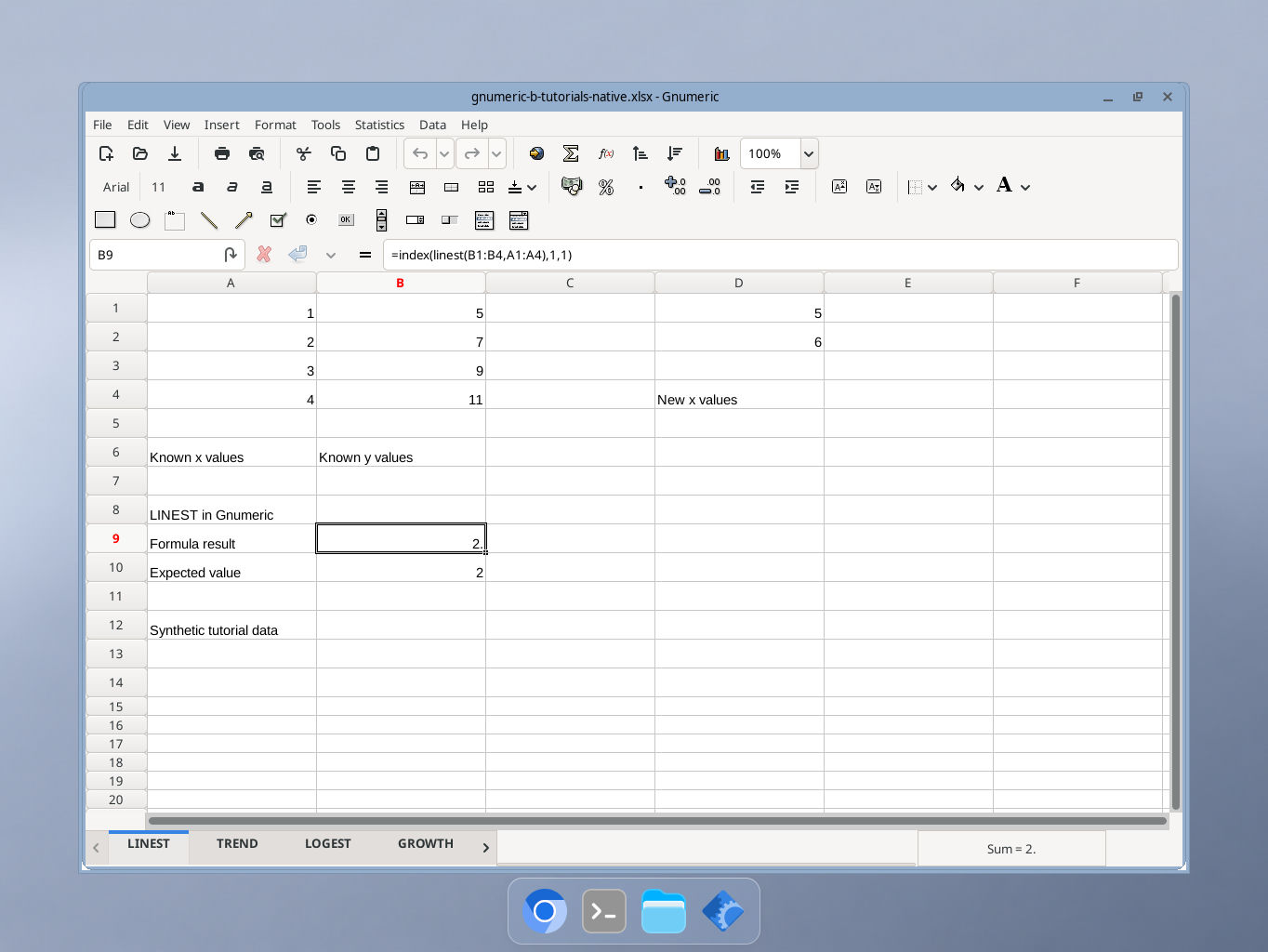
Gnumeric 1.12.57, captured October 17, 2026. Selected cell B9 shows the documented formula result 2. The formula bar and synthetic inputs are visible; GUI locale was not independently recorded.