

NETWORKDAYS Function in Gnumeric: Syntax, Examples and Compatibility
Use NETWORKDAYS in Gnumeric. Count inclusive workdays, with holidays and Gnumeric’s optional Sunday-first weekend array. Includes native 1.12.57 examples and version-scoped 1.12.62 source checks.
Verification status: See the evidence and test scope described in this guide. How formula examples are checked
Quick answer: Count inclusive workdays, with holidays and Gnumeric’s optional Sunday-first weekend array.
Evidence boundary: The examples explicitly labelled native below were calculated in Gnumeric 1.12.57 on October 18, 2026. The argument explanations also cite pinned 1.12.62 source and the official manual. There was no native 1.12.62 run, and these cases do not certify every release, locale or file-import scenario.
Availability and version history
- Introduced: Documented by 1.12.62; original introduction not established.
- Availability: Supported in Gnumeric 1.12.62, based on the function-specific registration.
- Scope: Desktop; the fn-date function module must be included and enabled.
- Checked: October 18, 2026. Bounded native 1.12.57 run; pinned 1.12.62 source reviewed separately. Original introduction remains unestablished.
Syntax and arguments
=NETWORKDAYS(start_date, end_date, [holidays], [weekend])
start_dateandend_dateare spreadsheet date values. Use DATE to avoid ambiguous typed date strings.holidaysis an optional date range or array. Supply the dates your business actually excludes; the function does not fetch public or company holidays.weekendis Gnumeric’s optional seven-element array in Sunday, Monday, Tuesday, Wednesday, Thursday, Friday, Saturday order. Zero means a workday and nonzero means an excluded weekday. The documented default is{1,0,0,0,0,0,1}.
If you want a custom weekend but no holidays, keep an empty third argument: the two commas before the array are intentional.
Worked example: the ordinary five-day week
In B2, enter =DATE(2026,6,1); in B3, =DATE(2026,6,5); in B4, =DATE(2026,6,3). Format them as dates. These are Monday, Friday and Wednesday, respectively.
=NETWORKDAYS(B2,B3)
=NETWORKDAYS(B2,B3,B4)
Native results: 5 without the holiday, 4 with it. Both endpoints are included when they are workdays.
Worked example: Wednesday and Thursday are off
=NETWORKDAYS(B2,B3,,{0,0,0,1,1,0,0})
Native result: 3. Reading the Sunday-first mask, Wednesday and Thursday are excluded. Monday, Tuesday and Friday remain. The zeroes for Saturday and Sunday designate workdays under this custom pattern, although neither date occurs in this five-day interval.
Add the Monday in B2 as a holiday:
=NETWORKDAYS(B2,B3,B2,{0,0,0,1,1,0,0})
Native result: 2, representing Tuesday and Friday. Holidays remove otherwise eligible dates; they do not change the weekly pattern.
Reversed dates and migration cautions
=NETWORKDAYS(B3,B2)
The native 1.12.57 result was 5, not a negative duration. The inspected 1.12.62 implementation swaps reversed endpoints before counting. If your report needs a signed measure, specify that rule explicitly rather than expecting reversed arguments to supply it.
The manual qualifies Excel compatibility on omitting the fourth argument. Do not carry this four-argument call into another application without checking its syntax. NETWORKDAYS.INTL uses a different argument order: weekend is third and holidays fourth. Its seven-character weekend string is Monday-first, unlike the Sunday-first array shown here. A seven-digit string copied unchanged is therefore not a safe substitute for this array.
Use NETWORKDAYS to count workdays in an interval; use WORKDAY when you want a date reached after moving a number of workdays. When counts seem wrong, inspect the actual date values, inclusive endpoints, selected holiday range, and the order of all seven weekend entries. This bounded fixture does not establish every date-system, locale, malformed-array or file-conversion edge case.
Native screenshot and calculation evidence
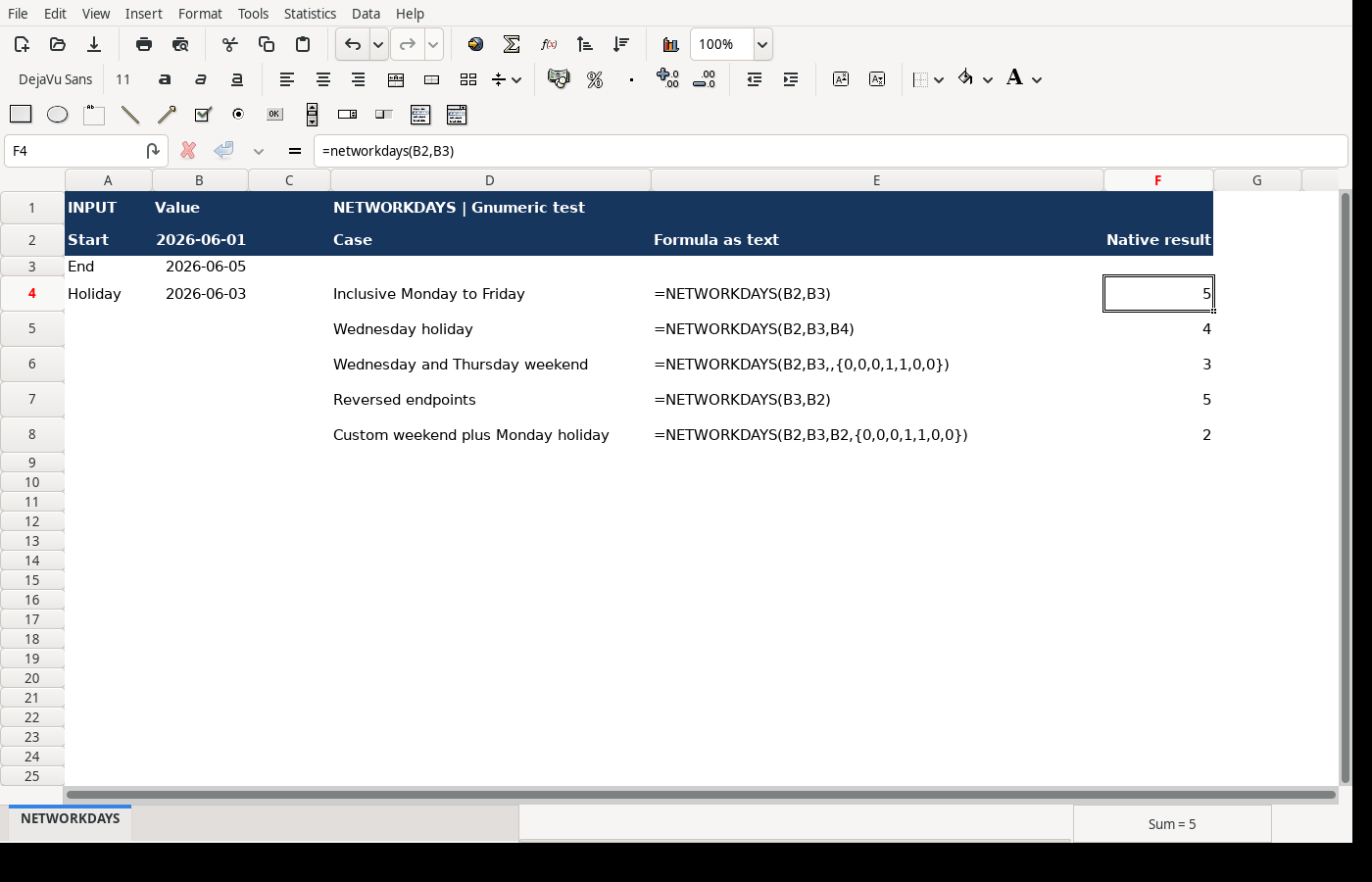
The image is an unmodified capture of the actual Gnumeric window opening the cache-free fixture. The formula-text column is a reading aid; the result column contains live formulas. The fixture was also recalculated and saved by ssconvert 1.12.57 through Gnumeric’s native workbook format, then read back as XLSX to inspect its formulas and values. The screenshot is from the GUI opening the original fixture; it is not a screenshot of a different application or a constructed illustration.
Formula examples use English function names and comma argument separators. Entry separators can vary with locale; the native run does not establish other locale conventions.
Related guides and official documentation
-
Gnumeric documentation for NETWORKDAYS — function syntax and current vendor information.
Editorial verification: Cache-free input formulas, native-saved formula/value readback, actual errors and raw screenshots were retained for these bounded cases. Source/manual checks and runtime results remain version-separated. See the editorial testing standards for the evidence policy.