

TREND Function (Gnumeric)
Learn the TREND function in Gnumeric: Calculates points along a regression line.
Verification status: See the evidence and test scope described in this guide. How formula examples are checked
TREND fits a least-squares linear relationship to known observations and evaluates it at selected x-values. It returns predictions, while a coefficient-oriented regression function returns the equation’s parameters. Use TREND for interpolation or modest extrapolation when a linear model is defensible; the result is not a confidence interval or a guarantee.
Syntax, defaults and shape
=TREND(known_ys,[known_xs],[new_xs],[affine])
known_ys is a required vector of dependent observations. known_xs is the predictor array; omitting it uses a single vector 1, 2, …, n. new_xs specifies where predictions are wanted and defaults to known_xs, giving fitted values at the training observations. affine defaults to TRUE and includes a constant term; FALSE constrains the fit through the origin.
Gnumeric supports multiple independent variables through its regression-data collector. Match each new observation’s predictor layout to the training layout, rather than passing an unrelated rectangular range. For the column-vector example below, a column of new x-values yields a column of predicted y-values. Use explicit small ranges first to make shape mistakes visible.
Reproducible prediction table
Enter A1:A4 as 1, 2, 3, 4 and B1:B4 as 5, 7, 9, 11. Put 5 in D1 and 6 in D2. Evaluate =TREND(B1:B4,A1:A4,D1:D2) in a two-row result area. Expected values are 13 and 15. To check one result at a time, use =INDEX(TREND(B1:B4,A1:A4,D1:D2),1,1) and then change the row index to 2.
Independently, every observed point lies on y = 2x + 3. Substituting 5 gives 13 and substituting 6 gives 15. Omitting new_xs with =TREND(B1:B4,A1:A4) instead returns fitted values 5, 7, 9, 11. Because this example’s x-values equal 1 through 4, =TREND(B1:B4,,D1:D2) also predicts 13 and 15.
The argument order is easy to reverse accidentally: y is first and x is second. The clean fixture makes that mistake detectable rather than concealing it in approximate data.
Advanced application: compare model constraints
For the same data, forcing affine FALSE fits y = mx. The least-squares slope is sum(xy)/sum(x²) = 90/30 = 3. Predictions at 5 and 6 would therefore be 15 and 18. Those differ from 13 and 15 because the original relationship has intercept 3. Choose the constraint only when the subject matter justifies it, rather than because a zero intercept looks tidier.
For dated observations, use a meaningful elapsed-time axis if you want an interpretable origin. Predicting at a date serial is valid only when training x-values use the same date system and scale. Omitting x substitutes observation positions, which loses unequal time gaps. Inspect residuals, plotted observations, and the distance beyond the training range before using a forecast operationally.
Errors and troubleshooting
Gnumeric documents a known-y versus known-x length mismatch as #NUM!. An unsuccessful or singular regression also produces #NUM! in the inspected callback. New predictor dimensions must fit the model; inspect the shape before treating a range error as a numerical problem. Constant predictors, duplicate predictor columns, or too few independent observations can prevent a stable fit.
If only the first prediction appears, check array entry or use INDEX to inspect each row. If predictions match the training values when future ones were expected, verify that new_xs was supplied. If results are systematically offset, inspect affine and the chosen x origin. Keep inputs numeric and aligned, rather than assuming blanks or text will represent missing periods correctly.
Availability and evidence scope
The fn-stat module in the retained official Gnumeric 1.12.62 source registers this function. NEWS records the start of TREND implementation in 0.32, one-dimensional GROWTH/TREND working in 0.42, and multiple-regression support for TREND in 1.10.12. These milestones distinguish initial development from working-support reports; historical execution was not repeated here, and the last functioning release is not established. This is a desktop worksheet function, with no web-edition claim. The official source archive was retained October 13–14, 2026 and inspected again October 17. It was not newly downloaded during this review.
The worked results are independently calculated expectations. On October 17, 2026, Gnumeric ssconvert 1.12.57 under C.UTF-8 recalculated the primary fixture successfully. The two INDEX-extracted predictions were exactly 13 and 15. Other optional-argument, statistical-diagnostic and edge-case statements are source-derived or mathematical rather than separately native-tested here. The selected primary example is also shown in the genuine Gnumeric 1.12.57 screenshot below. No Gnumeric 1.12.62 execution or broader GUI workflow is claimed. Formula examples use English names and comma separators; adapt separators to the workbook locale. Array results are not a promise of Excel-style automatic spilling. Use Gnumeric array entry for a suitably sized result area, or INDEX to inspect individual elements.
Sources and related guides
- Official Gnumeric function catalog
- Pinned official statistical function help and implementation
- Pinned registration
- Official release history
- SLOPE and INTERCEPT can independently check a single-predictor equation.
Native application screenshot
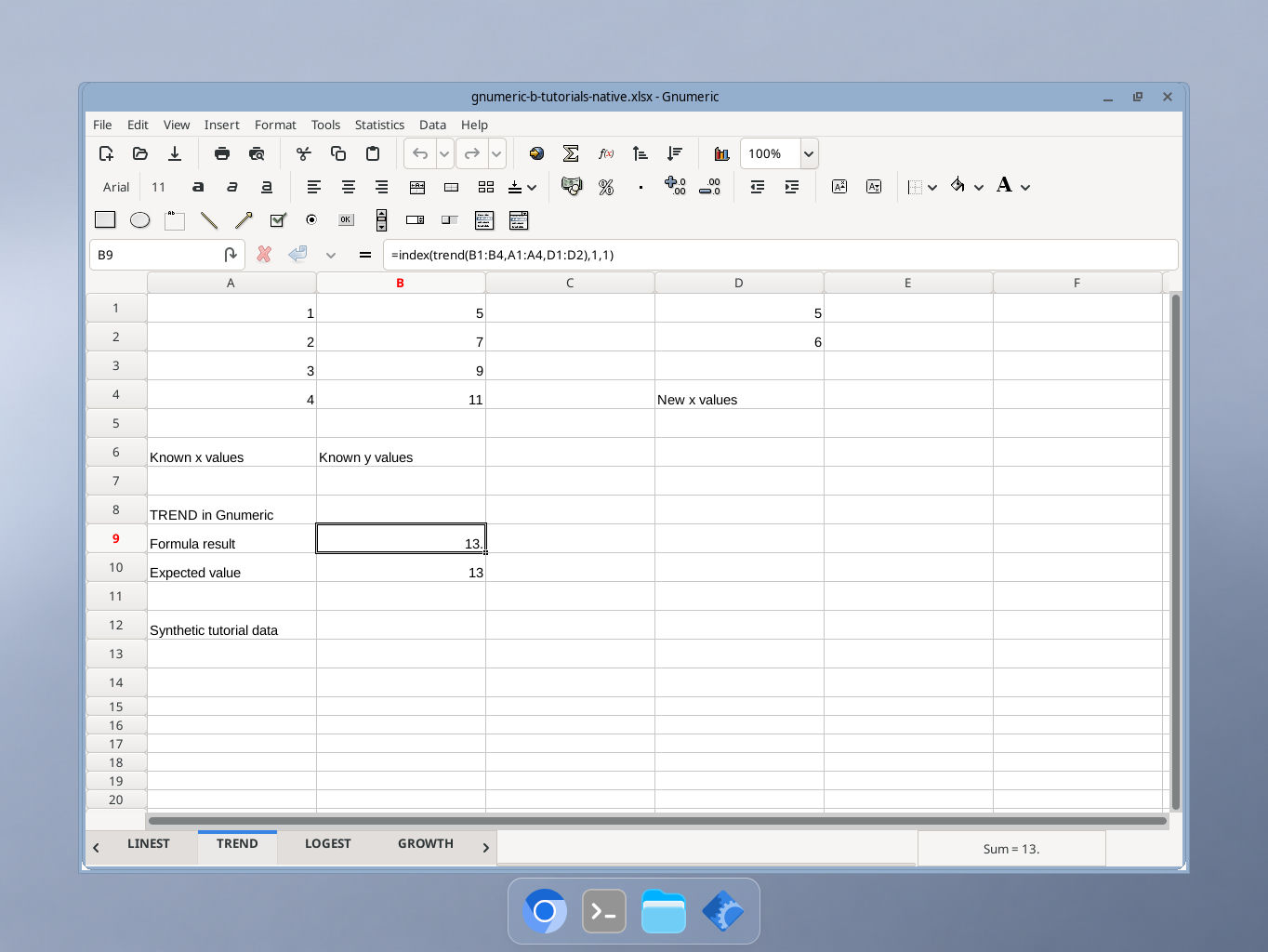
Gnumeric 1.12.57, captured October 17, 2026. Selected cell B9 shows the documented formula result 13. The formula bar and synthetic inputs are visible; GUI locale was not independently recorded.