

LibreOffice Calc · Data entry and validation · Beginner
Create a Drop-Down List from Another Sheet in LibreOffice Calc
Build a Calc status drop-down from a separate sheet, name its source range, add another option, and check invalid entries.
Worked example tested in LibreOffice Calc 26.8.1.1 · Editorial standards
To create a drop-down from another sheet, select the input cells and choose Data → Validity → Criteria. Set Allow to Cell range, enter a source such as $Lists.$A$2:$A$5, and enable Show selection list. A document-wide named range makes that source easier to maintain when the list grows.
Before you start
Use desktop LibreOffice Calc and save the working file as ODS. The directions use the standard menu bar and current LibreOffice 26.8 Help. A CSV supplies values only; it cannot save multiple sheets, named ranges or validity rules.
These examples use Calc’s default A1 reference syntax, in which a period separates the sheet name from the address. If you use another formula-syntax setting, select the source with the dialog’s range picker instead of translating the reference by guesswork.
1. Create a small source list and entry sheet
Make two sheets named Lists and Orders. On Lists, enter this data in A1:A5, or use the status-options CSV.
| Cell | Value |
|---|---|
| A1 | Status |
| A2 | New |
| A3 | In progress |
| A4 | Blocked |
| A5 | Done |
On Orders, enter Ticket in A1 and Status in B1. Put T-101, T-102, T-103 and T-104 in A2:A5; leave B2:B5 empty. Keeping the list separate lets you update the available choices without searching through entry rows.
2. Connect the drop-down to the other sheet
- On Orders, select
B2:B5. The Name Box to the left of the formula bar is a convenient place to enter the range. - Open Data → Validity, then Criteria.
- Choose Cell range under Allow. Enter
$Lists.$A$2:$A$5in Source. Exclude A1 so thatStatusdoes not become a choice. - Enable Show selection list. Leave Sort entries ascending off to preserve the workflow order shown above.
- On Input Help, optionally show the message
Choose a status from the list. - On Error Alert, enable Handle invalid values (the current Help calls this Show error message when invalid values are entered), choose Stop, and enter
Choose one of the listed statuses. - Confirm the dialog. Click a different cell, then return to B2 and open the list. Choose Blocked.
The Criteria documentation confirms that a validity source can be an explicit range or a named range. The Error Alert documentation distinguishes Stop, which rejects an invalid entry, from Warning and Information, which can let the user accept it.
Select a screenshot to open the full-size image.
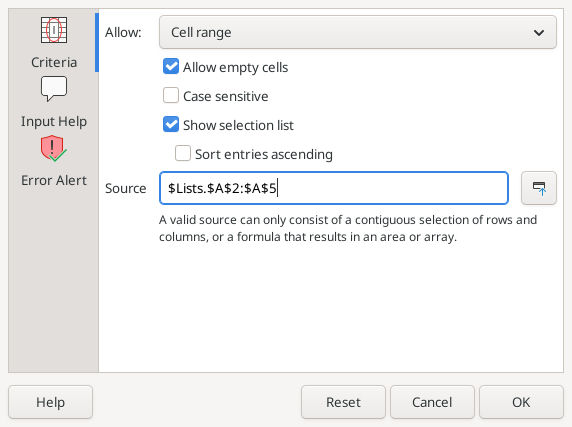
Native LibreOffice Calc 26.8.1.1 on Linux, captured 16 October 2026 with synthetic data.
Checkpoint: all four destination cells should offer New, In progress, Blocked and Done. Type Waiting directly into B3: the Stop alert should refuse it. A blank source list or the header Status in the menu means the Source range needs correction.
3. Replace the address with a reusable name
- Select
Lists.A2:A5. - Choose Sheet → Named Ranges and Expressions → Define.
- Enter StatusOptions as the name, verify Range or formula expression is
$Lists.$A$2:$A$5, and use Document (Global) scope. Confirm the dialog. - Select
Orders.B2:B5again. In Data → Validity → Criteria, keep Cell range and replace Source withStatusOptions, without quotation marks. - Confirm, then open a destination drop-down again.
The Define Names documentation explains that global scope makes a name available throughout the document. A sheet-local name may not resolve from Orders.
4. Add another option without rebuilding each rule
Enter On hold in Lists.A6. A name pointing to A2:A5 still ends at row 5, so merely typing underneath it is not a reliable expansion method.
- Open Sheet → Named Ranges and Expressions → Manage.
- Select StatusOptions and change its range to
$Lists.$A$2:$A$6. - Confirm, return to Orders, and reopen the list. On hold should now be available.
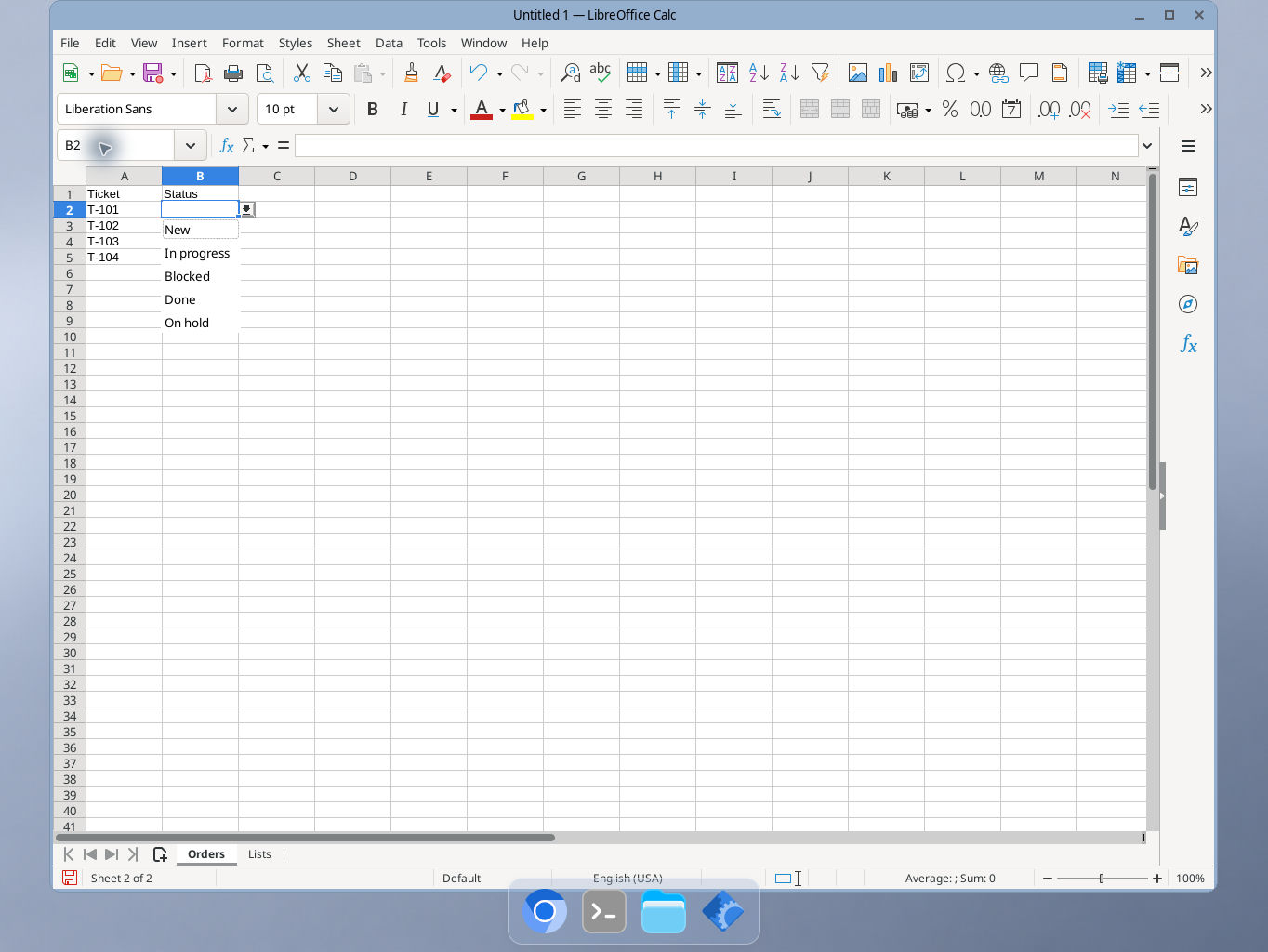
LibreOffice Calc 26.8.1.1: the fifth option appears after the named range is extended.
You changed the name’s definition once; the validity rules still refer to the same name. This is the maintenance benefit of a named range, not a promise that an ordinary fixed range automatically expands. See Manage Names.
Why the reference matters
The dollar signs keep the source sheet, column and row boundaries fixed when the rule is copied. Without a fixed source, a copied rule can end up looking one row farther down the options list. For a sheet named Status Lists, the default Calc reference is $'Status Lists'.$A$2:$A$5; the range picker avoids quote mistakes. See Calc’s absolute and relative references.
A range-based list is preferable here because the choices remain visible and editable on Lists. For a short list that rarely changes, Allow → List lets you enter choices directly in the dialog instead. Other validity types include whole numbers, decimals, dates, times, text length and custom conditions.
Problems that look like a broken drop-down
- The arrow is missing: select a destination cell and check Show selection list. The keyboard shortcut in Windows/Linux is Alt+Down Arrow.
- The newest option is missing: inspect the name’s final row. Also confirm the destination rule uses
StatusOptions, not the old literal address. - The menu is reordered or duplicates vanish: Sort entries ascending both sorts the list and removes duplicates from its display. Turn it off when order matters.
- Choices contain empty entries or spaces: keep the source list contiguous and clean. TRIM can help inspect unwanted spaces, but changing an allowed label does not rewrite values already selected in Orders.
- Invalid pasted values remain: validity is an entry aid, not an import gate. Existing values, paste and drag-and-drop can bypass it. Run Tools → Detective → Mark Invalid Data after bulk changes, then repair the marked values. This limitation is explicit in Validity of Cell Contents.
If letter case matters, enable Case Sensitive and test both forms. If saving as XLSX, reopen the file and retest the list; the direct List option has an Excel-format storage limit documented in Criteria.
Final check
Save the ODS file, reopen it, and test B2 and B5, the new On hold option, and a rejected direct entry. Use COUNTIF when you later want to count tickets with each status.
Verification: the cross-sheet range, global named source, fifth-option extension, rejection of an invalid typed entry, and saved-file reopening were tested in LibreOffice Calc 26.8.1.1 on Linux (English interface) on 16 October 2026. The screenshots are native captures of that synthetic example. Paste behavior and other locale/format caveats are based on the linked documentation, not separate native tests.