

ONLYOFFICE Spreadsheet Editor · What-if analysis · Intermediate
Find Break-Even Sales Quantity with ONLYOFFICE Goal Seek
Solve a one-input profit model, inspect the proposed quantity and verify whole-unit break-even instead of trusting a fractional result.
Official documentation reviewed; scoped native example verified · Editorial standards
Use Goal Seek to set a profit formula to zero by changing its quantity input. Then check the result against the original formula and your business constraints. Goal Seek’s proposed number is not automatically a valid whole-unit sales target.
Set up a small model
Use an editable XLSX copy in the current English desktop-style ONLYOFFICE Spreadsheet Editor. The Data tab documents Goal Seek in online and desktop interfaces; the native example below checks Desktop Editors Community 10.0.0.169, while mobile menus and historical builds are not tested here. This example is a simple fixed-price, fixed-cost model, not a complete business forecast.
Enter labels in column A and these values or formulas in B:
| Cell | Label | Enter |
|---|---|---|
| B2 | Unit selling price | 25 |
| B3 | Variable cost per unit | 13 |
| B4 | Fixed cost | 1000 |
| B5 | Quantity | 50 |
| B6 | Profit | =(B2-B3)*B5-B4 |
B2:B4 use the same currency. B5 is an editable numeric input; B6 must contain the formula, not a pasted result. With quantity 50, expected profit is -400: (25-13)*50-1000.
Run Goal Seek
- Open Data → Goal Seek.
- Set Set cell to B6, To value to 0, and By changing cell to B5.
- Click OK to calculate. Inspect the Goal Seek Status result before accepting it. In the tested build, the status showed the target and current profit, while the worksheet still showed the original quantity until acceptance.
- In this disposable test copy, use the status dialog’s OK to apply a plausible result, then inspect the changed quantity and recalculate the model. The official instructions identify this confirmation as applying the result. If the status is unsuitable, dismiss without accepting and verify or restore the original quantity 50. If the applied quantity fails the checks below, restore the original input rather than treating it as a valid sales target.
The changed input must be referenced by the target formula, as documented in ONLYOFFICE Goal Seek help. See also the Data tab.
Check the mathematics independently
Each unit contributes 25 - 13 = 12 toward fixed costs. Exact continuous break-even is 1000/12, or 83⅓ units. A solver may show an approximate decimal near 83.333333 rather than an exact fraction. Recalculate the profit using the proposed quantity and inspect the residual, not only a display rounded to zero.
For indivisible products, test neighboring whole units directly:
| Quantity | Revenue | Variable cost | Profit after fixed cost |
|---|---|---|---|
| 83 | 2075 | 1079 | -4 |
| 84 | 2100 | 1092 | 8 |
The smallest non-loss whole quantity in this example is 84. Enter 84 in B5 and confirm B6 is 8; 83 should still produce -4. This also prevents a near-integer solver approximation from silently producing a bad rounded answer.
For this linear model with positive contribution, =ROUNDUP(B4/(B2-B3),0) is an independent whole-unit calculation. ROUNDUP rounds away from zero; the example is deliberately positive. Do not generalize that expression to models with discounts, capacity tiers or negative margins without revisiting the model.
Know when the target is impossible or misleading
- Price equals variable cost: contribution is zero, so positive fixed costs cannot be recovered by selling more units.
- Price is below variable cost: each extra unit worsens the loss. A negative mathematical solution is not a valid nonnegative sales quantity.
- Capacity is 80 units: neither 83⅓ nor 84 is feasible even if Goal Seek finds it. The model needs a changed assumption, not blind acceptance.
- More than one input must change: this one-changing-cell workflow does not impose a multi-variable optimization or an integer constraint.
- A nonlinear formula uses thresholds or discontinuities: inspect candidate results carefully; one numerical result does not establish a unique or globally best answer.
If Goal Seek fails, check that B6 depends on B5, all inputs are numeric, and the target can be reached under the intended assumptions. Keep a copy of the original inputs so a trial does not become an unnoticed forecast update.
Native example and test limits
The linear profit model was tested in ONLYOFFICE Desktop Editors Community 10.0.0.169 (x64 deb) on Linux x86_64, with English UI, on October 16, 2026. Initial quantity 50 produced profit -400. Goal Seek targeted B6 at 0 by changing B5. Before acceptance, the status reported that it found a solution, with target and current profit both 0; the background worksheet still showed quantity 50.
Accepting the status applied a quantity displayed in the formula bar and saved as 83.3333333333333, with native profit 0. Independently recomputing from that serialized decimal gives about -0.0000000000004; this is a precision observation about the saved decimal, not a residual reported by Goal Seek. The exact mathematical root is 83⅓.
Directly entering 83 produced profit -4; entering 84 produced 8. The independent ROUNDUP formula returned 84. Saving, closing and reopening the final XLSX retained quantity 84, profit 8 and the ROUNDUP result 84.
Select a screenshot to open the full-size image.
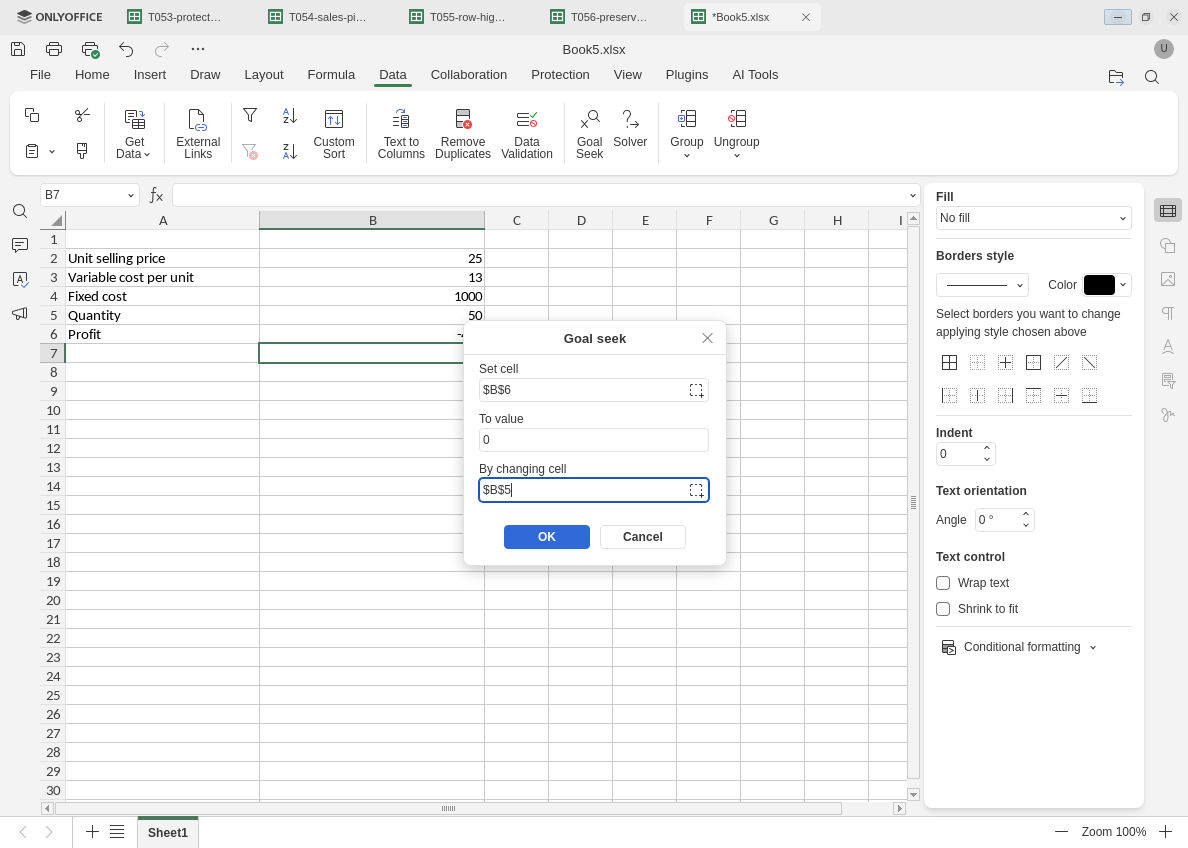
The profit formula is the target; quantity is the single changing input.
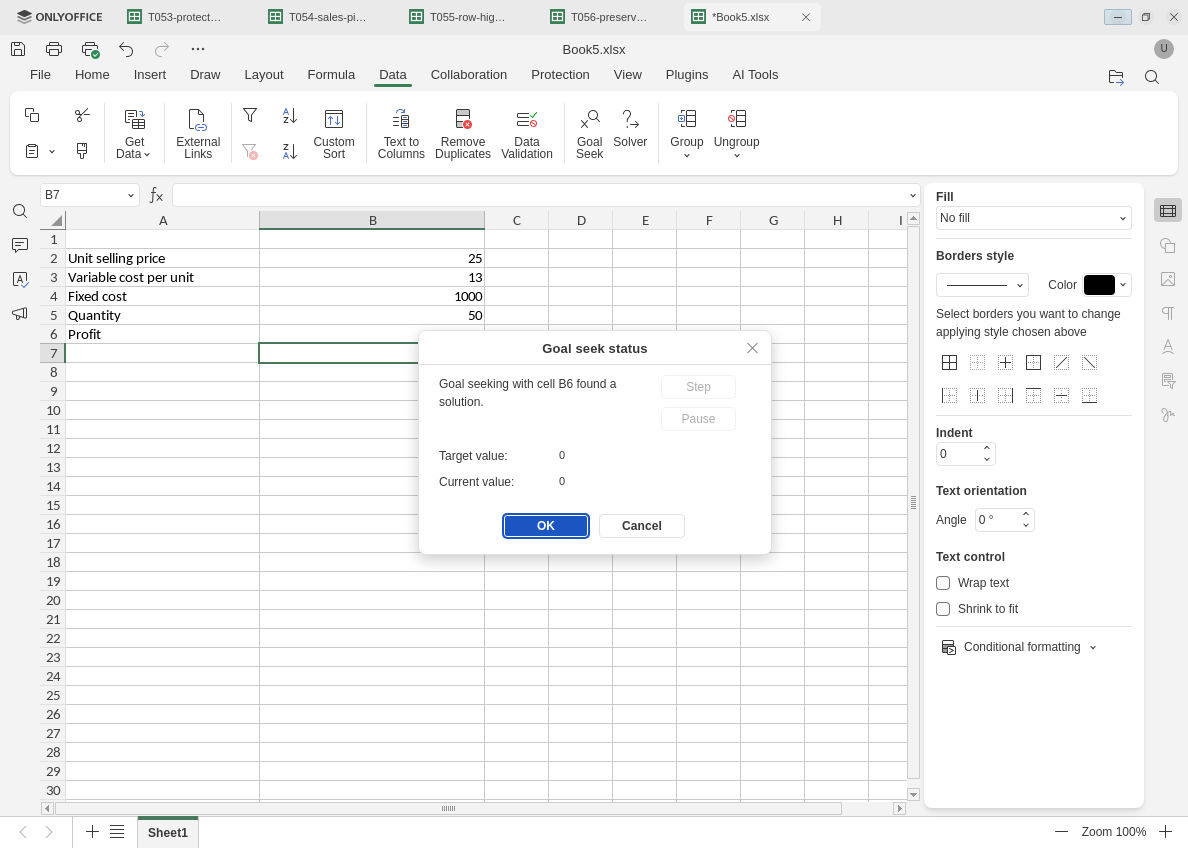
Inspect the status before applying it. In this build the new quantity appears after acceptance.
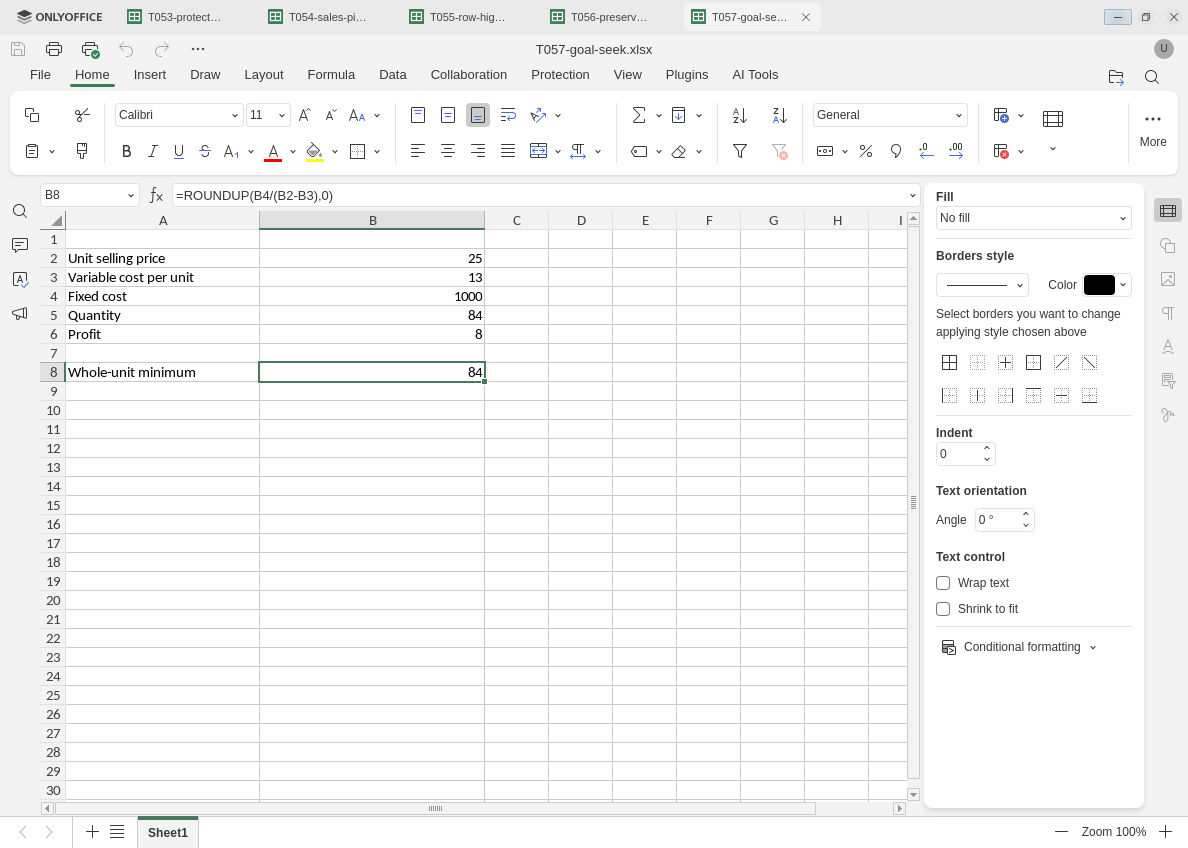
The verified whole-unit quantity is 84; the fractional Goal Seek result is not an integer constraint.
Evidence and limits: Official documentation and independent arithmetic were checked separately from native execution. Screenshots retain original capture bytes. Native testing covers this positive-contribution linear one-input model, status acceptance, neighboring whole-unit checks, ROUNDUP and final XLSX persistence. Cancel rollback, pause/step controls, failed convergence, nonlinear models, zero/negative margins, capacity constraints, integer-constrained solving, multiple variables, hosted/mobile builds and other editors were not tested. Goal Seek was not rerun after reopening.