

BINOM.INV in FreeOffice PlanMaker: Syntax and Worked Examples
Find a binomial lower-tail quantile, verify its cumulative crossing and compare the documented CRITBINOM spelling.
Verification status: See the evidence and test scope described in this guide. How formula examples are checked
Quick answer
=BINOM.INV(10,0.5,0.5) is expected to return 5. It finds the smallest integer k whose cumulative binomial probability reaches or exceeds alpha, here 0.5.
Tested-build limitation: Alpha=0 and Alpha=1 returned #NUM! in revision F1238.1005 for both spellings, despite the help’s inclusive wording.
The output is a success count, not a probability, a rate or an automatically justified acceptance threshold. The meaning of alpha must match the tail question being asked.
Syntax and quantile definition
=BINOM.INV(n, p, Alpha)
=CRITBINOM(n, p, Alpha)
All three arguments are required. n is the number of independent binary trials, p is the fixed success probability per trial and Alpha is the cumulative probability target. The official help places p and Alpha within 0 to 1.
The key mathematical rule is the smallest k with P(X≤k)≥Alpha. A discrete distribution has jumps, so the returned count usually does not have a cumulative probability exactly equal to Alpha. Use a whole, nonnegative trial count; the cited inverse-function page does not establish every noninteger-n coercion rule.
Step-by-step: verify both sides of the crossing
Put n=10 in A2, p=0.5 in B2 and Alpha=0.5 in C2. Enter =BINOM.INV(A2,B2,C2). Expected: 5.
For an independent check:
- P(X≤4)=386/1024=0.376953125, below 0.5.
- P(X≤5)=638/1024=0.623046875, at least 0.5.
Thus 5 is the first count that crosses the target. Looking only at P(X=5) would test the wrong quantity; the inverse is defined using a cumulative probability.
A second known quantile
=BINOM.INV(100,0.07,0.01) has the documented expected result 2. It identifies the 1% lower-tail quantile of a binomial model with 100 trials and success probability 7%.
The independent cumulative probability through 1 is approximately 0.0060129154, below 0.01, while the probability through 2 is approximately 0.0257885413, above it. This establishes why the returned count is 2. Do not reinterpret a small lower-tail alpha as a 99% upper acceptance limit. A quality-control decision would require separately defined risks, hypotheses and an acceptance rule; the function alone does not supply those decisions.
Boundary controls and practical interpretation
For n=10 and p=0.5, the mathematical lower-tail endpoint controls are 0 at Alpha=0 and 10 at Alpha=1. Although the help describes Alpha within 0 to 1, the tested FreeOffice PlanMaker 2024 revision F1238.1005 returned #NUM! at both endpoints, for both BINOM.INV and CRITBINOM. The mathematical controls are therefore not successful application results. Use an interior alpha for the ordinary examples and do not conceal this documented-domain/runtime discrepancy.
Keep the returned count as an integer in a report and show n, p and Alpha nearby. A result of 5 has no standalone meaning without its trial count and probability assumptions. If p is estimated from data, uncertainty in that estimate is not included automatically in this inverse calculation.
The trials must be independent and have a stable success probability. If those assumptions fail, a precise quantile for the wrong distribution can still be misleading.
Legacy spelling, errors and compatibility
The official CRITBINOM page explicitly calls BINOM.INV an identical newer function. Both names are covered here with paired cases. The current documentation does not label CRITBINOM retired or deprecated.
The modern page cites Excel 2010 or later compatibility. It does not establish the original PlanMaker introduction version or certify every imported workbook. Preserve and inspect the actual formula when exchanging files.
The reference does not provide a complete error-token or coercion table for invalid probabilities, invalid counts or text arguments. Validate the domain deliberately. Do not turn an error into zero and then interpret it as a valid lower-tail quantile.
Native quantiles and endpoint mismatches
Eight direct formulas were calculated in FreeOffice PlanMaker 2024 revision F1238.1005. Both BINOM.INV and CRITBINOM returned 5 for n=10,p=0.5,Alpha=0.5 and 2 for n=100,p=0.07,Alpha=0.01. Both names returned #NUM! for Alpha=0 and Alpha=1. Those four errors differ from the mathematical endpoint values and the help’s inclusive domain wording. All eight expressions and actual error results were preserved after PMDX save and reopen.
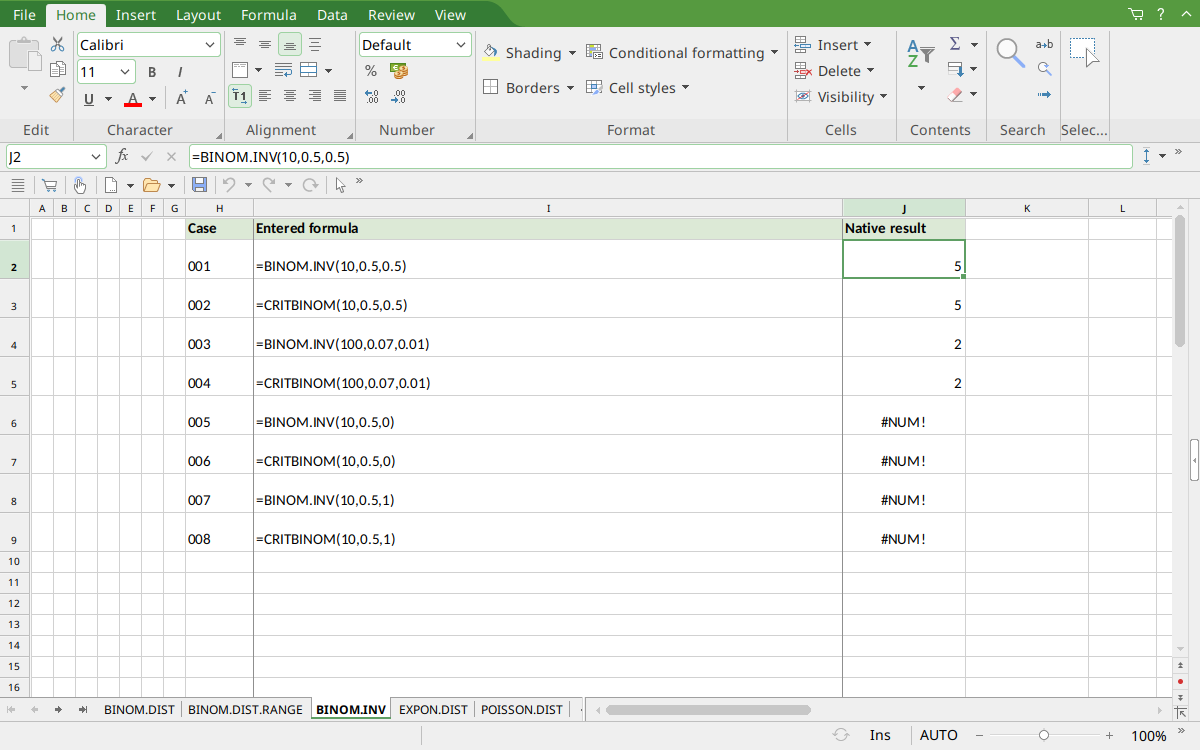
Selected J2 shows the interior quantile 5. J4:J5 show 2 for the second interior case; J6:J9 visibly show the four endpoint #NUM! results.
Version and verification scope
The official FreeOffice PlanMaker 2024 reference was checked October 18, 2026. The installed application is FreeOffice PlanMaker 2024 revision F1238.1005. The original introduction version is not established by this evidence; the current reference does not identify the function as deprecated or retired. No availability claim for a different edition or a 2026 release is implied.
The native section identifies the exact tested subset and outcomes from revision F1238.1005. Cell-reference walkthroughs and additional mathematical controls were not separate native cases. Screenshots show the reopened PMDX workbook; any spelling normalization or endpoint mismatch is stated explicitly. File-exchange notes are vendor guidance, not an Excel-export test. English formulas in this guide use commas; use the separators required by your formula settings.