

CHISQ.DIST.RT in FreeOffice PlanMaker: Syntax and Worked Examples
Calculate a chi-square right-tail probability, distinguish it from a density or lower tail, and compare CHIDIST.
Verification status: See the evidence and test scope described in this guide. How formula examples are checked
Quick answer
The independent mathematical value for =CHISQ.DIST.RT(2,2) is approximately 0.3678794412; native revision F1238.1005 returned 0.367879451219208. The small approximation difference matters if comparing many decimal places. This is the probability to the right of 2 under a chi-square distribution with two degrees of freedom.
It is not the probability density at 2 and not the probability of an exact point. For this continuous distribution, the right-tail probability is the area beyond the supplied value.
Syntax and domain
=CHISQ.DIST.RT(X, DegreesFreedom)
=CHIDIST(X, DegreesFreedom)
Both arguments are required. X must be nonnegative. DegreesFreedom must be at least 1 and below 10^10. The official help says decimal places in degrees of freedom are truncated.
The function evaluates a supplied statistic; it does not calculate that statistic from raw observations. Choose degrees of freedom from the model or test that produced X, rather than treating them as a display setting.
Step-by-step: a right-tail control with a closed form
Enter 2 in A2 and 2 in B2. In C2 enter =CHISQ.DIST.RT(A2,B2).
For two degrees of freedom, the independent survival function is particularly simple:
P(ChiSquare(2) ≥ x) = exp(−x/2)
At x=2: exp(−1) = 0.367879441171442 approximately
The complementary left-tail probability is 1−exp(−1)=0.6321205588 approximately. Swapping these tails would change the interpretation even though both numbers are valid probabilities.
| Direct formula | Independent expected result |
|---|---|
=CHISQ.DIST.RT(2,2) |
0.3678794412 approximately |
=CHISQ.DIST.RT(0,2) |
1 |
=CHISQ.DIST.RT(2,2.9) |
0.3678794412 approximately |
=CHISQ.DIST.RT(4,4) |
0.4060058497 approximately |
The third formula uses the documented truncation to two degrees of freedom. For the last, the four-degree survival function is exp(−x/2)×(1+x/2), giving 3×exp(−2).
Practical use: label the statistic and its tail
In a worksheet, keep the statistic, degrees of freedom and returned probability in separate labeled cells. A probability without its tail direction and degrees of freedom is incomplete information. The same X can have different tail probabilities under different reference distributions.
If a chi-square test statistic was assembled from observed and expected counts, validate that calculation independently. This function cannot detect that the wrong degrees of freedom, dependent observations or an inappropriate reference model were used.
A small right-tail probability indicates that the supplied statistic lies far to the right under the stated model. It is not the probability that a hypothesis is true or false, and the function alone does not justify a substantive decision. Any inference requires an appropriate design, assumptions and a defined question.
Numerical checks and errors
The right-tail result should be between zero and one for valid inputs. Increasing X with fixed degrees of freedom should decrease this survival probability. Those are mathematical controls, not an exhaustive test of the implementation’s extreme-tail accuracy.
The help specifies the input domain but does not give every error token or coercion rule. Do not infer that a negative X or a degree count below one produces a particular error without testing it. The examples do not establish numerical accuracy throughout the full documented degree range.
Legacy name and compatibility
The official CHIDIST page identifies CHISQ.DIST.RT as an identical newer function. Both spellings are covered here with paired checks. CHIDIST remains documented; the evidence does not call it retired or deprecated.
The modern-name page cites Excel 2010 or later support. It does not establish the first PlanMaker version or certify every export path. Verify the actual formula and result in the target application when exchanging files.
Native tail values and approximation precision
Eight paired modern/legacy formulas were calculated in FreeOffice PlanMaker 2024 revision F1238.1005. For x=2,df=2 and truncated df=2.9, both spellings returned 0.367879451219208, about 1.005×10^-8 above the independent exp(−1) value. Both returned 1 at x=0,df=2 and approximately 0.4060058497 at x=4,df=4. This comparison describes the tested approximation precision, not a universal accuracy bound. All eight function expressions remained after native PMDX save and reopen, allowing storage namespace prefixes.
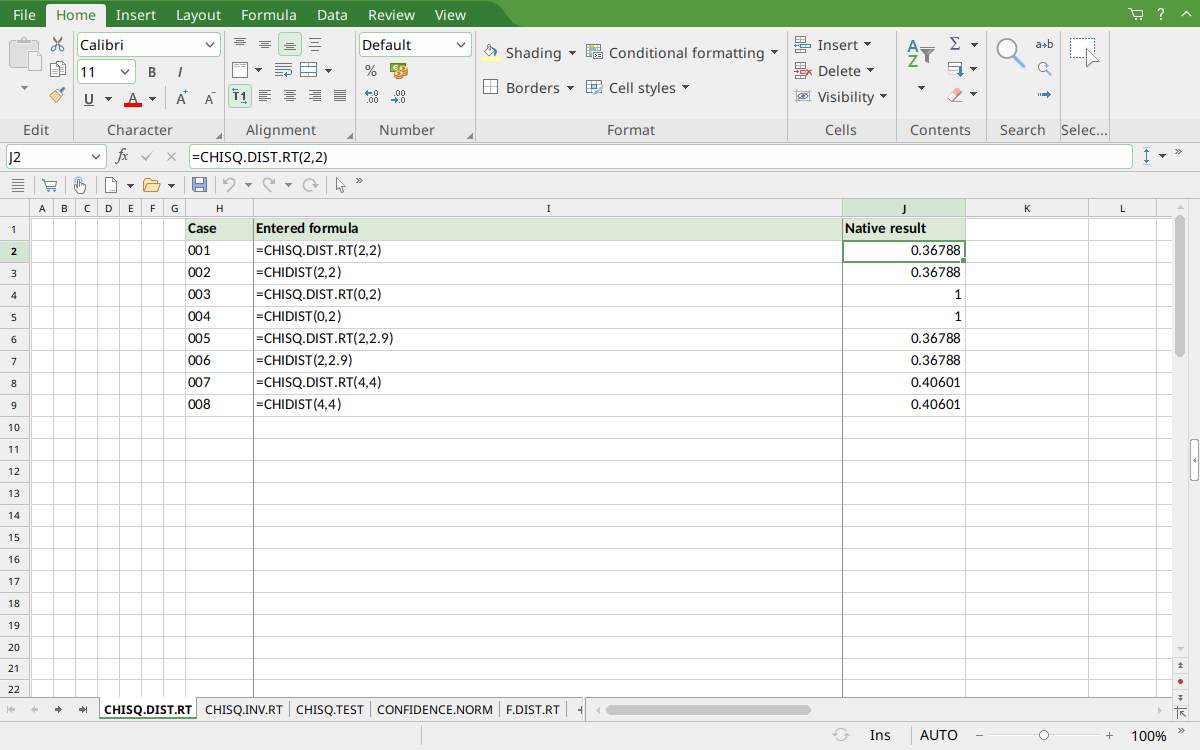
Selected J2 displays 0.36788, a rounded view of the saved native value. J4:J5 show the zero-statistic right tail 1; J8:J9 display 0.40601 for four degrees of freedom.
Version and verification scope
The official FreeOffice PlanMaker 2024 reference was checked October 18, 2026. The installed application is FreeOffice PlanMaker 2024 revision F1238.1005. The original introduction version is not established by this evidence; the current reference does not identify the function as deprecated or retired. No availability claim for a different edition or a 2026 release is implied.
The native section identifies the exact tested subset and values from revision F1238.1005 after native PMDX save and reopen. Independent mathematical values and observed numerical approximations are distinguished. Cell-reference walkthroughs and extra arithmetic controls were not additional native cases unless expressly identified. File-exchange notes are vendor guidance, not an Excel-export test. English formulas in this guide use commas; use the separators required by your formula settings.