

CONVERT in FreeOffice PlanMaker: Syntax and Worked Examples
Convert quantities with exact case-sensitive unit codes, including temperature offsets and PlanMaker-specific time units.
Verification status: See the evidence and test scope described in this guide. How formula examples are checked
Quick answer
=CONVERT(1,"day","sec") is expected to return 86400. The function converts a numeric quantity between unit codes in the same measurement category. It does not convert unrelated dimensions, such as length into time.
Unit codes are case-sensitive. Use the exact codes in the FreeOffice PlanMaker 2024 reference instead of spelling out a unit name or importing a code list from another spreadsheet.
Syntax and argument roles
=CONVERT(Number, From, To)
All three arguments are required. Number is the quantity in the source unit. From and To are text codes, normally quoted or held in cells. The result is numeric; it does not automatically append a unit label.
Examples of documented codes include g for grams, m for meters, sec for seconds, day for days, C for Celsius and F for Fahrenheit. Metric prefixes also have exact case: k represents kilo and m represents milli where supported.
Step-by-step: seconds in a duration
- Enter
1in A2. - Enter the text
dayin B2 andsecin C2. - Enter
=CONVERT(A2,B2,C2)in D2. - Label D2 as seconds so the unit remains clear when the value is copied.
Expected result: 86400, independently checked as 24×60×60. This is a quantity conversion, not a date calculation or a timezone-aware elapsed-time measurement.
| Formula | Expected result | Check |
|---|---|---|
=CONVERT(1000,"g","kg") |
1 | 1000 grams per kilogram |
=CONVERT(0,"C","F") |
32 | Celsius-to-Fahrenheit offset |
=CONVERT(212,"F","C") |
100 | (212−32)×5/9 |
=CONVERT(1,"yr","day") |
365.25 | Documented fixed year unit |
=CONVERT(1,"ftn","day") |
14 | One fortnight |
Temperature and calendar cautions
Temperature scales involve an offset, not just multiplication. For absolute temperatures, the familiar expression is F=C×9/5+32. Consequently, converting zero Celsius does not produce zero Fahrenheit. A temperature difference of 10 Celsius degrees is a different kind of quantity from an absolute temperature of 10°C; do not use an absolute-scale conversion blindly for differences.
The documented yr unit is fixed at 365.25 days. It is not the number of days in a particular calendar year. Use a calendar-aware function when the question is whether 2024 has 366 days or 2025 has 365. A fixed average-year conversion and a date-specific calendar calculation answer different questions.
Advanced use: preserve quantities and labels
Keep the original quantity and source unit in separate columns, and place converted values and target units in new columns. That makes a change in unit choice auditable and avoids overwriting the original measurement. For a mixed-unit import, check that every row’s pair belongs to the same category before aggregating converted values.
Do not round intermediate quantities merely to match a display. Apply display formatting or final reporting precision after conversion. Some conversion constants in the manual’s examples are shown rounded; a displayed example is not a universal statement of internal precision for every unit.
Errors and product-specific compatibility
The official help specifies #N/A when unit codes belong to different categories or a code is invalid. Thus =CONVERT(1,"m","sec") and =CONVERT(1,"DAY","sec") are expected to produce #N/A; the latter uses the wrong capitalization for day.
The documented fortnight code ftn is explicitly marked unsupported by Microsoft Excel. The PlanMaker table also contains unusual spellings for certain scientific units and prefixes. This guide does not silently replace those with another product’s conventions or certify untested combinations. Check the exact code and its behavior in the target application before exchanging a workbook.
The reference does not provide a complete coercion/error specification for nonnumeric quantities. Keep the quantity numeric and handle missing or invalid measurements deliberately rather than interpreting an error as a zero measurement.
Native unit-conversion checks
All eight listed direct CONVERT formulas were calculated in FreeOffice PlanMaker 2024 revision F1238.1005 and preserved after native PMDX save and reopen. The numeric results were 86400, 1, 32, 100, 365.25 and 14. The cross-category and incorrectly capitalized unit-code cases both displayed #N/A. These observations cover the stated unit pairs, not every code or prefix in the vendor table.
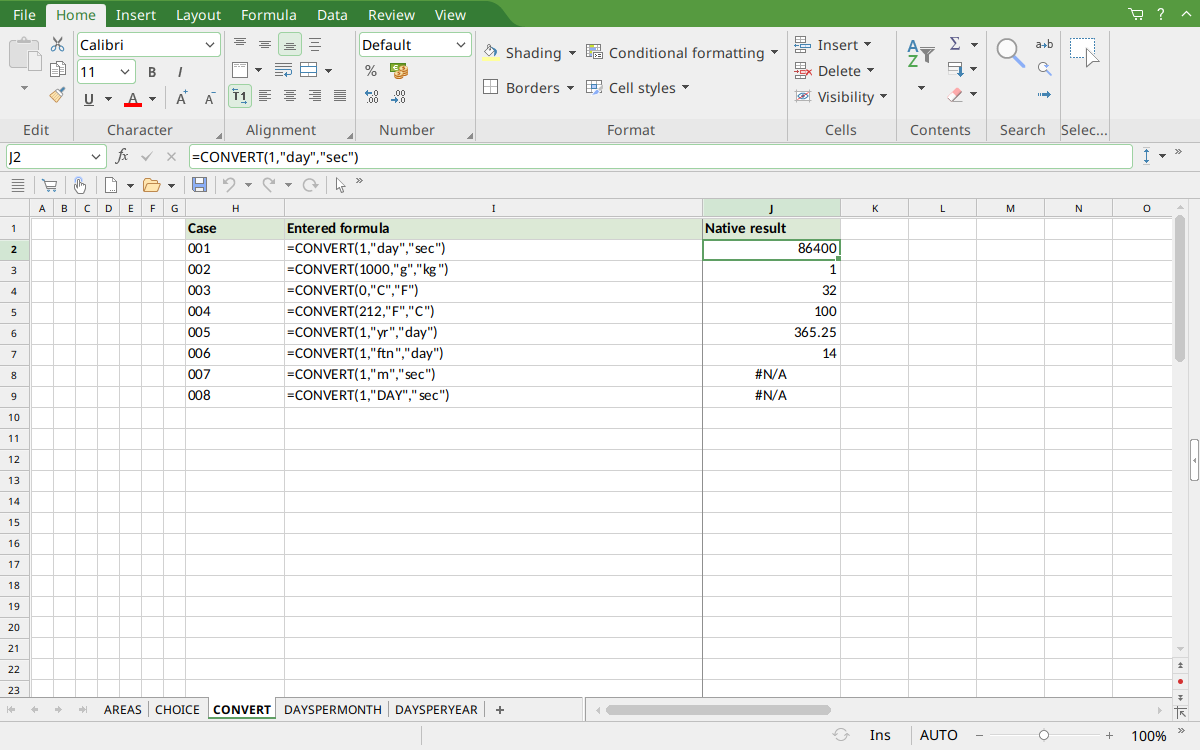
Selected J2 shows the day-to-second formula and result 86400. J3:J7 show the other numeric controls; J8:J9 show the two #N/A results.
Version and verification scope
The official FreeOffice PlanMaker 2024 reference was checked October 18, 2026. The installed application is FreeOffice PlanMaker 2024 revision F1238.1005. The original introduction version is not established by this evidence; the current reference does not identify the function as deprecated or retired. No availability claim for a different edition or a 2026 release is implied.
The native section identifies the exact tested subset and results from revision F1238.1005. Other examples are documentation-derived or independently calculated as indicated. Screenshots were captured after saving and reopening the native workbook. The documented ftn compatibility warning was not checked by exporting to Excel. English formulas in this guide use commas; use the separators required by your formula settings.