

DAYSPERMONTH in FreeOffice PlanMaker: Syntax and Worked Examples
Return the calendar month length for a supplied date, including leap February and native-file compatibility cautions.
Verification status: See the evidence and test scope described in this guide. How formula examples are checked
Quick answer
=DAYSPERMONTH(DATE(2024,2,15)) is expected to return 29, because the supplied date falls in February of a leap year. The function returns the length of the whole month containing the date, not the day of the month or the number of days remaining.
A date on the first or last day of the same month should identify the same calendar month. The day component selects a date; it does not shorten the month being measured.
Syntax and input type
=DAYSPERMONTH(Date)
The date argument is required. Use DATE or a cell containing a real spreadsheet date. Do not supply only the month number 2 and expect the function to interpret it as February in a chosen year; the year is essential for leap-year handling.
The result is a count of days, normally 28, 29, 30 or 31 for the modern Gregorian dates used here. Format the result as a number, not a date, so a value such as 29 is not displayed as a date serial.
Step-by-step: compare February across years
- Enter
=DATE(2024,2,1)in A2. - Enter
=DATE(2024,2,29)in A3. - Enter
=DATE(2025,2,15)in A4. - In B2 enter
=DAYSPERMONTH(A2)and fill down through B4.
Expected results are 29, 29 and 28. The first two dates differ by 28 days but belong to the same month; both return its full length. The third date belongs to February in a nonleap year.
| Formula | Expected day count |
|---|---|
=DAYSPERMONTH(DATE(2024,2,1)) |
29 |
=DAYSPERMONTH(DATE(2024,2,29)) |
29 |
=DAYSPERMONTH(DATE(2025,2,15)) |
28 |
=DAYSPERMONTH(DATE(2026,4,15)) |
30 |
=DAYSPERMONTH(DATE(2026,12,31)) |
31 |
=DAYSPERMONTH(DATE(2100,2,15)) |
28 |
The 2100 control matters because a year divisible by 100 is not a Gregorian leap year unless also divisible by 400. Simply testing divisibility by four is insufficient for century dates.
Practical case: a calendar-day allocation
Suppose a fictional monthly allowance is 290 units for February 2024 and your chosen allocation rule spreads it evenly over calendar days. Dividing 290 by DAYSPERMONTH for a February 2024 date gives 10 units per calendar day. For February 2025, the same 290 units divided by 28 gives approximately 10.3571428571.
This arithmetic is appropriate only if the policy explicitly uses calendar days. DAYSPERMONTH does not count weekdays, working days, paid days, occupancy days or holidays. The function supplies the denominator; it does not define the allocation policy.
For a month-end report, keep a real reference date for each row and derive the month length from it. Avoid typing a sequence of assumed 30-day months, which would lose February and 31-day variations.
Input errors and date boundaries
The official reference shows date text, but text interpretation can depend on locale. DATE avoids ambiguity between month/day and day/month ordering. Check imported cells for actual date values before applying this function.
The cited page does not specify every invalid-date, blank or text-coercion outcome. This guide does not invent an error code for those cases or validate early historical date-system behavior. The examples deliberately use valid modern dates and a future Gregorian century control. Do not infer that a blank cell means the current month.
Excel export and preservation
SoftMaker warns that this function does not exist in Microsoft Excel and that saving in an Excel format replaces its calculations with their current fixed results. A visible 29 after export may therefore be a constant, unable to update when the reference date changes.
Keep an editable native PMDX master. If distributing an Excel-format copy, inspect whether formulas remain live and choose a separately verified portable formula when recalculation is required. A successful current value is not proof of preserved functionality.
Native month-length checks
The six direct DATE-based formulas in the table were calculated in FreeOffice PlanMaker 2024 revision F1238.1005. They returned 29, 29, 28, 30, 31 and 28, matching the independent calendar checks. All six formulas remained in the native PMDX workbook after save and reopen. The allocation example is independent arithmetic, not an additional application test.
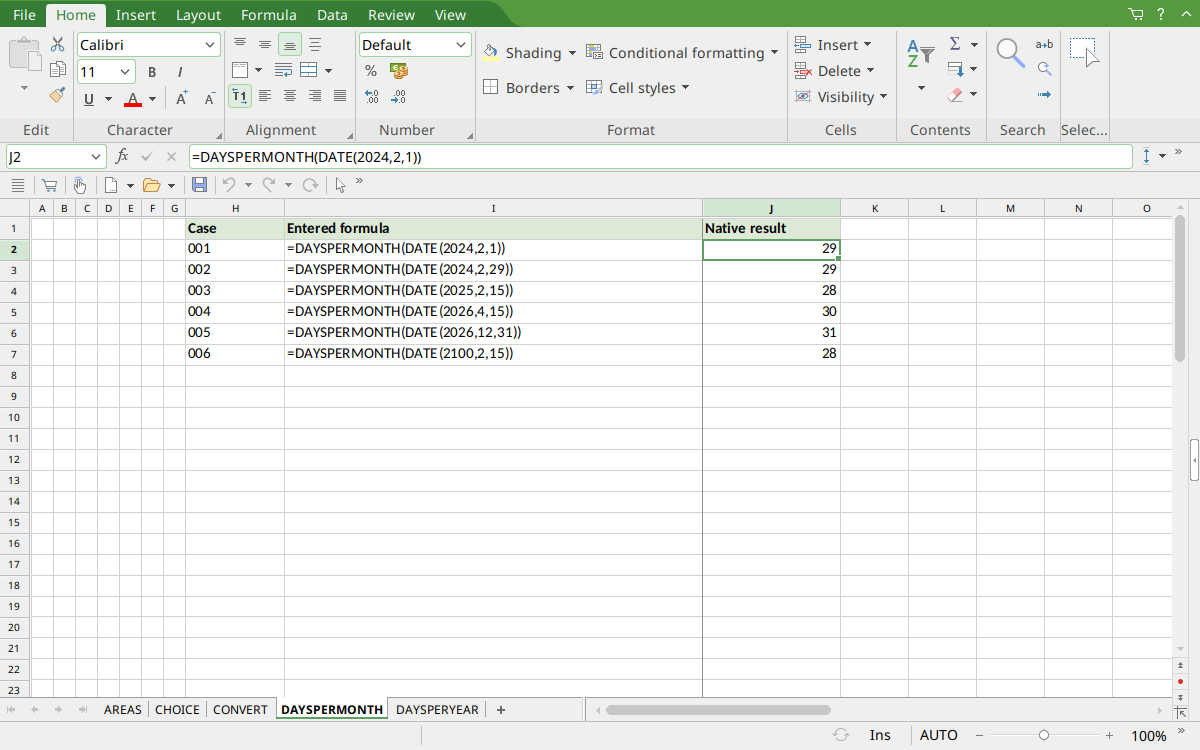
Selected J2 shows February 2024 returning 29. The remaining rows include nonleap February, April, December and the February 2100 century control.
Version and verification scope
The official FreeOffice PlanMaker 2024 reference was checked October 18, 2026. The installed application is FreeOffice PlanMaker 2024 revision F1238.1005. The original introduction version is not established by this evidence; the current reference does not identify the function as deprecated or retired. No availability claim for a different edition or a 2026 release is implied.
The native section identifies the exact tested subset and results from revision F1238.1005. Other examples are documentation-derived or independently calculated as indicated. Screenshots were captured after saving and reopening the native workbook. Excel-export behavior is a vendor warning, not an export test performed here. English formulas in this guide use commas; use the separators required by your formula settings.