

PlanMaker DOLLARFR Function: Encode decimal prices as fractional quotes
Use DOLLARFR in FreeOffice PlanMaker 2024 with precise arguments, worked examples, independent checks and compatibility limits.
Verification status: See the evidence and test scope described in this guide. How formula examples are checked
Quick answer: =DOLLARFR(27.5,8) returns 27.4, the numeric quote encoding for 27 and 4 eighths. The returned number is an encoded quotation, not the decimal amount 27.40.
Syntax and arguments
=DOLLARFR(Value, Divisor)
Value is the ordinary decimal amount. Divisor gives the fractional denominator used in the output quote. Both arguments are required. The official help requires a denominator of at least 1 and says its fractional digits are ignored. Use a positive integer to avoid an unintended change of convention.
For eighths, a decimal fractional part of 0.5 becomes the numerator 4, written after the decimal point as .4. For thirty-seconds, the same 0.5 becomes numerator 16, written as .16. The output is still a numeric cell value; it does not contain a slash, a denominator, or a currency identifier.
Changing a Number format cannot substitute for this calculation. Equally, applying a standard currency format to the returned quote can be misleading because it suggests that its fractional digits are cents.
Reproduce the basic examples
Create a new worksheet with these columns:
| Cell | Enter | Expected interpretation |
|---|---|---|
| A1 | Decimal price | Ordinary amount |
| B1 | Denominator | Quote unit |
| C1 | Fractional quote | Encoded result |
| A2 | 27.5 | Twenty-seven and one-half |
| B2 | 8 | Eighths |
| C2 | =DOLLARFR(A2,B2) |
27.4 |
| A3 | 100.5 | One hundred and one-half |
| B3 | 32 | Thirty-seconds |
| C3 | =DOLLARFR(A3,B3) |
100.16 |
| A4 | 27.125 | Twenty-seven and one-eighth |
| B4 | 8 | Eighths |
| C4 | =DOLLARFR(A4,B4) |
27.1 |
The independent checks are 0.5×8 = 4, 0.5×32 = 16, and 0.125×8 = 1. In each case the integral price remains unchanged and the numerator is encoded with the width appropriate to the denominator.
The native signed-conversion check returns =DOLLARFR(-27.5,8) → -27.4. The tested denominator-truncation case is =DOLLARFR(27.5,8.9) → 27.4. Both results were verified in FreeOffice PlanMaker 2024 rev F1238.1005.
Advanced use: publish a quote without changing the calculation model
Keep calculations in ordinary decimal units and generate the quoted representation only for output. For example, a calculated price of 100.25 corresponds to numerator 8 in thirty-seconds and therefore the encoded result 100.08. A price of 100.5 corresponds to 100.16.
Do not subtract those encoded results to compute a price spread. The actual spread is 100.5 − 100.25 = 0.25. The raw subtraction 100.16 − 100.08 produces 0.08, which has a different meaning.
For a validation column, use =DOLLARDE(C3,B3) and compare it with A3. The third row’s output should decode back to 100.5. Keep enough displayed digits to distinguish numerator 1 from numerator 10 in a two-digit convention.
Not every decimal price falls exactly on the chosen fractional increment. Decide independently whether the business process requires rounding to a multiple of 1/Divisor before encoding. This function’s purpose is conversion of representation; the official help does not promise a market-specific tick validation or a particular numerator-rounding policy. The examples deliberately use exactly representable increments.
Errors and edge cases
A zero or negative denominator violates the documented minimum. In this build, =DOLLARFR(27.4,0) and =DOLLARFR(27.4,-2) both return #NUM!. Other invalid-input coercions were not tested. An omitted argument is not a documented way to request eighths or thirty-seconds.
Store input numbers as numbers. A text string containing a currency sign or a fraction slash may need cleaning first; text parsing varies with locale and is outside these examples. An ordinary amount of 27.5 should not first be typed as an encoded quote 27.4, or it will be converted a second time under the wrong assumption.
An output such as 27.4 should travel with its denominator. Without that information it is easy for a recipient to read it as 27.40. Consider separate fields for original decimal amount, encoded quote, and denominator when exchanging data with another system.
Compatibility and related functions
The formulas here use the English help’s comma separators; use the syntax required by your locale. A workbook’s number format may change how the quote appears without changing its numeric encoding. Verify both the saved formula and the visible precision when moving between spreadsheet programs.
DOLLARDE decodes fractional quotations. ROUND handles explicit decimal rounding, while MOD may help validate whether an amount falls on a chosen increment after accounting for floating-point tolerance. Neither function identifies the original quoting convention for you.
Native example
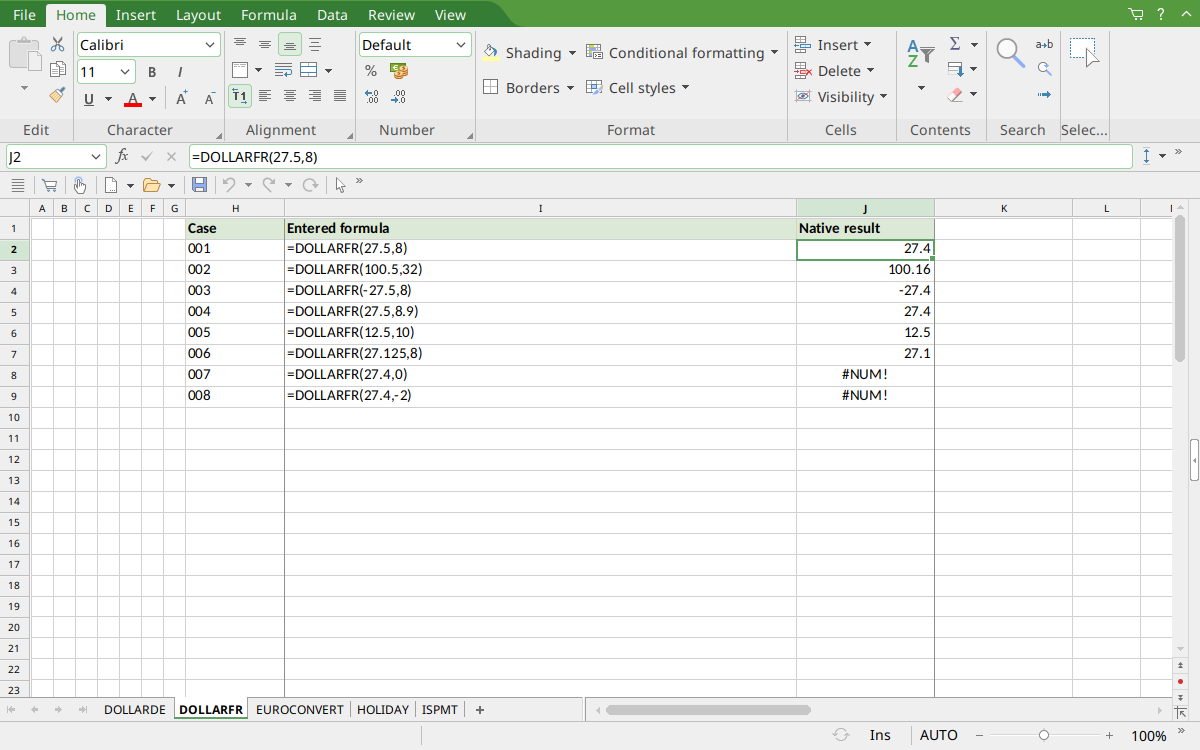
FreeOffice PlanMaker 2024 rev F1238.1005: selected cell J2 contains =DOLLARFR(27.5,8) and displays 27.4. The denominator remains essential to interpreting the quote.
Version and evidence scope
This guide uses the official FreeOffice PlanMaker 2024 DOLLARFR reference, checked October 18, 2026. The first release introducing the function is not established by that reference. It is documented in this edition; no retirement or deprecation is inferred. Availability in a different edition or year is not assumed.
Selected formulas were tested on October 18, 2026 in FreeOffice PlanMaker 2024 rev F1238.1005, 64-bit. The 8 listed native cases for this function were saved in native PMDX format and reopened with their formulas preserved. Independent arithmetic remains separate from those observations; the cell-reference teaching layout and advanced extensions were not each separately executed. The proprietary implementation has not been inspected. Untested inputs, other editions, and export behavior beyond the documented cautions are not inferred from these results.