

PlanMaker F.INV.RT Function: Find a right-tail F threshold
Use F.INV.RT (legacy FINV) in FreeOffice PlanMaker 2024 with explicit statistical meaning, worked inputs, independent calculations and precision limits.
Verification status: See the evidence and test scope described in this guide. How formula examples are checked
Quick answer: =F.INV.RT(0.05,2,4) is mathematically approximately 6.9442719100. It finds the F value with 5% of the specified distribution to its right. It does not return a left-tail 5th percentile.
Syntax and degrees-of-freedom order
=F.INV.RT(Probability, DegreesFreedom1, DegreesFreedom2)
=FINV(Probability, DegreesFreedom1, DegreesFreedom2)
All three arguments are required. Probability is the right-tail area. DegreesFreedom1 belongs to the numerator and DegreesFreedom2 to the denominator of the variance-ratio model. Their order matters.
The official reference requires both degrees of freedom to be at least 1 and less than 10¹⁰. It expects integers and says fractional parts are truncated. Use integer values explicitly rather than relying on accidental truncation. The probability page uses 0 to 1 wording; finite endpoint behavior must be verified rather than inferred from that phrase.
For independent normally distributed samples with sizes n₁ and n₂, an F variance-ratio construction commonly uses degrees of freedom n₁−1 and n₂−1. The function itself does not establish those sampling assumptions or select an appropriate test.
Reproduce a closed-form case
Put 0.05 in B2, 2 in B3, and 4 in B4. In B6 enter =F.INV.RT(B2,B3,B4). The independent mathematical reference is 6.9442719100.
For these particular degrees of freedom, the right-tail probability has a simple form:
P(F > x) = (1+x/2)^(-2)     for df₁=2, df₂=4
x = 2*(1/sqrt(p)-1)
At p=0.05, x=2×(sqrt(20)−1). At p=0.25, x=2. These formulas provide independent controls for =F.INV.RT(0.25,2,4) and the matching FINV spellings. They are special-case mathematics, not the general implementation algorithm.
The documented truncation rule predicts that =F.INV.RT(0.05,2.9,4.8) uses degrees of freedom 2 and 4 and matches the integer example. In the tested build, the fractional-df and integer-df calls both return approximately 6.94427177309990, agreeing with the documented truncation rule.
Accuracy is measured in probability space
The official help describes an iterative inverse with a limit of 100 iterations and a target deviation of approximately ±3×10⁻⁷ from Probability. It documents #N/A if the approximation does not meet that target within the iteration limit.
This is a right-tail probability residual, not a fixed absolute error in the F threshold. A small density at the threshold can turn a small probability error into a larger x error. Do not demand arbitrary machine-precision agreement with the mathematical quantile or interpret displayed digits as an accuracy guarantee.
For the bounded example, check the returned value through its independent closed-form tail:
=1/(1+F.INV.RT(0.05,2,4)/2)^2
The target is 0.05. Use the unrounded quantile, and compare the probability residual. This special formula applies only to the stated 2,4 degrees of freedom, not to every F distribution.
Practical use: distinguish one-tail and two-tail cutoffs
A 5% upper-tail threshold uses p=0.05. A two-sided variance comparison that allocates 2.5% to each tail uses a different upper-tail probability and also needs a lower threshold. The lower threshold can be related mathematically to a reciprocal F quantile with numerator and denominator degrees of freedom exchanged. Do not reuse the upper-tail threshold on both sides without that reasoning.
If a calculated sample variance ratio is 1.6 with numerator degrees of freedom 2 and denominator degrees of freedom 4, the right-tail area is 1/(1+1.6/2)²≈0.3086419753. A two-sided p-value is a different quantity, derived from both tails; F.TEST addresses that comparison. The threshold returned by F.INV.RT is not itself a p-value.
Errors, legacy spelling, and limits
Degrees of freedom 0 violate the documented domain. In this build, =F.INV.RT(0.05,0,4) returns #NUM!, =F.INV.RT(0,2,4) returns #N/A, and =F.INV.RT(1,2,4) returns #NUM!. These specific endpoint responses should not be generalized into a mathematical finite-endpoint rule. The documented iterative #N/A does not mean every invalid argument must return that same error.
The official FINV page calls F.INV.RT identical. The legacy spelling is not declared retired or deprecated. The Excel 2010 compatibility statement concerns the dotted name in Excel, not the date PlanMaker introduced it.
Keep degrees of freedom and probability visible with a reported cutoff. This function does not estimate variances, diagnose normality, or decide whether a statistical conclusion is justified. Use your locale’s formula separators; examples follow the English reference’s commas.
Native results and visible precision
The native 0.05 inverse is approximately 6.94427177309990. At 0.25, the native value is 2.00000002980232, displayed as 2 rather than an exact raw 2. The paired FINV calls return the same saved values. Independent right-tail evaluations at the raw quantiles satisfy the documented 3×10⁻⁷ probability tolerance; the native closed-form 0.05 control returns approximately 0.05000000153058.
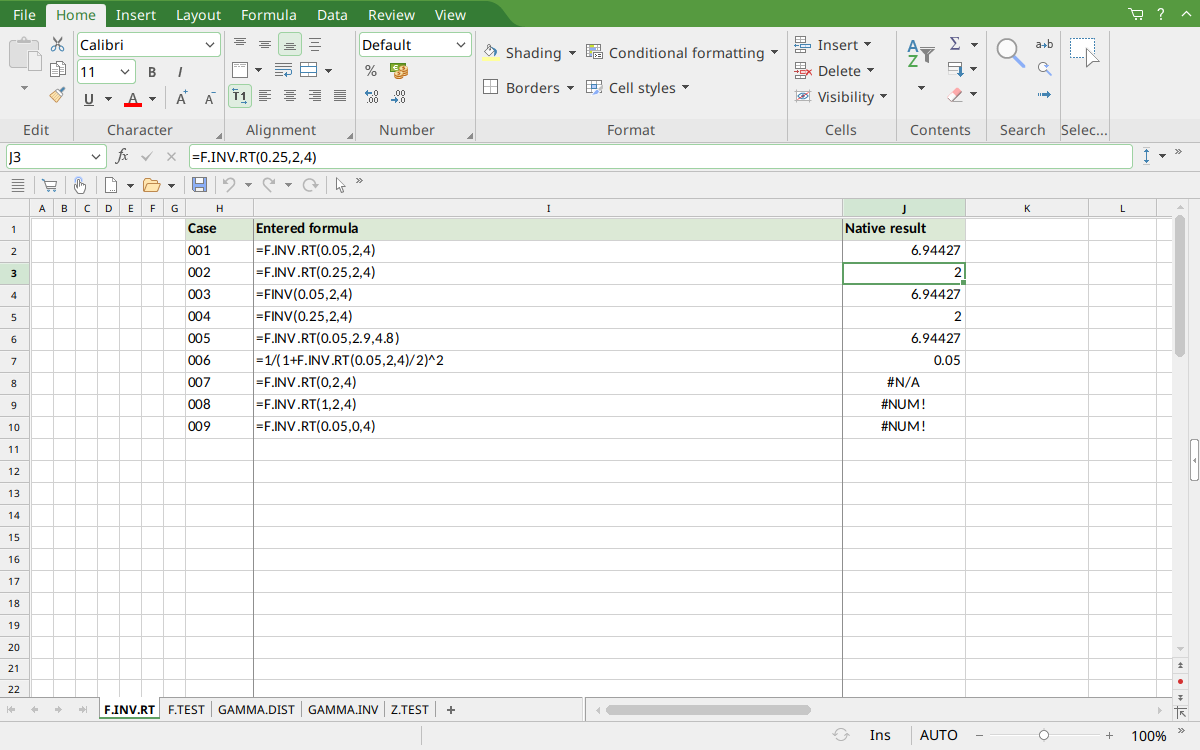
FreeOffice PlanMaker 2024 rev F1238.1005: selected cell J3 contains =F.INV.RT(0.25,2,4) and displays 2. Raw saved values retain more digits; rounded display values are not asserted as exact mathematical equality.
Version and evidence scope
Official FreeOffice PlanMaker 2024 references checked October 18, 2026: reference 1, reference 2. The first introduction release is unknown from these references. Current documentation does not imply retirement or identical behavior in every other edition.
The 9 selected formula cells for this function were tested on October 18, 2026 in FreeOffice PlanMaker 2024 rev F1238.1005, 64-bit, then saved in PMDX format and reopened with calculation meaning preserved. Paired legacy calls were included. Native observations remain distinct from independent mathematical references, teaching layouts, and advanced examples not individually executed. The proprietary implementation has not been inspected; the bounded results do not establish every tail, parameter, input type, edition, or export behavior.