

HYPGEOM.DIST in FreeOffice PlanMaker: Syntax and Worked Examples
Calculate sampling-without-replacement probabilities with HYPGEOM.DIST and the point-only HYPGEOMDIST contract.
Verification status: See the evidence and test scope described in this guide. How formula examples are checked
Quick answer
=HYPGEOM.DIST(1,5,2,10,FALSE) has an independent expected result of 5/9, approximately 0.5555555556. It describes exactly one marked item in a sample of five drawn without replacement from ten items, two of which are marked.
TRUE changes the question to at most one marked item, giving 7/9, approximately 0.7777777778. The older =HYPGEOMDIST(1,5,2,10) supplies the point probability only.
Syntax and population roles
=HYPGEOM.DIST(k, n, K, N, Cumulative)
=HYPGEOMDIST(k, n, K, N)
k is successes in the sample; n is sample size; K is successes in the entire population; N is total population size. TRUE selects cumulative probability P(X≤k), while FALSE selects the point mass P(X=k). Although the help calls the latter a density, these are discrete probabilities at integer counts.
The help says noninteger count arguments are truncated. Use intentional integer inputs: truncation is not a substitute for checking that the population and sample counts make sense.
For a valid finite-population model, 0≤K≤N and 0≤n≤N. Feasible successes range from max(0,n−(N−K)) to min(n,K). These mathematical constraints explain the model; they do not by themselves establish every application error token.
Worked example: inspect a small batch
- Enter 1 in A2 for the desired success count.
- Enter 5 in B2, 2 in C2 and 10 in D2.
- Use
=HYPGEOM.DIST(A2,B2,C2,D2,FALSE)for exactly one. - Use the same formula with TRUE for at most one.
- Compare
=HYPGEOMDIST(A2,B2,C2,D2)with the FALSE result.
Independent counting gives:
P(X=k) = C(K,k) × C(N−K,n−k) / C(N,n)
P(X=1) = C(2,1) × C(8,4) / C(10,5)
       = 2×70/252 = 5/9
P(X=0) = C(8,5)/C(10,5) = 56/252 = 2/9
P(X≤1) = 2/9+5/9 = 7/9
The denominator counts all equally likely size-five samples. Drawing without replacement changes the composition after each draw; it is not the independent fixed-probability trial model used by a binomial distribution.
Advanced use: distinguish at least from at most
For the same batch, the probability of at least one marked item is 1−P(X=0)=7/9. The probability of at least two is 1−P(X≤1)=2/9. At least one and at most one happen to agree here, but that numerical coincidence is not a general identity.
Use a clearly labeled complement: for at least m successes, subtract the cumulative probability through m−1 from one. Keep the sampling design alongside the formula; this arithmetic does not establish whether a real inspection sample was random or whether a decision threshold is suitable.
Truncation and boundary checks
=HYPGEOM.DIST(1.9,5.9,2.9,10.9,FALSE) and =HYPGEOMDIST(1.9,5.9,2.9,10.9) are expected to use the integer counts 1,5,2,10 under the documented rule.
The count k=0 is a legitimate nonempty-sample event in the example, with probability 2/9. An impossible count such as three marked items when only two exist has mathematical mass zero, but the help does not establish whether the function returns zero or an error. The tested build returned zero for that impossible-count case, as detailed below. Avoid treating an error as proof that the underlying event has nonzero probability.
Legacy contract and compatibility
The HYPGEOMDIST page documents four arguments and point probability. Only the modern FALSE mode is its direct comparison; modern TRUE adds cumulative behavior. Do not remove the switch while retaining a cumulative interpretation.
Modern-function support in Excel is documented from 2010. This does not date the original PlanMaker implementation or prove a file-format roundtrip. Both spellings remain in the current help.
Native sampling and truncation results
Eight formulas were calculated in FreeOffice PlanMaker 2024 revision F1238.1005. Both point-probability spellings returned approximately 0.5555555556 for k=1,n=5,K=2,N=10 and for the documented decimal-truncation example. Both returned approximately 0.2222222222 at k=0. Modern cumulative mode returned approximately 0.7777777778 at k=1. The impossible-count probe k=3,K=2 returned 0, rather than an error, in this build. All eight expressions survived native PMDX save and reopen. Complement arithmetic in the advanced example is independently derived rather than an additional native test.
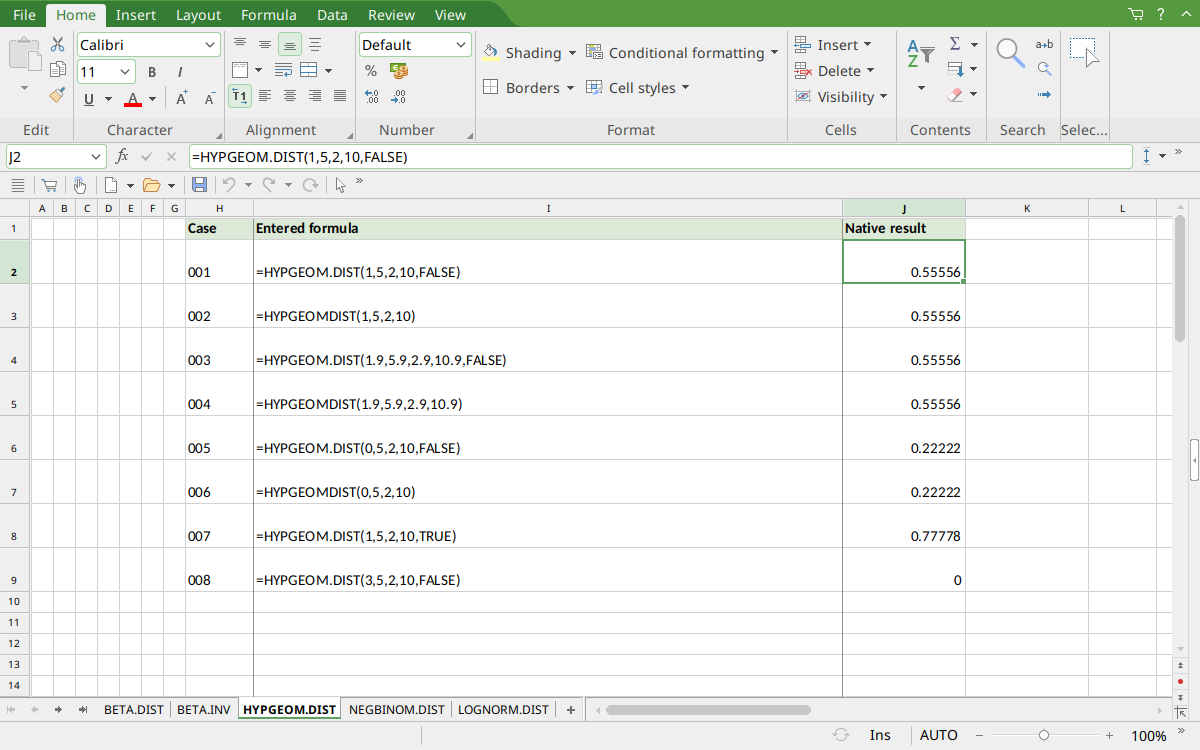
Selected J2 displays 0.55556. J4:J5 show the same rounded result after truncation; J6:J7 display 0.22222, J8 displays cumulative 0.77778 and J9 displays the impossible-count result 0.
Version and verification scope
The official FreeOffice PlanMaker 2024 reference was checked October 18, 2026. The installed application is FreeOffice PlanMaker 2024 revision F1238.1005. The original introduction version is not established by this evidence; the current reference does not identify the function as deprecated or retired. No availability claim for a different edition or a 2026 release is implied.
The native section identifies the exact scalar formulas calculated in revision F1238.1005 and preserved after native PMDX save and reopen. Independent mathematical expectations, extra arithmetic and observed approximations are distinguished. Cell-reference walkthroughs were not additional native cases. Excel compatibility statements are vendor guidance, not export tests. English formulas in this guide use commas; use the separators required by your formula settings.