

PlanMaker ISPMT Function: Inspect interest in an equal-principal schedule
Use ISPMT in FreeOffice PlanMaker 2024 with precise arguments, worked examples, independent checks and compatibility limits.
Verification status: See the evidence and test scope described in this guide. How formula examples are checked
Quick answer: ISPMT calculates an interest amount for a specified period. Its four arguments are Rate, Per, NPer, and PV. In the tested FreeOffice PlanMaker 2024 build, =ISPMT(0.01,1,4,1200) returns -9, while period 0 returns -12. The examples therefore use zero-based indices for the interest-bearing periods of this equal-principal model.
Syntax, units, and the model distinction
=ISPMT(Rate, Per, NPer, PV)
All four arguments are required. Rate is the interest rate per period, Per identifies the period, NPer is the total number of periods, and PV is the original amount. The FreeOffice 2024 reference supplies those meanings but does not explain period indexing or a detailed calculation formula.
Keep the units consistent. For a model using a nominal annual rate of 12% and monthly periods, the period rate is 12%/12, or 0.01. A total of four monthly periods is entered as 4, not four years. The function does not include an argument for payment timing, residual balance, or calendar day-count convention.
An equal-principal schedule pays the same principal amount each period. As the balance falls, interest falls too, and total principal-plus-interest payments vary. An annuity schedule instead keeps the total payment level, changing the principal portion over time. Do not substitute ISPMT for IPMT merely because both functions mention interest.
Reproduce the independent interest schedule
Use a new sheet with the following inputs:
| Cell | Label | Value |
|---|---|---|
| B2 | Interest rate per month | 0.01 |
| B3 | Number of months | 4 |
| B4 | Original principal | 1200 |
Principal falls by 1200/4 = 300 each period in the independent model. Create a separate table with period indices 0, 1, 2, and 3 in A8:A11. Enter =ISPMT($B$2,A8,$B$3,$B$4) in B8 and fill down to B11.
The mathematical model is:
interest = -PV * Rate * (1 - Per / NPer)
The independent model predicts the following results, all verified in FreeOffice PlanMaker 2024 rev F1238.1005:
| Per | Balance used by this model | Interest |
|---|---|---|
| 0 | 1200 | -12 |
| 1 | 900 | -9 |
| 2 | 600 | -6 |
| 3 | 300 | -3 |
| 4 | 0 | 0 |
The short help does not define zero-based indexing, but the tested values establish that convention for these examples. Using 1 as the first index skips the initial -12 charge. Keep one explicit numbering convention throughout the worksheet, and distinguish a human-facing “payment 1” label from the function’s index 0.
Advanced use: reconcile principal, interest, and totals
For the four interest-bearing rows 0 through 3 in this model, principal repayments are 300 each. Their sum is 1200. The corresponding interest charges total 12 + 9 + 6 + 3 = 30, so total payments are 312, 309, 306, and 303, summing to 1230.
This arithmetic offers a stronger check than inspecting one cell. If the spreadsheet instead totals only 18 of interest, inspect whether the period range starts at 1 and ends at 4. That range shifts the interest model by one period and includes the zero-balance endpoint.
As a manual reference column, calculate the remaining principal before interest and multiply by the periodic rate. Keep cash-flow signs consistent: in this model a positive original balance produces negative interest payments, while changing PV to -1200 returns +9 for index 1 in the native test. A zero rate returns zero interest for index 1 without changing the principal schedule.
This example is a simplified periodic model. It does not establish a lender’s amortization convention, date-based accrual, fees, irregular payments, or contractual rounding. Use it to understand the function’s mechanics and validate a spreadsheet, not to infer a real payment obligation.
Errors and edge cases
A zero total period count makes the independent formula divide by zero. Treat it as invalid input rather than a way to request an immediate repayment. In the tested build, =ISPMT(0.01,1,0,1200) returns #DIV/0!. Out-of-range period indices, text values, and fractional counts were not tested; the help does not specify their exact errors.
Use a positive integer number of periods and explicit period indices while establishing the model. Do not assume ISPMT rejects an index outside the intended schedule or rounds a fractional index for you. Likewise, a negative rate or negative principal should be intentional, not the result of a misplaced sign or percentage conversion.
Entering 12 for a 12% annual rate means 1200%, not 12%. Enter 12% or 0.12, then convert to the desired periodic rate according to the model. Do not divide by 12 again if the supplied input is already a monthly rate.
Compatibility and related functions
The formula examples use the English documentation’s comma separators. Verify the installed locale’s syntax and preserve numeric precision separately from the display format. The documentation here is for FreeOffice PlanMaker 2024; it is not evidence of identical calculations in every other spreadsheet application or edition.
PMT calculates a level annuity payment. IPMT separates an annuity payment’s interest component, and PPMT separates its principal component. Those functions’ payment timing and period conventions must be read on their own terms.
Native example
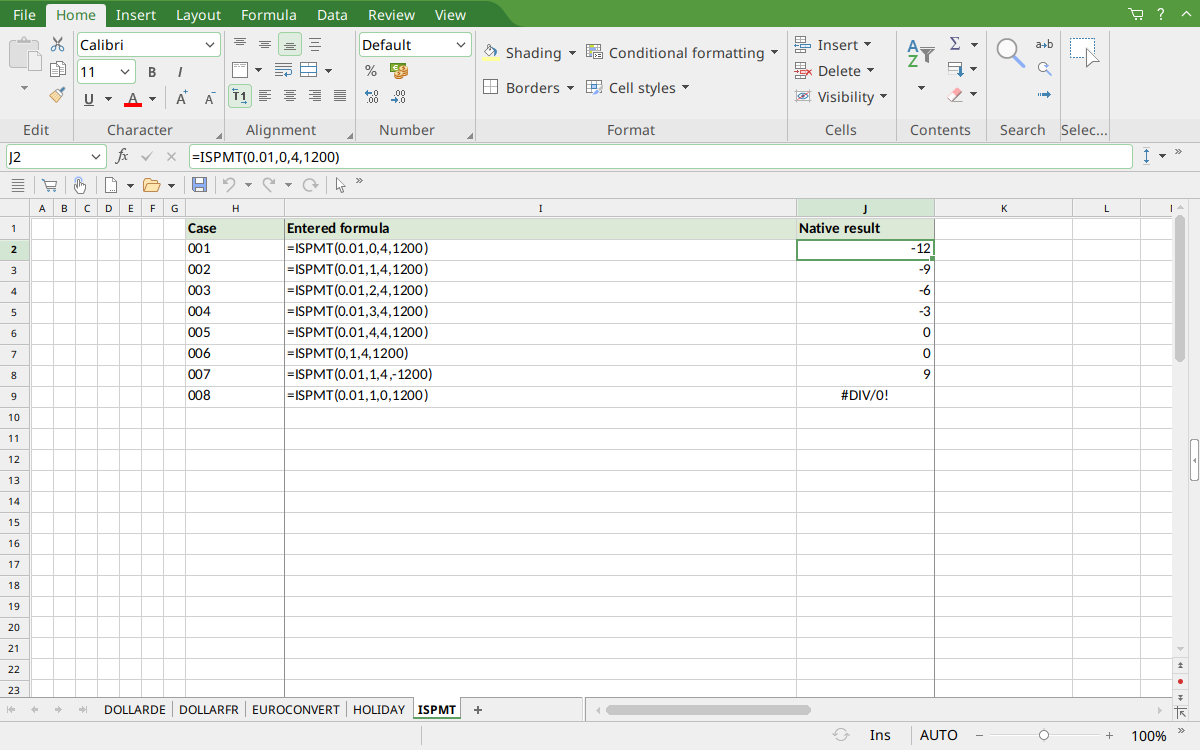
FreeOffice PlanMaker 2024 rev F1238.1005: selected cell J2 contains =ISPMT(0.01,0,4,1200) and displays -12. Successive rows show -9, -6, -3, and 0, establishing the period convention for this example.
Version and evidence scope
This guide uses the official FreeOffice PlanMaker 2024 ISPMT reference, checked October 18, 2026. The first release introducing the function is not established by that reference. It is documented in this edition; no retirement or deprecation is inferred. Availability in a different edition or year is not assumed.
Selected formulas were tested on October 18, 2026 in FreeOffice PlanMaker 2024 rev F1238.1005, 64-bit. The 8 listed native cases for this function were saved in native PMDX format and reopened with their formulas preserved. Independent arithmetic remains separate from those observations; the cell-reference teaching layout and advanced extensions were not each separately executed. The proprietary implementation has not been inspected. Untested inputs, other editions, and export behavior beyond the documented cautions are not inferred from these results.