

LOGEST in FreeOffice PlanMaker: Syntax and Worked Examples
Read exponential coefficients from LOGEST, distinguish multiplicative scale from a linear intercept, and keep transformed statistics in context.
Verification status: See the evidence and test scope described in this guide. How formula examples are checked
Quick answer
For x=0,1,2,3 and y=2,4,8,16, LOGEST returns the exact-model coefficients m=2,b=2 for y=b×m^x. The first row contains multiplier first, scale second.
These are exponential coefficients. The multiplier two is not a linear slope of two y units per x unit: it doubles y for each unit increase in x.
Syntax and coefficient order
=LOGEST(y_values [, x_values] [, Constant] [, Stats])
Omitted x values default to 1,2,3,… . Constant TRUE or omitted estimates b. FALSE forces b=1 and adjusts the multipliers. Stats FALSE or omitted returns only coefficients; TRUE adds the documented regression-statistics rows.
For several predictors the model is y=b×m1^x1×m2^x2×… . The returned coefficient order is reversed: m_n,…,m_1,b. This guide’s native examples use one predictor; the multiple-predictor ordering is documentation-derived.
Taking natural logarithms gives ln(y)=ln(b)+x×ln(m). Use positive y for this log-regression interpretation. A zero or negative y does not have a real natural logarithm. The LOGEST page does not specify every invalid-input error token. In this build, the tested zero-containing y range returned #NUM!, as detailed below.
Worked example: recover an exact model
Enter A2:A5 as 0,1,2,3 and B2:B5 as 2,4,8,16. Then inspect:
=INDEX(LOGEST(B2:B5,A2:A5),1,1)
=INDEX(LOGEST(B2:B5,A2:A5),1,2)
Independent expectations are 2 and 2. In log space the values lie on ln(y)=ln(2)+x×ln(2). Exponentiating the log slope and intercept gives the original-scale multiplier and scale.
If x is omitted, the same y values correspond to x=1,2,3,4 and the scale becomes 1, with multiplier still two. Thus =INDEX(LOGEST(B2:B5),1,2) is expected to return one. Changing the coordinate origin changes the scale even though the sequence of fitted y values is unchanged.
Forced scale and a separate control
Enter C2:C5 as 1,2,4,8. These data satisfy y=2^x for the explicit x values in A2:A5. With Constant FALSE, the expected coefficients remain m=2 and b=1:
=INDEX(LOGEST(C2:C5,A2:A5,FALSE),1,1)
=INDEX(LOGEST(C2:C5,A2:A5,FALSE),1,2)
Forcing b=1 on the earlier B data would impose a different model and refit m. Do not simply replace the displayed scale while keeping an old multiplier.
Statistics and transformed units
The official Stats layout mirrors LINEST: coefficient row, coefficient standard-error row, R² and standard error for y, F and degrees of freedom, then regression and residual sums of squares. For the single-predictor, fitted-scale example, the residual degree count is independently 4−2=2; that component is checked natively.
The log-linear transformation matters when interpreting uncertainty. The help’s short labels do not justify treating every reported error or sum of squares as an original-y-unit statistic. This guide does not numerically certify the scale of untested standard-error or residual-statistic components, or present them as prediction intervals for y.
For noisy data, a fitted exponential curve and an arithmetic conditional mean need not coincide after transforming back from logarithms. Additional error-model assumptions may be needed. The exact dataset here avoids that issue and isolates coefficient/default behavior.
Array workflow and limits
The official array instructions call for selecting the output region and confirming with Ctrl+Shift+Enter. A single-predictor coefficient-only result occupies one row by two columns. The native evidence below uses scalar INDEX components; no full output-region or spill UI operation is claimed.
Keep x/y observations aligned and avoid a singular predictor design. A high fitted R² or exact coefficient control does not validate extrapolation or establish a causal mechanism. The documentation does not enumerate every shape or singular-input error.
Native exponential coefficients and zero-y observation
Seven scalar INDEX formulas were calculated in FreeOffice PlanMaker 2024 revision F1238.1005. Explicit x yielded multiplier 2 and scale 2. Omitting x changed the scale to 1. The scale-one dataset with Constant FALSE returned multiplier 2 and scale 1. The selected statistics component returned residual degrees of freedom 2. A y range containing zero returned #NUM!. All seven expressions and twelve numeric inputs survived native PMDX save and reopen. No original-scale interpretation of untested standard errors or sums of squares is established by these checks, and no multi-cell array-entry operation is claimed.
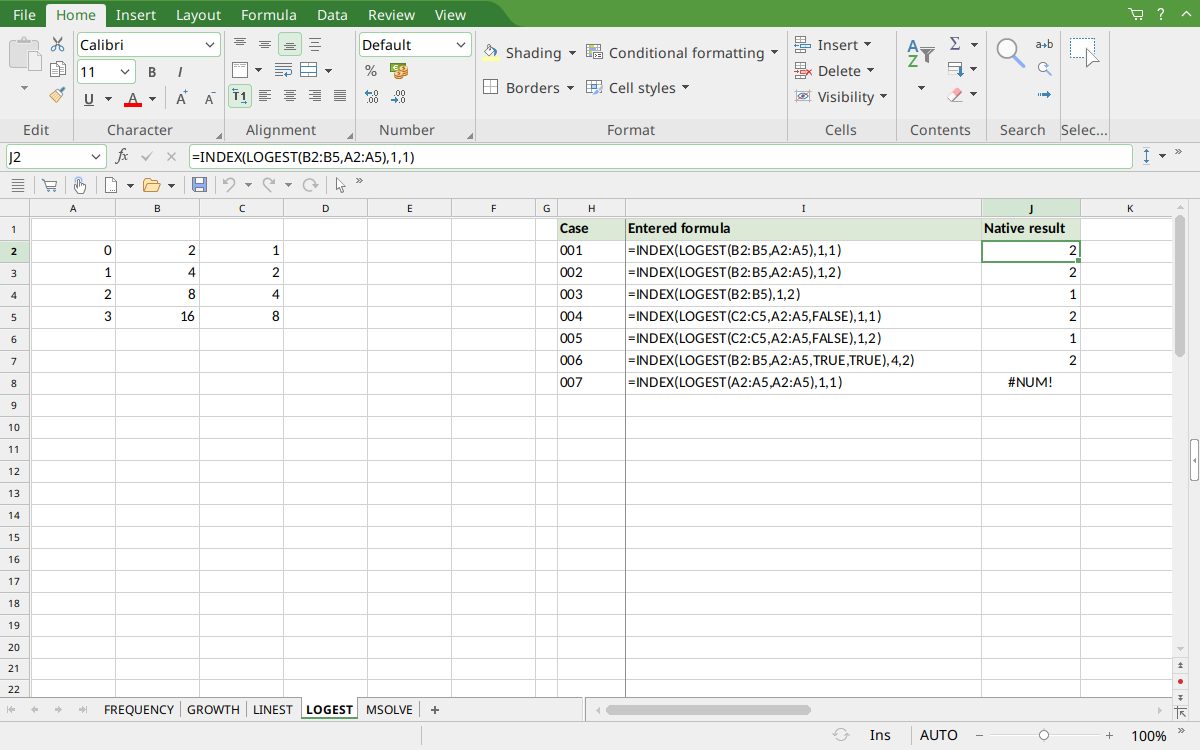
Selected J2 displays multiplier 2; J3 shows scale 2. J4:J6 show omitted-x scale 1 and forced-scale coefficients 2,1. J7 shows degrees of freedom 2; J8 shows #NUM! for zero-containing y.
Version and verification scope
The official FreeOffice PlanMaker 2024 reference was checked October 18, 2026. The installed application is FreeOffice PlanMaker 2024 revision F1238.1005. The original introduction version is not established by this evidence; the current reference does not identify the function as deprecated or retired. No availability claim for a different edition or a 2026 release is implied.
The native section records scalar INDEX component readbacks or residual expressions calculated in revision F1238.1005 and preserved after PMDX save and reopen. It does not demonstrate multi-cell native array entry or automatic spilling. Official array workflow instructions are documentation-derived. Independent additional arithmetic and untested cases are identified separately. English formulas in this guide use commas; use the separators required by your formula settings.