

MSOLVE in FreeOffice PlanMaker: Syntax and Worked Examples
Solve a small square linear system with MSOLVE, check equation residuals, and preserve live calculations in native PlanMaker format.
Verification status: See the evidence and test scope described in this guide. How formula examples are checked
Quick answer
For the system 2x+3y=4 and 2x+2y=8, MSOLVE has the independent solution x=8,y=−4. It returns a column vector of unknowns in the same variable order as the coefficient columns.
MSOLVE is PlanMaker-specific. The official help warns that saving to Excel format replaces calculations using it with their current fixed results. Use a native PMDX document when retaining recalculable formulas matters.
Syntax and shape requirements
=MSOLVE(ArrayA, VectorB)
ArrayA is the numeric coefficient matrix. The help requires it to be square and to have a nonzero determinant. VectorB is a one-column right-hand-side vector; its length must match the number of equations for the matrix equation Ax=B to be meaningful.
The result is a column vector. The documentation specifically warns against arranging the direct solution as a row. For a row presentation it prescribes TRANSPOSE(MSOLVE(ArrayA,VectorB)); that transformed orientation is documented here but not tested in the scalar-readback examples.
Step-by-step: two equations
Enter the coefficients and right-hand sides:
| Row | A: x coefficient | B: y coefficient | D: right side |
|---|---|---|---|
| 2 | 2 | 3 | 4 |
| 3 | 2 | 2 | 8 |
The determinant is 2×2−3×2=−2, so this small system is nonsingular. Subtracting the second equation from the first gives y=−4. Substituting in the second gives 2x−8=8, so x=8.
For a full solution vector, the official array workflow selects the output range before entering the expression and confirming with Ctrl+Shift+Enter. This system needs two output rows and one column for =MSOLVE(A2:B3,D2:D3).
Verify components and residuals
The actual bounded test uses scalar readbacks:
=INDEX(MSOLVE(A2:B3,D2:D3),1,1)
=INDEX(MSOLVE(A2:B3,D2:D3),2,1)
Independent expectations are 8 and −4. These formulas inspect solution components without claiming that a multi-cell array region was entered natively.
Check the original equations after solving:
First residual: 2×8+3×(−4)−4 = 0
Second residual: 2×8+2×(−4)−8 = 0
The native example also calculates both residual expressions directly from MSOLVE component readbacks. This catches a reversed component order or a mismatch between the matrix and the right-hand side.
Advanced use: interpret residuals carefully
A small residual means the returned vector approximately satisfies the supplied equations. It does not prove that the equations themselves represent the intended problem. Check coefficients, units and signs before interpreting the solution.
Near-singular systems can amplify small input changes. A nonzero determinant alone is not a universal numerical-conditioning guarantee, especially when values have very different scales. The official implementation uses singular value decomposition and warns that matrices larger than roughly 10–20 rows can have substantial rounding errors. These two-row controls do not certify large-system accuracy.
Singular and invalid inputs
A separate bounded example uses coefficient rows (1,2) and (2,4), with right sides 3 and 6. The second equation duplicates the first, so the determinant is zero and there is no unique solution. This is outside the documented nonzero-determinant requirement. The native first-component readback returned 0.6, as detailed below; that observation is not a unique-solution guarantee.
Another native example supplies only one right-hand-side cell for the two-row matrix and returns #VALUE!. The mathematical dimensions are incompatible. The help does not enumerate every resulting error token or text-conversion rule.
Do not treat an arbitrary output from an invalid or singular input as a unique verified solution. The tested scope is the small, numeric, nonsingular system and its residuals.
File-format compatibility
The Excel fixed-value warning is vendor documentation, not an export test performed here. Native PMDX save and reopen evidence below verifies the tested live expressions. A screenshot of a result alone would not establish that an exported workbook still contains a working MSOLVE formula.
Native solution, residuals and singular-input caution
Six scalar component or residual formulas were calculated in FreeOffice PlanMaker 2024 revision F1238.1005. The nonsingular system returned 8 and −4, and both original-equation residuals were 0. For the singular system, the tested first-component readback returned 0.6 rather than an error. Only that component was observed; this does not establish a unique solution, a full returned vector or a general supported singular-system contract. The mismatched one-cell right-hand side returned #VALUE!. All six live expressions and twelve numeric inputs survived native PMDX save and reopen. This verifies scalar component/residual calculations, not native column-array entry or the TRANSPOSE workflow.
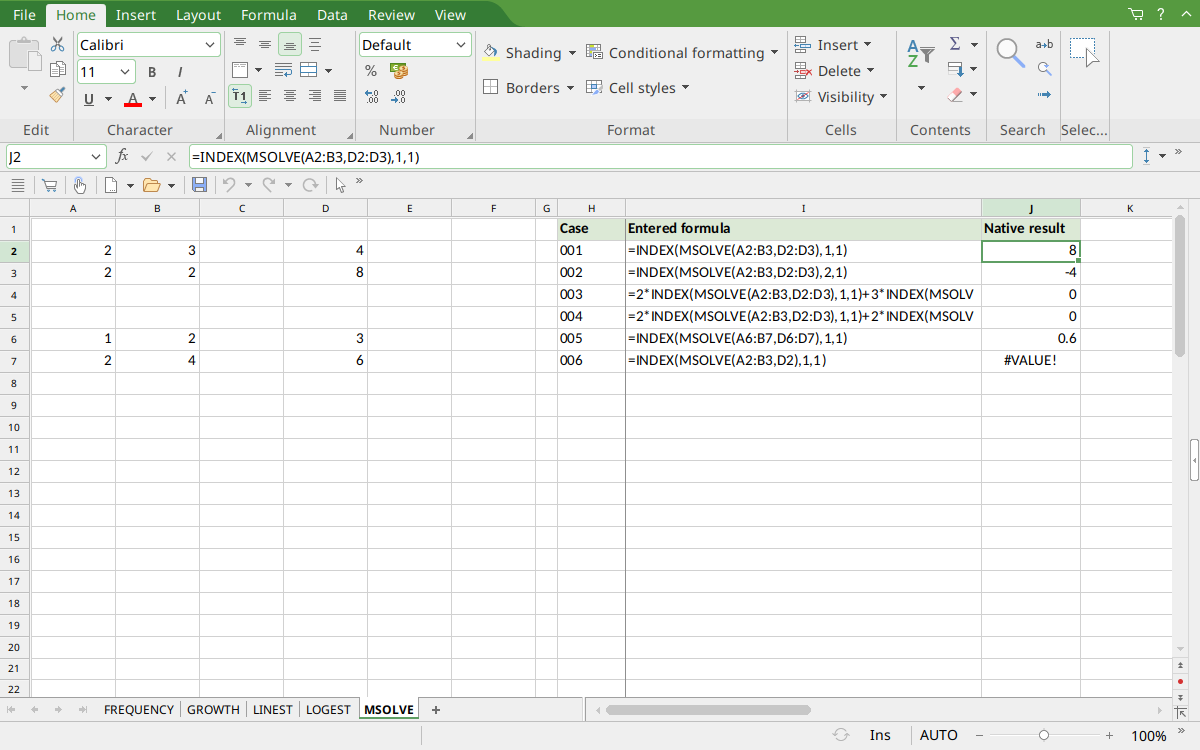
Selected J2 displays the first solution component 8 with its full INDEX(MSOLVE(…)) formula visible in the formula bar. J3 shows −4, J4:J5 show zero residuals, J6 shows the singular first-component observation 0.6 and J7 shows #VALUE!. The two long residual formula labels are clipped in the table; their full algebra is explained above.
Version and verification scope
The official FreeOffice PlanMaker 2024 reference was checked October 18, 2026. The installed application is FreeOffice PlanMaker 2024 revision F1238.1005. The original introduction version is not established by this evidence; the current reference does not identify the function as deprecated or retired. No availability claim for a different edition or a 2026 release is implied.
The native section records scalar INDEX component readbacks or residual expressions calculated in revision F1238.1005 and preserved after PMDX save and reopen. It does not demonstrate multi-cell native array entry or automatic spilling. Official array workflow instructions are documentation-derived. Independent additional arithmetic and untested cases are identified separately. English formulas in this guide use commas; use the separators required by your formula settings.