

PlanMaker RANDBETWEEN Function: Generate an integer within inclusive bounds
Use RANDBETWEEN in FreeOffice PlanMaker 2024 with inclusive integer bounds, genuine samples and recalculation limits.
Verification status: See the evidence and test scope described in this guide. How formula examples are checked
Quick answer: =RANDBETWEEN(1,6) returns a random integer from 1 through 6, including both bounds in the documented domain. A particular roll is an observed sample, not a fixed result promised for that formula.
Syntax and integer-bound contract
=RANDBETWEEN(LowerLimit, UpperLimit)
Both arguments are required. The official description gives an integer x satisfying LowerLimit ≤ x ≤ UpperLimit and says a new random number is generated whenever the document recalculates.
Use integer limits with LowerLimit no greater than UpperLimit for the examples here. The short reference does not specify how fractional limits are rounded or coerced, so this guide does not transfer another spreadsheet’s rounding policy to PlanMaker.
The inclusive upper bound differs from RAND, whose documented upper limit 1 is excluded. RANDBETWEEN’s result is an integer, not a continuous decimal between its limits.
Build a bounded-sample worksheet
Enter these formulas in separate cells:
| Formula | Documented property, not a fixed draw |
|---|---|
=RANDBETWEEN(1,6) |
Integer 1 through 6 |
=RANDBETWEEN(1,6) |
Another observed integer 1 through 6 |
=RANDBETWEEN(-3,3) |
Integer −3 through 3 |
=RANDBETWEEN(5,5) |
Only possible result is 5 |
The equal-bound case is a deterministic control: the closed interval [5,5] contains only one integer. It does not establish anything about the generator’s distribution for wider intervals.
To audit a draw, put it in a cell and inspect that same cell for both integrality and bounds. Repeating RANDBETWEEN inside several checks can produce different draws, so it is not a reliable way to describe one original sample.
The native demonstration preserves actual observed samples. Saved cached values and later live samples are recorded separately.
Practical use: map integer codes to categories
A simple simulation can use integers 1–6 as category codes, then interpret those codes through a separate lookup table. Keep the mapping visible: for example, 1 can identify the first category and 6 the last. The formula selects a code; it does not know the meaning or relative real-world frequency of the categories.
For a signed offset demonstration, =RANDBETWEEN(-3,3) has seven permitted integer outcomes. It is not the same as drawing a continuous value in that interval and rounding it, because such a transformation can change endpoint frequencies. Do not infer that two formulas with similar visible bounds have identical statistical behavior.
If a workbook needs multiple related calculations from one sampled offset, store the draw once and reference it. Calling the function again creates another volatile expression rather than reusing the first sample.
Recalculation, snapshots and interpretation
The official help identifies document recalculation as the trigger for a new number. A recalculation may coincidentally return the same integer, so repeated equality is possible and is not by itself a malfunction.
A saved formula cache can differ from a later reopened live result. When reporting a sample, distinguish the saved value, the visible capture and any subsequent recalculation. Preserving formula text does not imply that a volatile numeric result remains unchanged.
For a deliberately frozen report, a copied-as-value result is a snapshot and should be labelled accordingly. It no longer updates as RANDBETWEEN. A handful of sampled values cannot establish uniformity, independence, absence of bias or the chance of each endpoint. This function is not documented as a security-grade source for secrets.
Invalid limits and support boundaries
=RANDBETWEEN(6,1) reverses the bounds. In the tested build it returned 6, rather than an error. This observation does not make reversed limits a valid interval or establish a documented auto-correction rule. Validate LowerLimit ≤ UpperLimit yourself. Do not swap the arguments silently if their order represents a meaningful configuration error.
Text values, fractional limits, very large magnitudes and every overflow boundary are outside the bounded examples here. Use explicit integer limits appropriate for the worksheet and validate them before interpreting the draws.
The official FreeOffice PlanMaker 2024 page documents the function and the RANDBETWEEN(1,6) example. It does not establish an introduction release, a seed-control mechanism or a special export-conversion rule. Verify actual formulas and recalculation behavior if the workbook is exchanged with another spreadsheet program.
Native results and scope
The two =RANDBETWEEN(1,6) cells had saved cached values 4 and 3, while the later screenshot displayed 6 and 1. The =RANDBETWEEN(-3,3) cache was 0, with later visible value 3. The deterministic =RANDBETWEEN(5,5) result was 5. The reversed-limits observation returned 6.
The native save was recorded before 06:40:28 UTC on October 18, 2026, and the RANDBETWEEN screenshot was captured at approximately 06:40:43 UTC before closing without another save. Consequently the live screenshot and saved caches are different calculation states. No selected outcome was forced, and the observed values are not predictions for a reader’s next recalculation.
All three valid random integer samples satisfy their specified bounds in both recorded states. The reversed-limits result is excluded from that valid-domain check. A tiny set of draws cannot certify frequency, uniformity, independence or security properties.
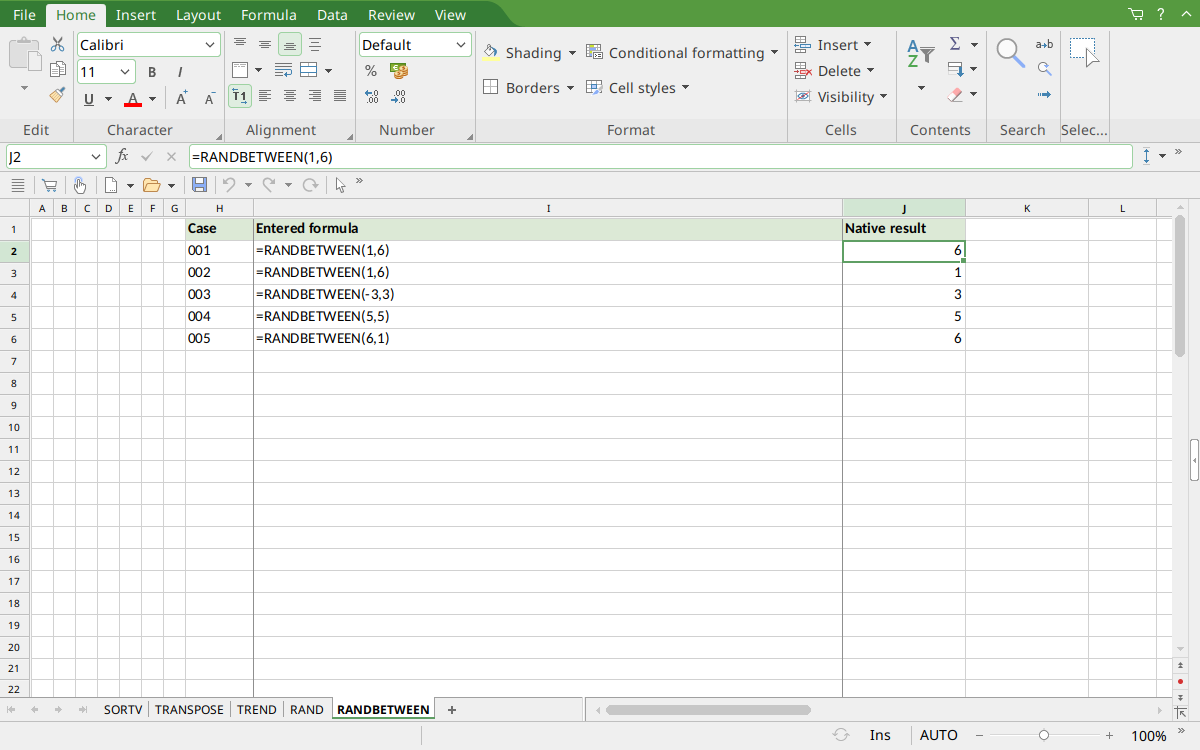
FreeOffice PlanMaker 2024 rev F1238.1005: selected J2 contains =RANDBETWEEN(1,6) and displays 6. This is the live sample at capture; the earlier saved cache for this cell was 4.
Version and evidence scope
Official FreeOffice PlanMaker 2024 reference, checked October 18, 2026. No introduction release is inferred from current support.
Selected examples were tested on October 18, 2026 in FreeOffice PlanMaker 2024 rev F1238.1005, 64-bit. The actual observations are distinguished from independent mathematical references and from teaching extensions not individually executed. Proprietary implementation code has not been inspected. Random results have no fixed expected draw; saved caches and later live observations must be distinguished.