

XIRR in FreeOffice PlanMaker: Syntax and Worked Examples
Estimate an irregular-cash-flow return with XIRR, explicit dates and guesses, and distinguish numerical roots from financial conclusions.
Verification status: See the evidence and test scope described in this guide. How formula examples are checked
Quick answer
With a payment of −1000 on January 1, 2025 and income of 1100 on January 1, 2026, =XIRR(A2:A3,B2:B3,0.1) has an independent expected annual return of 0.1, displayed as 10% when percentage formatting is applied.
XIRR searches for a rate at which dated cash flows balance in present-value terms. It is an estimate from a numerical solver, not a promise about realized returns or an investment recommendation.
Syntax, signs and guess
=XIRR(Values, Dates [, Guess])
Values contains cash flows: payments are negative and income positive. The help requires at least one of each. Dates supplies a corresponding date for every cash flow. Preserve that pairing when sorting or inserting rows.
Guess is optional, but the official page does not specify its default. Use an explicit starting value when reproducibility matters. A guess of 0.1 means a rate of 10%, not ten currency units.
The official help says the iterative search stops after 20 iterations if it cannot reach accuracy of 0.00001% or better, returning #NUM!. It suggests trying another Guess. It does not define a present-value residual bound or establish convergence for every dataset.
Worked example: one full year
Enter −1000 in A2 and 1100 in A3. Enter actual spreadsheet dates January 1, 2025 in B2 and January 1, 2026 in B3. These dates are 365 days apart; they are not text labels.
Enter =XIRR(A2:A3,B2:B3,0.1), then compare the same calculation with Guess=0.2. The independent equation is:
−1000 + 1100/(1+r) = 0
1+r = 1.1
r = 0.1
The raw rate is 0.1. Percentage formatting changes its presentation to 10% without changing the stored value. Two starting guesses provide a bounded solver check for this simple unique ordinary root; they do not prove that Guess never matters.
Irregular dates and annualization
The short help page does not state a day-count denominator. This guide therefore compares native results with an independently specified 365-day discount model rather than attributing an undocumented convention to the help:
Present value = sum of flow_i / (1+r)^((date_i−first_date)/365)
For −1000 followed by 1100 after 182 days, the model root is 1.1^(365/182)−1. A separate January 1, 2024 to January 1, 2025 control spans 366 days and has model root 1.1^(365/366)−1. Those controls distinguish fixed-365 annualization from treating every calendar year as exactly one exponent. The native outcomes below agree with the fixed-365 model for both intervals.
Advanced example: more than one mathematical root
Consider annual flows −100,230,−132 on January 1 of 2025,2026,2027. The independent present-value equation is:
−100 + 230/(1+r) − 132/(1+r)^2 = 0
Let y=1+r: 100y²−230y+132=0
Roots: y=1.1 and y=1.2, so r=10% or20%
Both rates solve the equation. Native calculations with guesses 0.05 and 0.25 both returned #NUM!, even though these two mathematical roots exist. A single returned rate cannot prove uniqueness or choose the economically appropriate interpretation.
Check the present-value residual at the raw returned rate, using the actual dates. Small changes in a rate or a displayed rounded percentage can materially change a large-flow residual. A low residual confirms a numerical balance for that model, not the merits of the underlying transaction.
Errors and practical limits
Use genuine numeric dates and aligned ranges. At least one positive and one negative flow is necessary under the documented contract, but it is not a universal convergence guarantee. Irregular ordering, duplicated dates, malformed values and rates outside the real-valued discount domain require care; the help does not specify every error or conversion rule.
A #NUM! can reflect unsuccessful iteration. Changing Guess may help, but it can also locate a different root. Keep the original cash flows, dates, guess and unrounded result for review. The examples are fictional function demonstrations and do not recommend an investment or financing decision.
Native dated returns and solver failure
Seven formulas were calculated in FreeOffice PlanMaker 2024 revision F1238.1005 using the displayed numeric dates. The 365-day example returned 0.09999999995343402 with either explicit guess 0.1 or 0.2. With Guess omitted it returned 0.10000000000582102; this observation does not identify a universal default starting value. The 366-day leap-year control returned 0.099713585944846, and the 182-day control returned 0.21063382155261898. These agree with the independently evaluated fixed-365 model within approximately 1.6×10^-11 in rate for the two controls. This is observed evidence for those date intervals, not a vendor-specified rule for every date convention. Both guesses 0.05 and 0.25 for the two-root −100,230,−132 example returned #NUM!. The existence of mathematical roots therefore did not guarantee solver success. All seven formulas and the eighteen numeric cash-flow/date inputs survived native PMDX save and reopen.
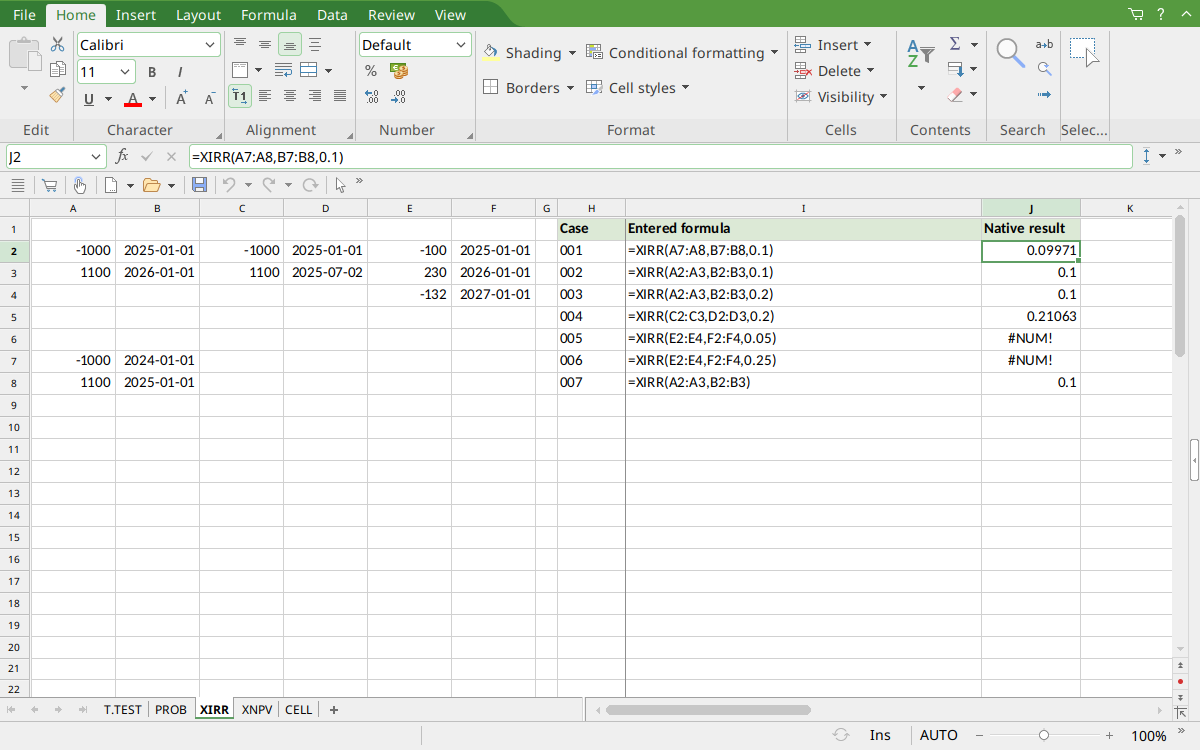
Selected J2 shows the leap-year rate rounded to 0.09971. J3:J4 display 0.1 for the ordinary year; J5 shows 0.21063 for 182 days. J6:J7 show #NUM! for both multiple-root guesses; J8 shows the omitted-guess result rounded to 0.1. Dates are displayed in ISO form.
Version and verification scope
The official FreeOffice PlanMaker 2024 reference was checked October 18, 2026. The installed application is FreeOffice PlanMaker 2024 revision F1238.1005. The original introduction version is not established by this evidence; the current reference does not identify the function as deprecated or retired. No availability claim for a different edition or a 2026 release is implied.
The native section identifies the exact tested formulas and observed values from revision F1238.1005 after native PMDX save and reopen. Independent calculations, documented requirements and observed limitations are distinguished. Extra model arithmetic is not an additional native case unless identified. Compatibility notes are vendor guidance, not an Excel-export test. English formulas in this guide use commas; use the separators required by your formula settings.