

XNPV in FreeOffice PlanMaker: Syntax and Worked Examples
Calculate present value for dated cash flows with XNPV, keeping the initial payment, rate units and irregular timing explicit.
Verification status: See the evidence and test scope described in this guide. How formula examples are checked
Quick answer
For −1000 on January 1, 2025 and 1100 on January 1, 2026, =XNPV(0.1,A2:A3,B2:B3) has an independent expected result of 0. The initial payment is included in the supplied cash-flow range.
XNPV returns a value in the cash flows’ currency units. Its Rate argument is a decimal discount rate: 0.1 represents 10%. Do not format the present-value output as a percentage merely because the input rate is a percentage.
Syntax and cash-flow alignment
=XNPV(Rate, Values, Dates)
All three arguments are required. Values contains negative payments and positive income; the official help requires at least one of each. Dates supplies the date associated with every flow. Use consistent currency units and genuine date values, not locale-dependent text that only resembles a date.
Unlike a periodic model, dates matter. Two equal receipts can have different present values if received on different days. The function does not infer missing dates or validate whether the timing assumptions are commercially realistic.
Worked example: include the initial outlay once
| Row | A: cash flow | B: date |
|---|---|---|
| 2 | −1000 | 2025-01-01 |
| 3 | 1100 | 2026-01-01 |
Enter =XNPV(0.1,A2:A3,B2:B3). With a 365-day interval, independent arithmetic is −1000+1100/1.1=0. The first flow is already in the model. Adding another −1000 outside the formula would count the initial outlay twice.
A result of zero means the specified flows balance at the supplied discount rate under the timing model. It does not mean that no money changes hands or that the transaction has no uncertainty.
Irregular timing and an explicit reference model
The official page does not specify its day-count denominator. For independent comparisons, use the fixed-365 model:
PV = sum of flow_i / (1+Rate)^((date_i−first_date)/365)
For a receipt of 1100 only 182 days after the initial −1000, the model value at 10% is −1000+1100/1.1^(182/365). Earlier receipt means less discounting than in the one-year example.
For January 1, 2024 to January 1, 2025, the interval is 366 days. The same model gives −1000+1100/1.1^(366/365), slightly below zero. The native section distinguishes observed values from this independently specified convention; a leap-year control is needed before claiming that a calendar year always has exponent one.
Advanced example: two rates can give zero
For annual flows −100,230,−132, independent discounting gives:
| Rate | Calculation | Expected PV |
|---|---|---|
| 10% | −100+230/1.1−132/1.1² | 0 |
| 20% | −100+230/1.2−132/1.2² | 0 |
This nonconventional sign pattern illustrates why an internal-return calculation can have more than one mathematical root. XNPV evaluates a rate you provide; it does not search for or choose a root. Use a deliberately chosen discount rate for the question being modeled rather than substituting an arbitrary solver result.
The example also provides transparent arithmetic controls for the native calculation. A near-zero floating-point result should be interpreted relative to cash-flow scale and numerical precision, not assumed to be an exact symbolic zero.
Validation and boundaries
Keep flow and date ranges aligned and of compatible length. The native examples returned #VALUE! for mismatched ranges and accepted zero rate, returning the sum of flows, 100. These are bounded observations for the supplied inputs; the sparse help does not enumerate every error or rate boundary.
Rates at or below −1 can make fractional-power discounting undefined or singular in this reference model. Do not extend successful positive-rate examples into a promise about every negative rate, date ordering or same-day combination.
The model treats supplied flows as the inputs; it does not forecast uncertain income, adjust currencies or choose a suitable discount rate. These fictional examples explain spreadsheet calculation, not financial advice.
Native timing controls and near-zero residuals
Seven formulas were calculated in FreeOffice PlanMaker 2024 revision F1238.1005. The leap-year 366-day control returned −0.26108969043878 and the 182-day control 48.9457915753676, agreeing with the independently specified fixed-365 model on these cases. The one-year balance returned approximately −1.13687×10^-13, a floating-point residual around mathematical zero. Zero rate was accepted and returned 100. The −100,230,−132 controls at rates 0.1 and 0.2 returned approximately −1.42109×10^-14 and 1.42109×10^-14, confirming near-zero discounted values even though the corresponding XIRR searches failed. The mismatched-date input returned #VALUE!. Six formulas were retained exactly apart from storage prefixes; the seventh saved the one-cell range B2:B2 as B2, with the same referenced date and observed error. All eighteen numeric input cells survived native PMDX save and reopen.
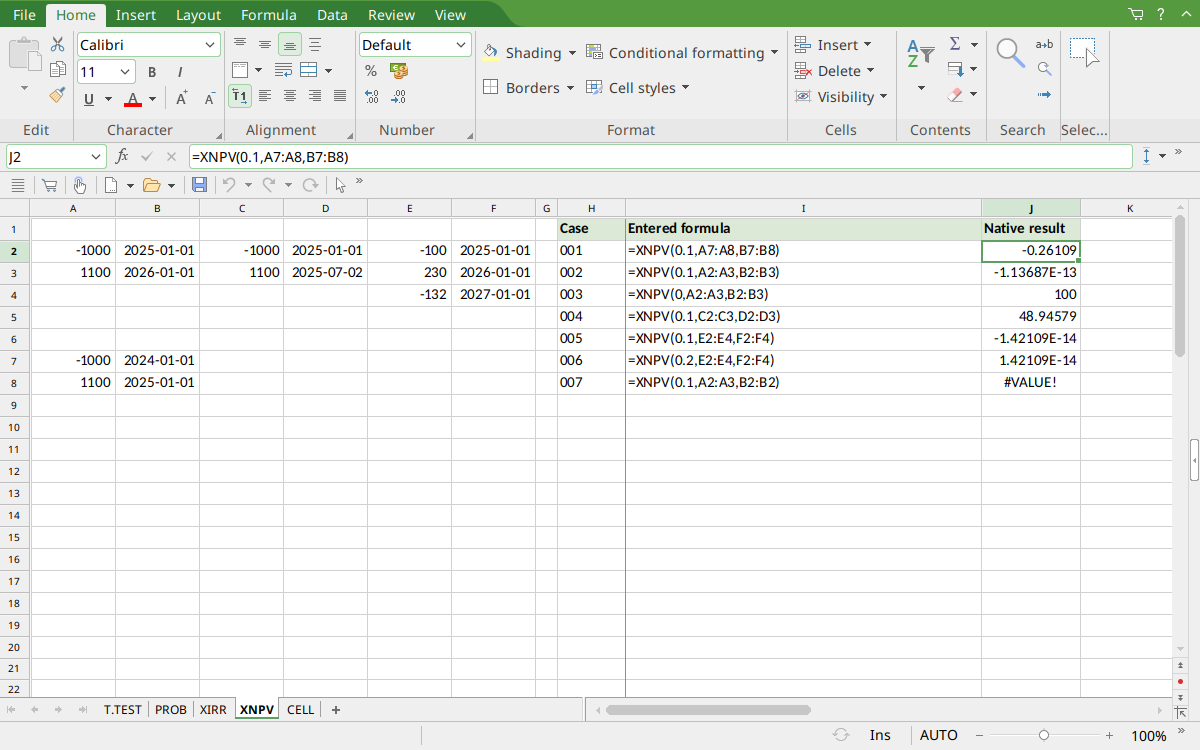
Selected J2 displays the leap-year value −0.26109. J3 shows the small one-year residual in scientific notation; J4 shows 100 at zero rate and J5 shows 48.94579 for 182 days. J6:J7 show near-zero residuals at the two known roots; J8 shows #VALUE!.
Version and verification scope
The official FreeOffice PlanMaker 2024 reference was checked October 18, 2026. The installed application is FreeOffice PlanMaker 2024 revision F1238.1005. The original introduction version is not established by this evidence; the current reference does not identify the function as deprecated or retired. No availability claim for a different edition or a 2026 release is implied.
The native section identifies the exact tested formulas and observed values from revision F1238.1005 after native PMDX save and reopen. Independent calculations, documented requirements and observed limitations are distinguished. Extra model arithmetic is not an additional native case unless identified. Compatibility notes are vendor guidance, not an Excel-export test. English formulas in this guide use commas; use the separators required by your formula settings.