

AVERAGEIFS in Calligra Sheets: Build a Mean With Multiple Row Conditions
Learn Calligra Sheets AVERAGEIFS with exact arguments, reproducible inputs, independently checked results and implementation-specific cautions.
Verification status: See the evidence and test scope described in this guide. How formula examples are checked
Quick answer
AVERAGEIFS averages values only where all supplied row conditions pass. For example, average recorded hours for East-team rows with at least four units. Use ordinary rectangular ranges of matching dimensions and numeric average values. Calligra 26.08.2 has an important nonnumeric-value counting behavior explained below; do not assume its mean always matches another application’s.
Syntax and argument order
=AVERAGEIFS(average_range;criteria_range1;criterion1[;criteria_range2;criterion2;...])
The average range is first, followed by one or more range/criterion pairs. At least three arguments are required. Every added condition needs both a range and a criterion. There are no optional defaults for a missing pair. Brackets and ellipsis describe repetition; they are not text to enter.
The release registration permits three or more arguments, while the function body consumes pairs after the first argument. Do not rely on registration to repair an incomplete pair or supply a friendly error; always supply an odd total argument count. Each row must pass every criterion, so two different criteria ranges express AND rather than OR.
Reproduce a two-condition average
- Enter headers Team, Units and Hours into A1:C1.
- Enter this data, keeping B and C numeric:
| Row | A: Team | B: Units | C: Hours |
|---|---|---|---|
| 2 | East | 3 | 10 |
| 3 | West | 7 | 20 |
| 4 | East | 8 | 30 |
| 5 | East | 4 | 0 |
| 6 | West | 9 | 40 |
- In E2 enter:
=AVERAGEIFS(C2:C6;A2:A6;"East";B2:B6;">=4")
Expected: 15, from rows 4 and 5: (30 + 0)/2. Row 2 has the correct team but fails the units criterion.
- In E3 enter:
=AVERAGEIFS(C2:C6;A2:A6;"West";B2:B6;">=7")
Expected: 30, from (20 + 40)/2. Each pair acts on the corresponding row; the formula is not looking for a matching label anywhere else in the column. All shown results are independent arithmetic expectations checked against the release source; selected native cases are recorded below.
Advanced example: a bounded interval controlled by cells
To report hours for rows with between four and eight units, inclusive, apply two conditions to the same units range. Put 4 in G2 and 8 in H2:
=AVERAGEIFS(C2:C6;B2:B6;">="&G2;B2:B6;"<="&H2)
Expected: 16.666667, because rows 3, 4 and 5 qualify and (20 + 30 + 0)/3 = 50/3. A repeated criteria range is deliberate: one pair sets the lower bound and another sets the upper bound.
For a reusable summary with team names in G5:G6, enter East and West there and use:
=AVERAGEIFS($C$2:$C$6;$A$2:$A$6;G5;$B$2:$B$6;">="&$G$2)
Fill down one row. With G2 = 4, expected means are 15 and 30. Fixed data ranges and a fixed threshold prevent references drifting during fill. The relative G5 reference changes to G6 for the second team.
Important Calligra behavior: check the denominator
In the 26.08.2 averageIfs implementation, each row passing all criteria increases the denominator. Only numeric average values increase the numerator. Thus a matching text or blank average value can dilute the result instead of being excluded from the count. This differs from Calligra’s normal rectangular AVERAGEIF path, which counts only matching numeric average values.
For a diagnostic copy of the sample, replace C5’s numeric zero with text missing. The source-derived expectation for the East/units>=4 formula remains 30/2 = 15, not 30. That is an implementation reading, not an observed test of your installed binary. Do not treat it as a desirable missing-data policy. Keep a numeric completeness check alongside the report and decide explicitly whether a missing value should exclude a record or prevent publication of the mean.
Criteria, errors and other limits
- Numeric conditions should be quoted, for example
">=4". Bare label criteria such as"East"use the document’s text/pattern mode. Wildcard versus regex behavior is settings-dependent. - In the inspected source, bare-text matching is case-insensitive, but explicit
"=East"uses the case-sensitive equality branch. Do not casually replace one with the other. - Use matching rectangular shapes for the average and all criteria ranges. The implementation iterates the average range’s dimensions; no general safe behavior for mismatched shapes is promised here.
- No qualifying rows produce a zero denominator in the ordinary multi-cell path. A zero mean and an undefined mean are different report states.
- The source has separate scalar criteria branches; single-cell and scalar inputs are outside these supported examples. Do not infer scalar behavior from the five-row fixture.
- Error-valued inputs need separate validation. The code’s criteria-error branch does not establish simple Excel-equivalent error propagation, so a blanket claim that all errors propagate identically is intentionally avoided.
- OR logic requires a different design. Two pairs for East and West on the same team column ask for both labels simultaneously; they do not mean either team.
Compatibility
AVERAGEIFS starts with the average range; AVERAGEIF starts with the check range. Reordering a formula during conversion is essential. Keep workbook-specific regex/wildcard settings and nonnumeric handling in your migration checklist. Matching numeric examples establish the arithmetic for these cases, not broad Excel, Calc, import/export or UI compatibility. Verify recalculated results in each target application and label the exact tested version.
Availability and verification
- Release checked: Calligra Sheets 26.08.2, using KDE’s release source package and release information, inspected on October 18, 2026. Relevant locations:
sheets/functions/statistical.cpplines 127–131 and 775–798;sheets/engine/ValueCalc.cpplines 2191–2243 and 2466 onward. - Introduced: The original introduction version is not established by these sources. Current registration establishes presence in 26.08.2, not the first release.
- Lifecycle: Registered in the inspected release; no retirement or deprecation marker was found in this function’s registration. Retirement (removed support) and deprecation (discouraged but retained support) are different claims; neither is asserted here.
- Native testing: Selected examples were recalculated and saved in Calligra Sheets 25.04.2. The source discussion concerns 26.08.2; these are different evidence scopes. Other examples and edge cases remain source-derived or independently calculated.
Related guides and sources
- AVERAGE
- AVERAGEA
- SUMIF
- COUNTIF
- Calligra function guide index
- KDE formula entry instructions, checked October 18, 2026. Examples use leading
=and semicolons, with a period for decimal numbers. Confirm regional separators in your installation before pasting.
Selected native results and screenshot
The following results were observed in Calligra Sheets 25.04.2 after loading a corrected ODS fixture, recalculating and saving it. Saved formula expressions were read back and checked against the displayed results. An earlier XLSX import had rewritten range references incorrectly; those results are excluded. This confirms these selected cases, not a successful XLSX round trip or a native test of 26.08.2.
| Executed expression shown in native notation | Native displayed result |
|---|---|
=AVERAGEIFS(C2:C6;A2:A6;"East";B2:B6;">=4") |
15.0000000000 |
=AVERAGEIFS(C2:C6;A2:A6;"West";B2:B6;">=7") |
30.0000000000 |
=AVERAGEIFS(C2:C6;B2:B6;">=4";B2:B6;"<=8") |
16.6666666667 |
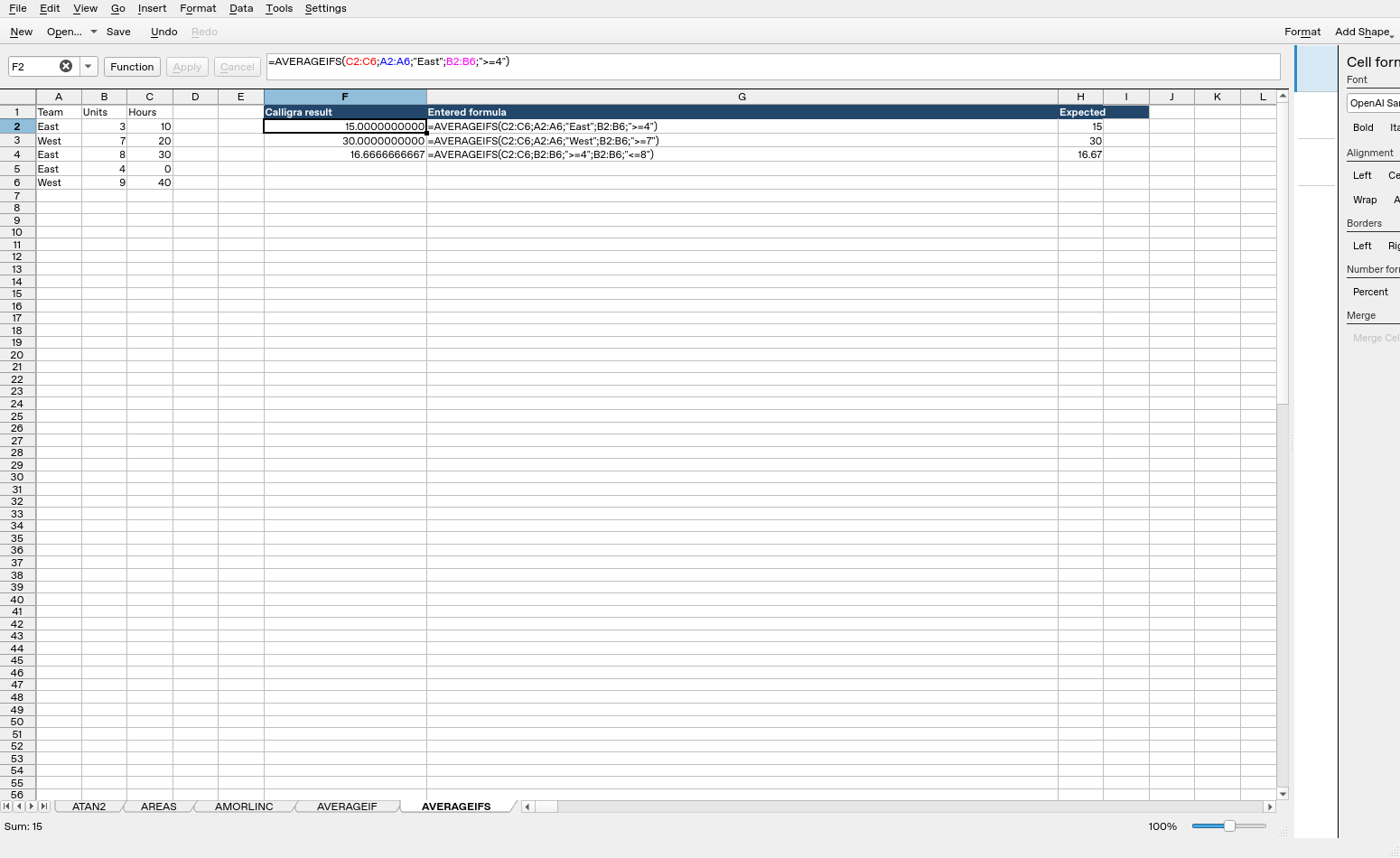
Screenshot: Genuine native 25.04.2 capture. Cell F2 shows =AVERAGEIFS(C2:C6;A2:A6;"East";B2:B6;">=4") and displays 15.0000000000. Column F contains native results; column G contains fixture labels and column H contains reference expectations, sometimes rounded to two decimals, not additional application calculations.
Relevant released function source was independently compared between 25.04.2 and 26.08.2 and found byte-identical for the inspected implementations. This supports the source discussion without upgrading an older-version GUI run into a 26.08.2 native test. Other platforms, locales and unlisted edge cases remain unverified.