

Calligra Sheets · Summaries and analysis · Beginner
Build a Checked Sales Summary in Calligra Sheets
Summarize region and channel sales with literal SUMIF helper keys, reconcile totals to 580 and audit new rows, label spelling and duplicates.
Native-tested scoped in 25.04.2; documentation/source reviewed in 26.08.2 · Editorial standards
Build a two-way sales summary with a helper key and SUMIF, then reconcile it against the original sales total. The example below summarizes one flat transaction list; it does not require a pivot-table creation feature.
Evidence and applicability: The eight-record helper-key summary, mixed-reference copying, source-change recalculation and appended-row range expansion were tested in Calligra Sheets 25.04.2 on Linux (Debian 13, Qt 6.8.2), with English UI and the default en_US environment, on October 16, 2026. Source-change checks were repeated after reopening the base ODS. The final restored base and expanded copy were saved, but were not reopened again. The documentation review uses official v26.08.2 source and handbook revision 2.7 dated March 11, 2013; v26.08.2 was not run. The relevant condition parser and formula source match v25.04.2. Case variations, arbitrary labels and other applications were not tested.
The older handbook documents a pivot dialog, but the reviewed v26.08.2 build and action registration disable that workflow. This guide therefore uses supported formulas rather than presenting the old pivot instructions as a current feature.
Start with eight sales records
Download the synthetic sales CSV and place its header in A1:C1, with these eight records in A2:C9. Keep the Amount column numeric.
| Region | Channel | Amount |
|---|---|---|
| North | Online | 120 |
| North | Retail | 80 |
| South | Online | 90 |
| South | Retail | 140 |
| North | Online | 60 |
| South | Online | 30 |
| North | Retail | 40 |
| South | Retail | 20 |
Save a working ODS copy before entering formulas, and commit each edit with Enter or the editor’s Apply control. One initial formula-entry attempt ended the application session; after restarting, the same SUMIF workflow succeeded. The cause of that exit was not established. The successful run used direct cell entry, so check the selected cell and completed formula before moving on.
Each row is a separate sale. Repeated region/channel pairs are intentional and should be added, not deduplicated. Before proceeding, =SUM(C2:C9) should yield 580. That is the control total for the entire summary.
Make an inspectable helper key
- Put Summary key in D1.
- In D2 enter
=A2&":"&B2and copy it down to D9. - Inspect every key. It should be one of
North:Online,North:Retail,South:OnlineorSouth:Retail. Each occurs twice in this sample. - Check the original labels for spelling, leading/trailing spaces and case. Also confirm that neither label contains a colon. The separator must not occur inside either label, or different label pairs could produce the same combined string.
The helper column exposes the grouping decision. A blank region, misspelled channel or unapproved category should be corrected or explicitly included, not silently hidden by the summary.
Create the two-way report
Set up this layout away from the source, in F1:I4:
| Cell | Entry |
|---|---|
| F1 | Region |
| G1 | Online |
| H1 | Retail |
| I1 | Total |
| F2 | North |
| F3 | South |
| F4 | Total |
Select G2, type the following formula directly into the cell, and press Enter to commit it:
=SUMIF($D$2:$D$9;"="&$F2&":"&G$1;$C$2:$C$9)
Copy G2 across to H2, then copy G2:H2 down to G3:H3. The native test selected G2:H2 and used Edit → Fill → Fill Right, then selected G2:H3 and used Fill Down. Inspect the copied formulas before trusting the numbers:
- The two source ranges stay fixed with dollar signs.
$F2keeps the Region column while allowing the row to change.G$1keeps the channel header row while allowing the column to change.- The first SUMIF range contains the helper keys; the final range contains the amounts to add.
Use semicolons as shown for function arguments. The & operator joins the criterion pieces. In G2 the finished criterion is the literal text =North:Online.
Why the equals prefix matters here
The reviewed SUMIF implementation passes text criteria through Calligra’s condition parser. Without an operator prefix, text can be interpreted as a regular expression or wildcard, depending on settings. An unescaped pipe would be particularly unsuitable as a regex separator.
The explicit leading = inside the quoted criterion selects the source’s literal string-equality branch. In this reviewed release that branch compares case-sensitively. Keep North and Online spelled exactly as in the source. This case-sensitive matching detail is Calligra-specific source evidence; the lowercase comparison was not tested natively. Do not assume another spreadsheet’s SUMIF case or wildcard behavior is identical.
The colon is also an ordinary literal character for this controlled dataset. The formula is not a general solution for arbitrary labels, unknown whitespace, mixed types or separators embedded in category names. Review those issues before extending it.
Reconcile in both directions
In I2 enter =SUM(G2:H2) and copy to I3. In G4 enter =SUM(G2:G3) and copy to H4. In I4 enter =SUM(I2:I3).
| Region | Online | Retail | Total |
|---|---|---|---|
| North | 180 | 120 | 300 |
| South | 120 | 160 | 280 |
| Total | 300 | 280 | 580 |
As a final check, enter =I4-SUM($C$2:$C$9) in K2. Expect 0. Also check =SUM(G4:H4)-I4, expecting 0. These calculations were independently verified and reproduced in the native 25.04.2 test.
Select a screenshot to open the full-size image.
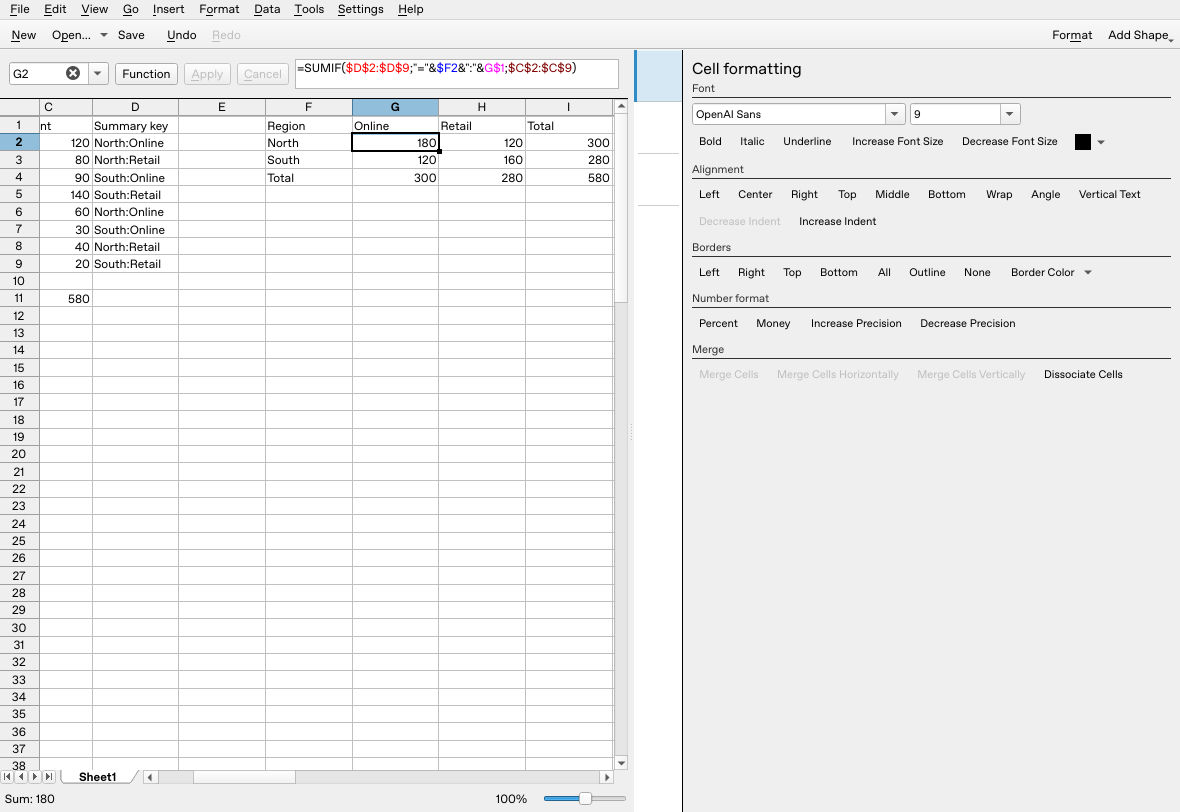
The original mixed-reference SUMIF formula returns 180 for North/Online; the complete summary totals 580.
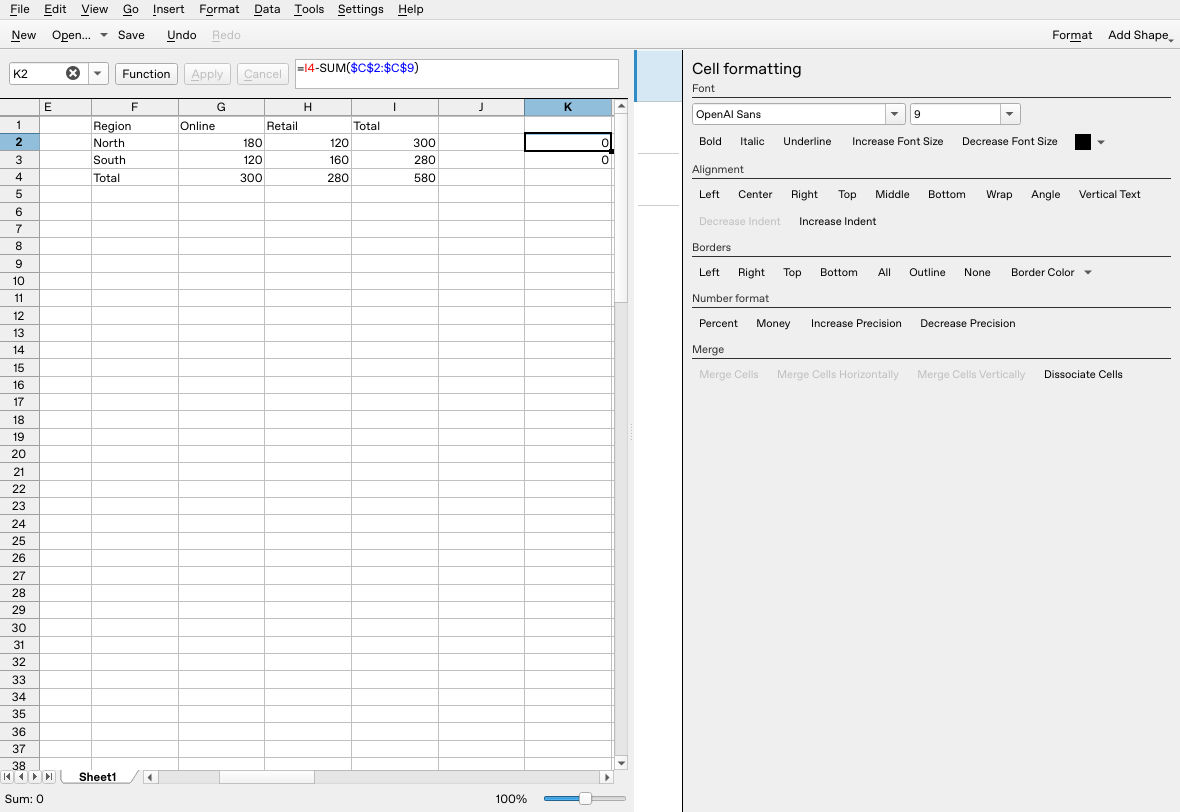
After the base ODS was reopened and the change test repeated, restoring the first amount to 120 returned the summary to 580 and both differences to zero. This restored state was saved, but not reopened a second time.
A zero difference does not detect every problem. An accidentally duplicated transaction can be counted in both the source and summary totals. Review the source records and the four individual group amounts as well.
Test a change and an added row
Change the first North/Online amount from 120 to 125. Expected results are North/Online 185, North total 305, Online total 305 and grand total 585. All four were obtained natively, including a repeated change after reopening. Restore 120 after checking. If the sheet does not update, inspect its automatic recalculation setting and use Tools → Recalculate Document.
A new sale in row 10 is outside this example’s fixed ranges. To see the failure clearly in a separate copy, append North, Online, 50 in A10:C10. Expand the source control to =SUM(C2:C10) and the source side of K2 to =I4-SUM($C$2:$C$10). Before updating the summary, the source total is 630, the summary remains 580, and K2 is −50. This mismatch was observed natively.
Fill the helper key into D10, then expand both SUMIF ranges to row 10 in all four summary formulas. For G2:
=SUMIF($D$2:$D$10;"="&$F2&":"&G$1;$C$2:$C$10)
After filling across and down, the native report showed North/Online 230, North total 350, Online total 350 and grand total 630; the other three groups remained 120, 120 and 160. Both reconciliation differences were 0. The comparison screenshots include a separate Source label and =SUM($C$2:$C$10) display in J5:K5 to make the source total visible.
Add a report row or column for any new category. Do not assume fixed references automatically include appended records.
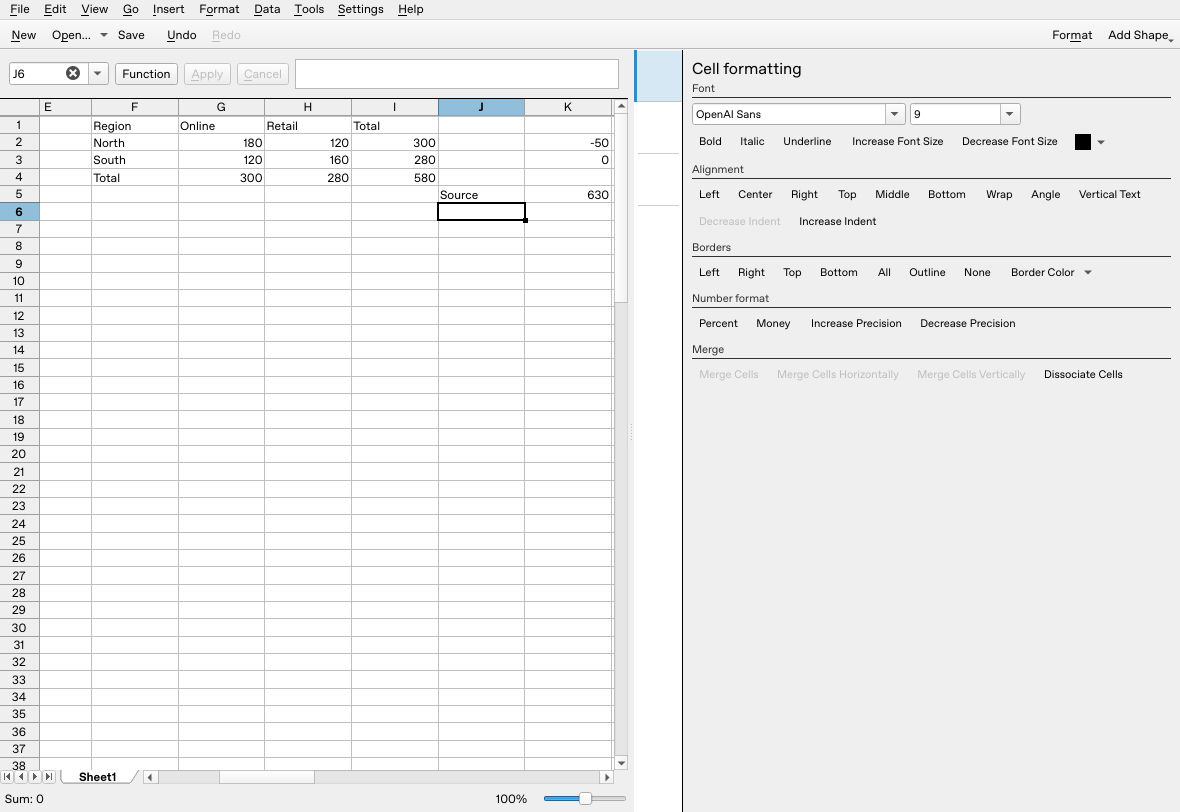
Before expanding the summary, the appended 50 is visible in the source control but missing from the fixed-range report.
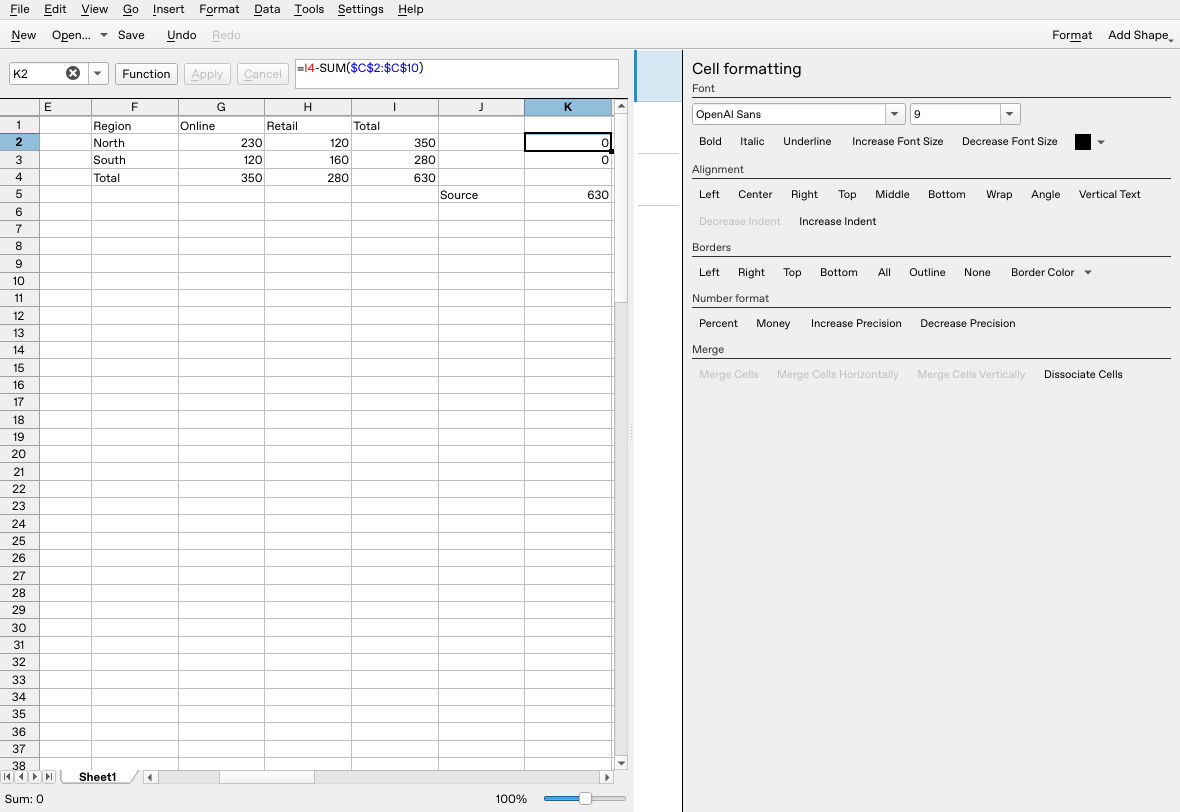
After extending the helper and both SUMIF ranges in every summary cell, the report reaches 630 and reconciles. This expanded copy was saved, but its reopening was not tested.
Save a separate ODS copy, reopen it and repeat a source-change check before using the report for real work. See SUMIF, SUM and absolute references for the components used here.
Official evidence
- v26.08.2 SUMIF definition and documented syntax and implementation.
- v26.08.2 condition parser and matching: explicit equality versus pattern modes.
- v26.08.2 formula concatenation.
- KDE older pivot handbook, compared with v26.08.2 build list and action registration. The legacy pivot workflow is not used here.