

IFERROR Function (Gnumeric)
Provide error fallbacks in Gnumeric with IFERROR while preserving successful zero, FALSE and empty-text results.
Verification status: Gnumeric 1.12.57 ssconvert bounded IFERROR fixtures, with a separate primary-example GUI capture; pinned/retained 1.12.62 source inspected separately. How formula examples are checked
IFERROR returns a value when that value is not an error, and an alternative when it is an error. It is useful for a readable status message around an expected failure. It does not fix the cause of an invalid calculation, and a broad fallback can conceal an unexpected broken reference or data problem.
Syntax and exact contract
=IFERROR(x,y)
Both arguments are required. x is the value or expression to inspect; y is the alternate value returned when x is an error. There are no omitted fallback defaults. The fallback can be a number, text, a reference or another expression.
An ordinary zero, FALSE or empty text is not an error. IFERROR preserves those successful values rather than treating them as false conditions. This is different from IF, which chooses a branch from a logical condition. The contract concerns the returned result; this guide does not promise a particular internal evaluation order for every expression or array.
Worked example
The retained formula =IFERROR(1/0,"Check value") returns Check value. The division raises an error and the text fallback is returned.
For a ratio worksheet, enter 12 in A1, 3 in B1, 8 in A2 and 0 in B2. Put =IFERROR(A1/B1,"Check denominator") in C1 and copy it to C2. C1 returns 4, while C2 returns Check denominator. The fallback is text, so it will not behave like an ordinary numeric ratio in later summaries.
| Formula | Expected result |
|---|---|
=IFERROR(0,99) |
numeric 0 |
=IFERROR(FALSE,99) |
FALSE |
=IFERROR(NA(),0) |
numeric 0 |
=IFERROR(1/0,NA()) |
#N/A |
The last example shows that a failing alternate expression is not made valid simply because it is inside IFERROR. The function returns the selected alternative, including its error.
Advanced use: separate diagnosis from presentation
For the ratio example, retain the raw numerator and denominator in their original columns. A separate status column can distinguish a zero denominator from a missing or invalid measurement, while the displayed result uses a readable message. This keeps the explanation visible instead of making every failure appear to be the same numeric zero.
If zero denominator is the only expected exception, an explicit condition on the denominator can be more informative than wrapping the entire calculation. IFERROR also catches other error types, so an accidental reference error may otherwise be hidden behind “Check denominator,” even when the denominator is not the underlying problem.
Before using a numeric fallback in a total or average, decide whether it represents a real measured zero. Replacing a missing ratio with zero changes the summary; it is not merely a cosmetic way to remove error symbols. An empty-string fallback likewise affects counting and text/numeric handling downstream.
Errors and troubleshooting
- Quote literal status text. Unquoted words can be interpreted as names rather than strings.
- A fallback does not repair a malformed formula that cannot be parsed. Check parentheses and separators first.
- Valid zero and FALSE are preserved. Use a logical test if those values need special handling.
- The alternate expression can itself return an error, as the native
NA()example demonstrates. - Broad error handling can hide structural workbook defects. Inspect the original expression before adding IFERROR to a previously working formula.
- A text fallback may make a chart or numeric aggregation omit the cell. Decide whether that omission is intended and document it.
Availability and version history
- Introduced: 1.9.0, where official NEWS records implementation of IFERROR.
- Availability: Supported in Gnumeric 1.12.62, based on the function-specific registration.
- Scope: Desktop; the fn-logical function module must be included and enabled.
- Source evidence: Retained official source reexamined October 17, 2026; fn-logical source freshly retrieved at the same pinned revision. No 1.12.62 native execution.
Related functions
Official sources
Native verification scope
On 17 October 2026, Gnumeric 1.12.57 ssconvert recalculated 7 bounded IFERROR fixtures in C.UTF-8. The article reports their actual numerical, logical, text and error outputs. The original worked examples are included in the native fixtures. Other explanatory formulas are independently checked rather than described as additional runs. These fixture records are engine evidence; the separate primary-example GUI capture below does not certify untested criteria, coercions or other versions.
Native application screenshot
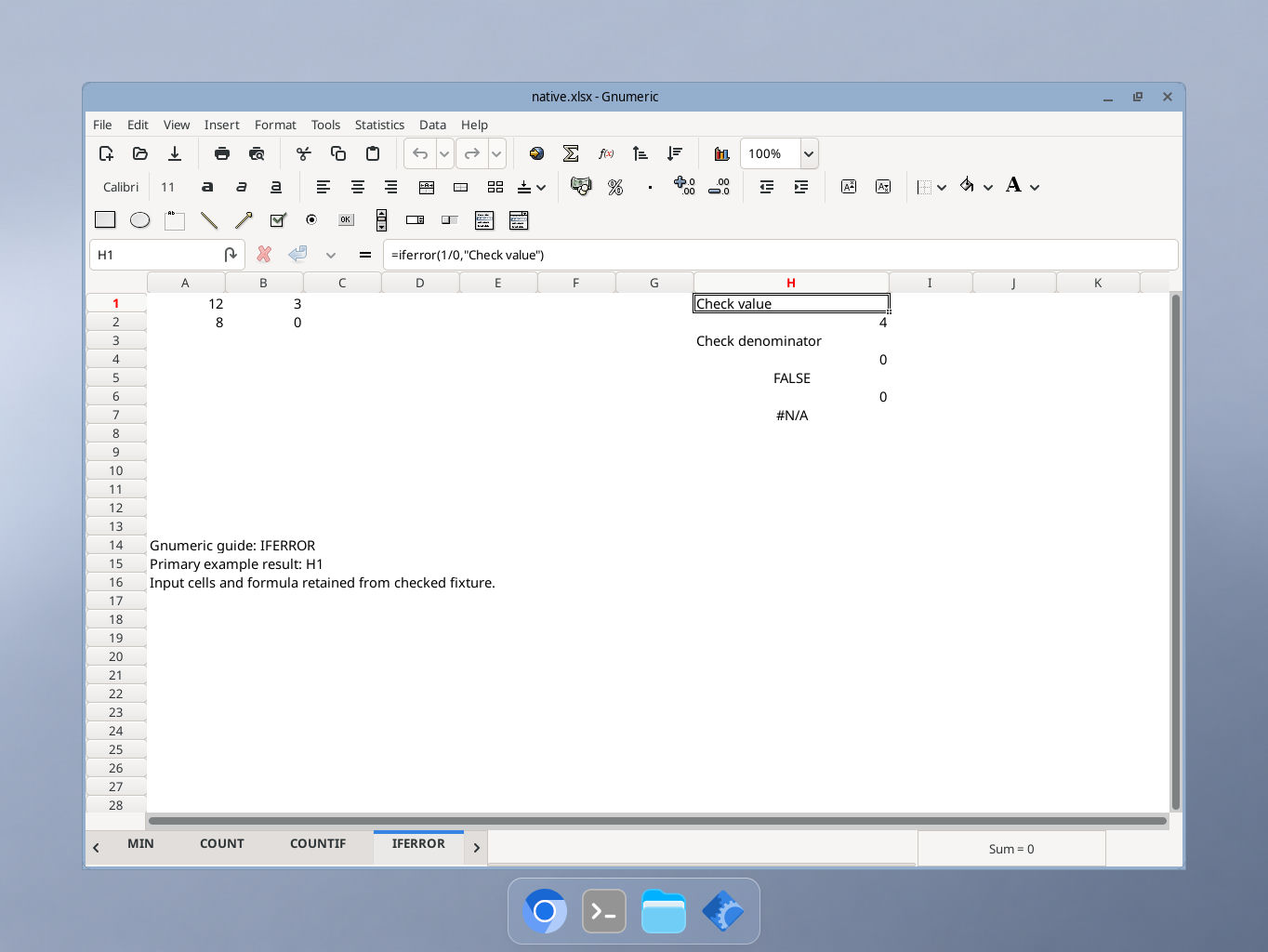
Gnumeric 1.12.57, captured 17 October 2026. The selected H1 cell shows the primary example result, with its formula in the formula bar. Other visible rows are supplemental fixture cases. General number formatting preserves floating-point tails; the GUI locale was not independently recorded.