

PRICE Function (Gnumeric)
Learn the PRICE function in Gnumeric: Returns the price per 100 currency units face value of a security that pays periodic interest.
Verification status: See the evidence and test scope described in this guide. How formula examples are checked
PRICE computes a quoted price per 100 face-value units from a coupon rate, yield, redemption amount and coupon schedule. It models periodic interest payments. The result is a price quote, not a percentage return, the amount of your holding, or a recommendation to buy a security. The examples below use synthetic cash flows solely to explain the worksheet calculation.
Syntax and arguments
=PRICE(settlement,maturity,rate,yield,redemption,frequency,[basis])
settlement and maturity are spreadsheet dates. rate is the nominal annual coupon rate; yield is the annual yield used to discount the cash flows. Enter 5% as 0.05, not 5. redemption is the repayment per 100 face-value units, normally 100 in a par-redemption example. frequency is 1, 2 or 4 for annual, semiannual or quarterly coupons. basis is optional and defaults to US 30/360 (0).
The documented day-count bases are 0 US 30/360, 1 actual/actual, 2 actual/360, 3 actual/365 and 4 European 30/360. Use an explicitly documented basis rather than assuming every numeric value accepted by a source-level validator has a portable meaning. The internal coupon convention applies end-of-month handling; changing dates around month ends can therefore change accrued-interest fractions.
A reproducible two-payment valuation
Enter =DATE(2025,1,1) in A2, =DATE(2027,1,1) in B2, 0.05 in C2, 0.06 in D2, 100 in E2, 1 in F2 and 0 in G2. Then use:
=PRICE(A2,B2,C2,D2,E2,F2,G2)
The independently expected result is 98.16660733357065. Settlement is on a coupon boundary and the two annual cash flows are 5 after one year and 105 after two years. Their present value is 5/1.06 + 105/1.06^2. There is no accrued coupon to subtract at this particular settlement date.
Change D2 to 0.05 and the expected quote is 100. This is a useful par-price control: equal coupon and yield with par redemption and whole periods give par. The two results also demonstrate why coupon rate and yield must occupy separate cells. Raising the discount yield while leaving payments unchanged reduces this example’s present value.
Advanced use: quote versus settlement amount
For a face amount of 10,000, multiplying the quote by 10,000/100 gives the clean quoted value. It does not automatically include accrued interest, transaction costs or other settlement adjustments. For an off-coupon settlement, the implementation discounts remaining payments and subtracts accrued coupon interest; do not describe the returned quote as a complete cash invoice.
A scenario table can keep settlement, maturity and coupon terms fixed while varying D2. Label each output as price per 100 and retain enough decimal places to compare scenarios before formatting to currency. Do not change the coupon frequency without also checking that it represents the actual payment schedule.
Errors and troubleshooting
The inspected 1.12.57 callback returns #VALUE! when date conversion fails, and #NUM! for an invalid basis/frequency, settlement after maturity, a negative coupon or yield, or nonpositive redemption. Equality of settlement and maturity is not rejected by that front-end comparison, so this guide does not claim every equal-date boundary has a meaningful result. Use settlement strictly before maturity for ordinary modeling.
Use DATE or real date cells instead of ambiguous date strings. A numeric serial from another workbook date system may be a valid number representing the wrong date. If the quote looks implausible, check percentage entry, redemption units and frequency before changing the mathematical model. Only the stated coupon-boundary cases are native-tested; general day-count equivalence across spreadsheet products is not established.
Verification scope and sources
On October 17, 2026, Gnumeric ssconvert 1.12.57 under C.UTF-8 recalculated the synthetic FinancialTraffic fixture. Native results were F1 = 99.99999999999999; F2 = 98.16660733357068. The earlier fixture uses the exact literal formulas described above. A separate native Gnumeric 1.12.57 screenshot below shows the primary example only. Other edge cases are source-derived unless explicitly identified as tested. No native 1.12.62 execution is claimed. Official 1.12.57 source was retrieved October 17, 2026. Original introduction and last functioning version are not established. Retained release history from the official 1.12.62 source was originally obtained October 13–14, 2026 and reviewed October 17; it is not a fresh runtime test.
Related Gnumeric guides
Native application screenshot
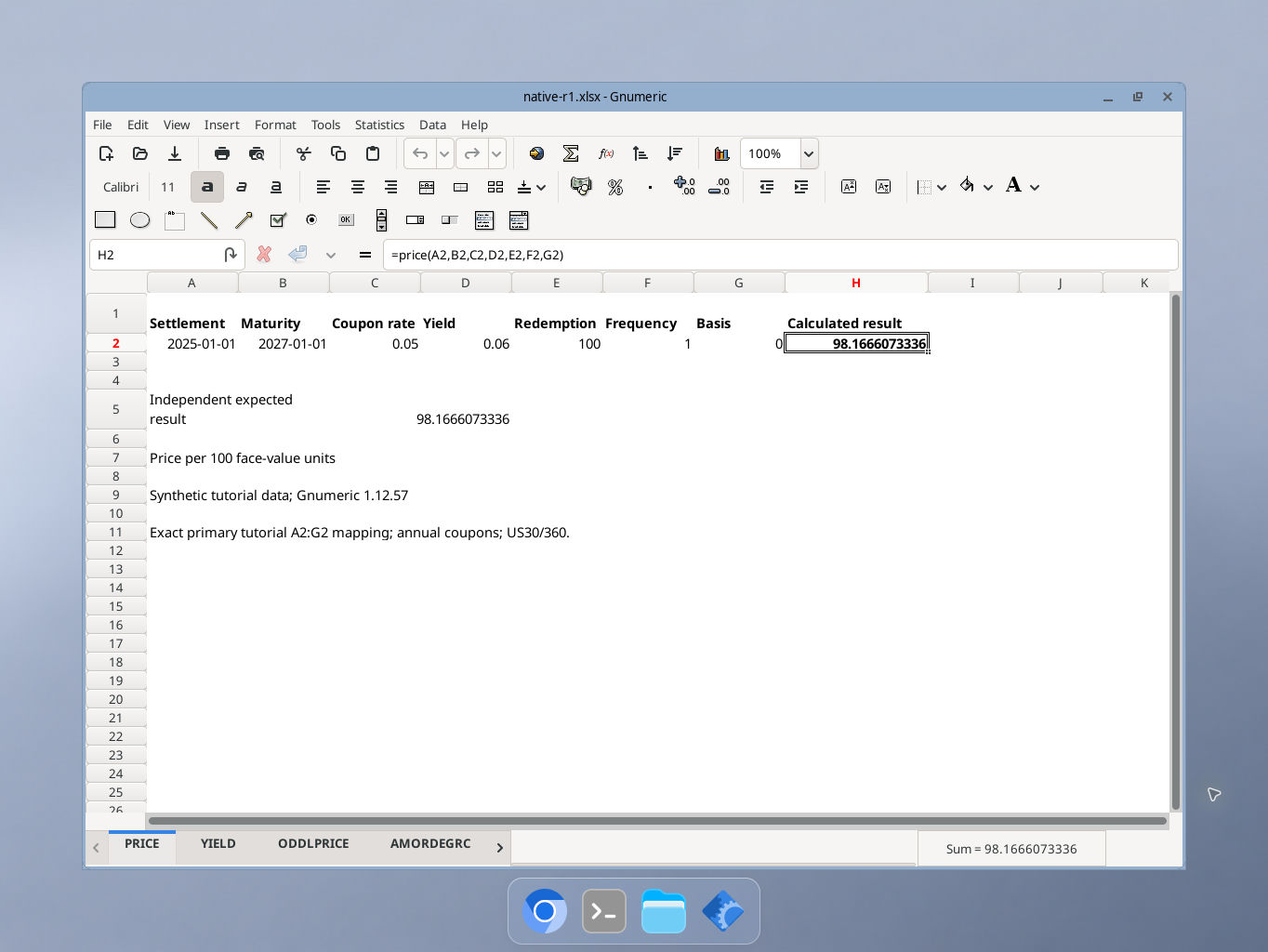
Gnumeric 1.12.57, captured October 17, 2026. Selected cell H2 shows 98.1666073336 per 100 face-value units. The formula bar and synthetic inputs are visible. GUI locale was not independently recorded; this capture covers the primary example only.