

TTEST Function (Gnumeric)
Compare means in Gnumeric with TTEST, paired, pooled or Welch designs, required tail/type choices and independently checked p-values.
Verification status: Gnumeric 1.12.57 ssconvert: specified TTEST fixtures and separately captured worked-example GUI. Gnumeric 1.12.62 source inspected separately. How formula examples are checked
TTEST returns a Student-t-based p-value for comparing two population means. Gnumeric offers paired, pooled equal-variance and Welch unequal-variance tests through the same function. Selecting the correct design matters more than obtaining a small p-value: repeated measurements on the same subjects should not be treated as independent samples.
Syntax and argument choices
=TTEST(array1,array2,tails,type)
All four arguments are required; none has an omitted-argument default.
| Argument | Meaning |
|---|---|
| array1 | First numeric sample |
| array2 | Second numeric sample |
| tails | 1 for one tail; 2 for two tails |
| type | 1 for paired observations; 2 for independent equal-variance samples; 3 for independent unequal-variance samples (Welch) |
Use the exact integer choices shown. The retained help says fractional selectors are truncated, but the retained 1.12.62 callback tests exact equality before dispatching. Do not rely on fractional inputs being accepted. These formulas use comma separators; a different locale may require different argument separators.
For type 1, corresponding positions must represent the same subject or matched unit. Ranges must have the same number of positions. Gnumeric omits nonnumeric pairs together rather than independently compacting each sample. For types 2 and 3, samples are collected separately, so unequal sample sizes are allowed. Strings, blanks and logical values do not count as observations; input errors should be corrected, not concealed.
Worked example: three designs, different questions
Enter A1:A5 as 1, 2, 3, 4, 5 and B1:B5 as 2, 4, 6, 8, 10. Enter each formula in its own cell:
| Formula | Expected two-sided p-value, approximately |
|---|---|
=TTEST(A1:A5,B1:B5,2,1) |
0.013235600 |
=TTEST(A1:A5,B1:B5,2,2) |
0.094349773 |
=TTEST(A1:A5,B1:B5,2,3) |
0.107531195 |
These expected values are independently calculated from the t distribution, not interchangeable answers to a single study. Use type 1 only when row pairs genuinely belong together. The paired differences are -1, -2, -3, -4, -5, with mean -3 and sample standard deviation √2.5. The absolute t statistic is 3√2, with 4 degrees of freedom. For independent tests, the means are 3 and 6, the sample variances are 2.5 and 10, and the absolute t statistic is 3/√2.5. The pooled test has 8 degrees of freedom; Welch’s test has approximately 5.882352941.
Advanced use: understand the one-tail result
Changing tails to 1 returns half the corresponding two-sided result for these examples. Gnumeric uses the absolute t statistic, so TTEST(A1:A5,B1:B5,1,1) and the same formula with the ranges reversed return the same small-tail probability. This argument does not encode a signed alternative such as “the first mean is larger.”
If your predeclared directional hypothesis is that the first mean is larger but the observed first mean is smaller, the relevant directional probability is the large tail, not the small value returned by blindly choosing 1. Check the sample means and the direction before interpreting a one-sided test. Do not choose the direction after seeing the data. For exploratory comparisons, a two-sided test usually avoids that particular mistake.
Errors and troubleshooting
- Paired ranges of different total sizes produce
#N/A; align the observations before changing the formula. - Invalid tails or type choices produce
#NUM!in the examined callback. Use literal 1, 2 or 3 as applicable. - Too few usable observations produce
#DIV/0!in the variance calculations. For a paired test, you need at least two usable pairs. - Constant paired differences have zero estimated standard error and produce
#DIV/0!. A constant shift does not justify reporting an invented p-value of zero. - Both independent samples being constant also leaves the ordinary test undefined. Examine sample variances before interpreting results.
- Normality assumptions concern paired differences for type 1 and the relevant populations for independent tests. A spreadsheet result does not establish independence, representative sampling or a valid experimental design.
Version and verification scope
The contract and selectors were inspected in retained Gnumeric 1.12.62 source. Official NEWS lists TTEST among the functions added in Gnumeric 0.27. No retirement or last functioning release is inferred. Independent SciPy calculations provide the expected numeric examples; native results, where available, have the separately stated version and fixture scope below.
Related functions
Official sources
Native evidence note
On 17 October 2026, Gnumeric 1.12.57 recalculated a synthetic workbook through ssconvert in the C.UTF-8 locale. The 6 recorded TTEST fixture cases matched the independently computed numerical results or the source-predicted error cases within floating-point precision. The cases covered all three two-sided tests, rejection of tails 1.9 and type 2.9 with #NUM!, and unequal-sized paired ranges returning #N/A. These records are engine tests; the separately captured worked-example screenshot is scoped below. It does not certify other versions, locales, workbook formats or untested edge cases.
Native application screenshot
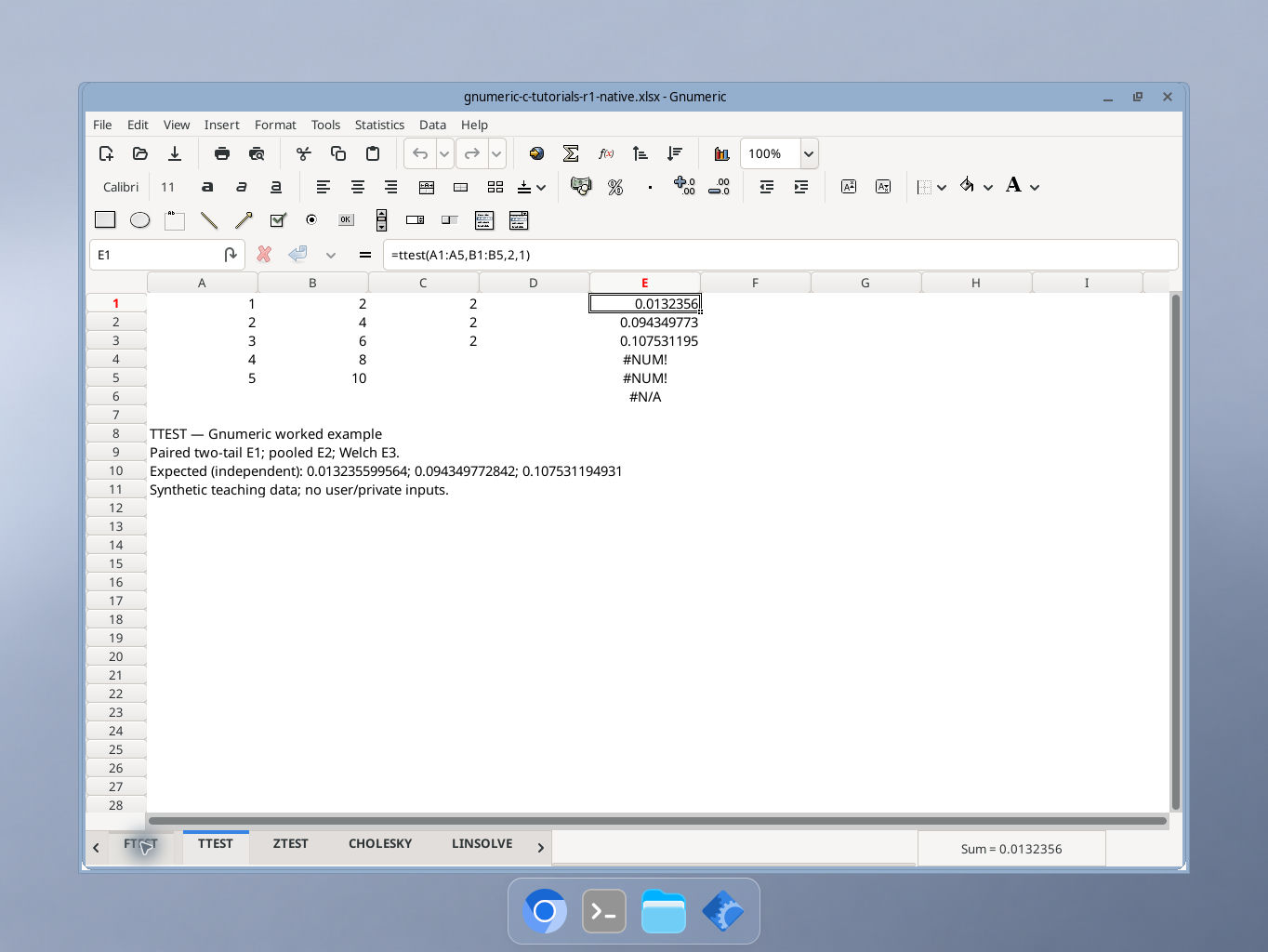
Gnumeric 1.12.57, captured 17 October 2026. Paired two-tail E1; pooled E2; Welch E3. The selected cell E1 shows the formula in the formula bar. Display precision is shorter than the independent reference values; integer cells may show a trailing decimal point. GUI locale was not independently recorded.