

WEEKNUM Function in Gnumeric: Syntax, Examples and Compatibility
Use WEEKNUM in Gnumeric. Choose the week-numbering method explicitly, especially for dates around New Year. Includes native 1.12.57 examples and version-scoped 1.12.62 source checks.
Verification status: See the evidence and test scope described in this guide. How formula examples are checked
Quick answer: Choose the week-numbering method explicitly, especially for dates around New Year.
Evidence boundary: The examples explicitly labelled native below were calculated in Gnumeric 1.12.57 on October 18, 2026. The argument explanations also cite pinned 1.12.62 source and the official manual. There was no native 1.12.62 run, and these cases do not certify every release, locale or file-import scenario.
Availability and version history
- Introduced: Documented by 1.12.62; original introduction not established.
- Availability: Supported in Gnumeric 1.12.62, based on the function-specific registration.
- Scope: Desktop; the fn-date function module must be included and enabled.
- Checked: October 18, 2026. Bounded native 1.12.57 run; pinned 1.12.62 source reviewed separately. Original introduction remains unestablished.
Syntax and methods
=WEEKNUM(date, [method])
date is a spreadsheet date value. The optional method defaults to 1, which starts weeks on Sunday and places January 1 in week 1. Method 2 starts weeks on Monday but still places January 1 in week 1. A Monday start alone does not make a week number ISO 8601.
Method 150 selects ISO numbering: weeks start on Monday, and week 1 contains the year’s first Thursday. January 1 can belong to week 52 or 53 of the previous ISO week-year.
The pinned 1.12.62 source also supports 21 as an ISO method; 17 as Sunday-start; 11 as Monday-start; and 12–16 as Tuesday-through-Saturday starts. Those calendar methods put January 1 in week 1. The captured manual names 1, 2 and 150, illustrating why release-specific source and runtime checks matter. The native method-21 result is reported below.
Worked example: ordinary Monday-based reporting
=WEEKNUM(DATE(2026,1,1),2)
=WEEKNUM(DATE(2026,1,5),2)
Native results: 1 and 2. Thursday January 1 starts inside the opening partial week; Monday January 5 begins the next Monday-based calendar week. The statement “January 1 is in week 1” applies here because method 2 was selected. It is not a rule for every WEEKNUM method.
Worked example: a New Year ISO boundary
Put =DATE(2021,1,1) in B2 and compare:
=WEEKNUM(B2,2)
=WEEKNUM(B2,150)
Native results: 1 and 53. Friday January 1, 2021 is in the first calendar week under method 2, but in ISO week 53 of ISO year 2020 under method 150. A week number is not a complete period identifier: pair ISO weeks with the ISO week-year rather than blindly appending YEAR(date).
Worked example: default versus Monday start
Put =DATE(2026,1,4) in B3. This date is a Sunday.
=WEEKNUM(B3)
=WEEKNUM(B3,2)
Native results: 2 and 1. The default Sunday-based method starts week 2 that day; the Monday-based method does not start its next week until January 5. Omitting the method is therefore a meaningful choice.
Version-specific result and troubleshooting
=WEEKNUM(B2,21) returned 53 in the native 1.12.57 run. The 1.12.62 source supports 21 as ISO numbering and predicts 53 for this date. These agree for this fixture but remain separate version-specific observations; the source statement is not a native 1.12.62 test. Both 150 and 21 produced the ISO result in the tested 1.12.57 installation. Check your installed release before migrating week-method codes.
=WEEKNUM(B3,3) returned #VALUE!. Method 3 is not a supported choice in the inspected 1.12.62 switch either. Do not assume every integer identifies a valid week system.
For a mismatch, first compare the method, then the underlying date, then the application version. Preserve the method argument during workbook migration. The fixture tests the listed ordinary dates only; it does not validate every supported source method, date serial, locale or import/export combination. ISOWEEKNUM is also worth consulting when a report always uses ISO weeks.
Native screenshot and calculation evidence
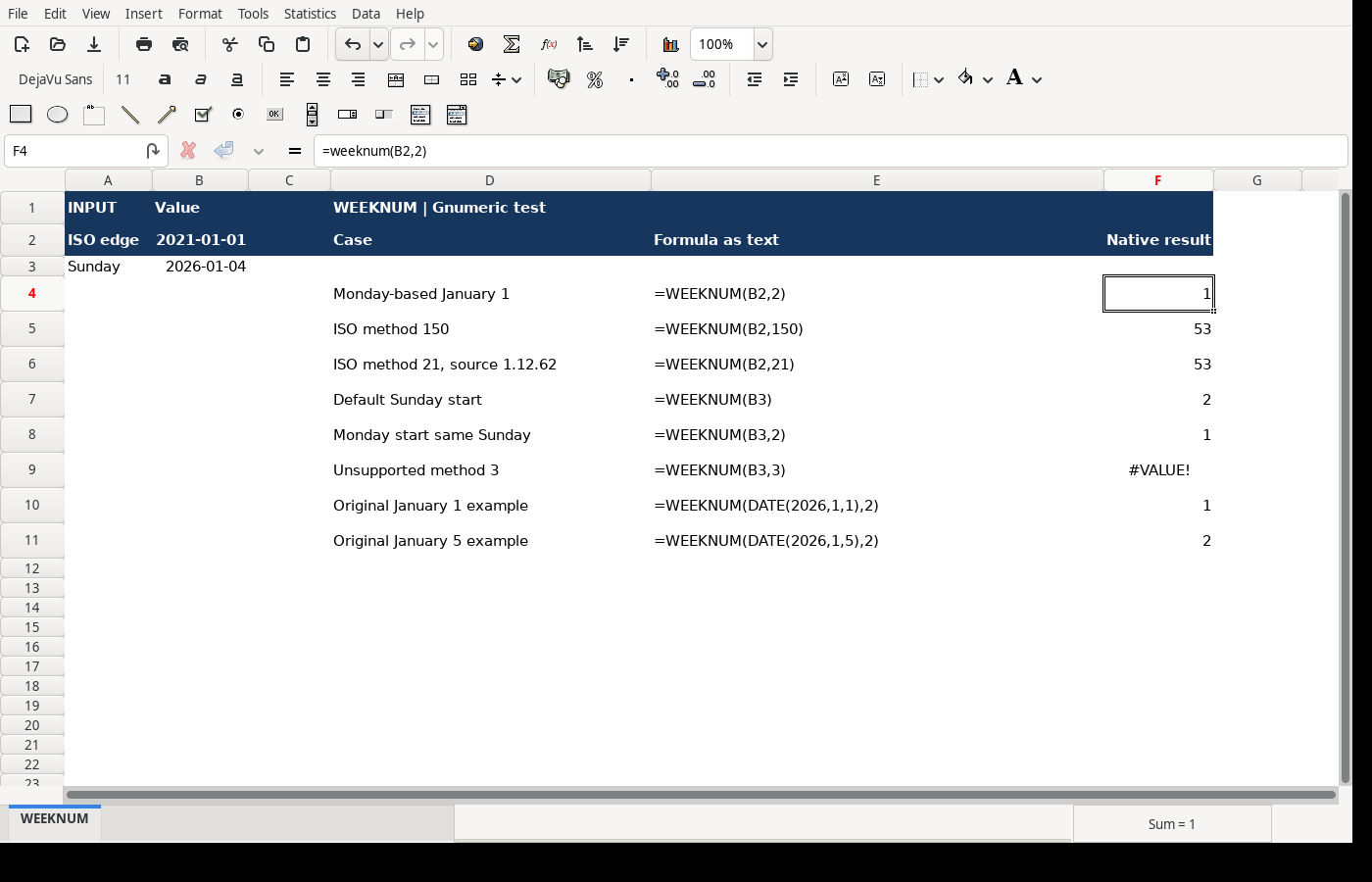
The image is an unmodified capture of the actual Gnumeric window opening the cache-free fixture. The formula-text column is a reading aid; the result column contains live formulas. The fixture was also recalculated and saved by ssconvert 1.12.57 through Gnumeric’s native workbook format, then read back as XLSX to inspect its formulas and values. The screenshot is from the GUI opening the original fixture; it is not a screenshot of a different application or a constructed illustration.
Formula examples use English function names and comma argument separators. Entry separators can vary with locale; the native run does not establish other locale conventions.
Related guides and official documentation
-
Gnumeric documentation for WEEKNUM — function syntax and current vendor information.
Editorial verification: Cache-free input formulas, native-saved formula/value readback, actual errors and raw screenshots were retained for these bounded cases. Source/manual checks and runtime results remain version-separated. See the editorial testing standards for the evidence policy.