

EXP Function in ONLYOFFICE Spreadsheet Editor: Exponential Growth and Worked Examples
Calculate e raised to a power, continuous growth and exponential factors in ONLYOFFICE, with checked outputs and domain-aware troubleshooting.
Verification status: See the evidence and test scope described in this guide. How formula examples are checked
EXP returns e raised to a power. Use it for exponential factors and continuous-growth models. A negative exponent gives a positive reciprocal: EXP(-1) is about 0.367879, not a negative number.
Availability and version history
- Introduced: The original introduction version and date are not established by the checked sources.
- Availability: Documented in the current ONLYOFFICE Spreadsheet Editor help; no final supported-version endpoint is established.
- Scope: Docs and Desktop Editors release separately. The unversioned help does not establish identical support in older builds, mobile clients or every deployment.
- Checked: October 14, 2026, against the official EXP reference and related function entries. Examples were independently calculated; these formulas have not been run in the native application.
Syntax and meaning
=EXP(number)
number is the exponent. There is no optional base or other argument. The official EXP reference defines the base as e; the decimal constant printed there is an approximation, not a value you need to type into the formula.
Use POWER for a chosen base: =EXP(2) is approximately 7.389056, while =POWER(2,2) is 4.
A complete exponent worksheet
Create a sheet named ExponentialLab, using A1:D7. Put the headers Exponent, Exponential, Recovered exponent and Difference in A1:D1. Enter the following inputs in A2:A7. In B2 enter =EXP(A2), in C2 enter =LN(B2), and in D2 enter =C2-A2. Fill B2:D2 through row 7.
| Row | A: exponent | Expected B, six decimals | Expected C |
|---|---|---|---|
| 2 | -2 | 0.135335 | -2 |
| 3 | -1 | 0.367879 | -1 |
| 4 | 0 | 1.000000 | 0 |
| 5 | 0.05 | 1.051271 | 0.05 |
| 6 | 0.5 | 1.648721 | 0.5 |
| 7 | 1 | 2.718282 | 1 |
D2:D7 have mathematical targets of zero. Tiny residuals can result from finite precision; format the cells to see more digits before interpreting them. Keep B’s underlying values unrounded when checking the inverse.
Use F1:G5 for the following additional controls, with labels in F and formulas in G:
| Cell | Formula | Expected result |
|---|---|---|
| G2 | =EXP(2) |
7.389056 |
| G3 | =EXP(0.1) |
1.105171 |
| G4 | =ROUND(EXP(1),3) |
2.718 |
| G5 | =LN(EXP(1)) |
1 |
Display formatting changes what you see. ROUND changes the numeric result used by later calculations.
Reproduce the vendor illustration
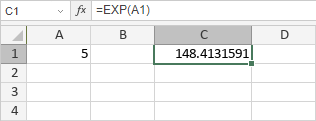
On a separate VendorEXP sheet, put 5 in A1 and =EXP(A1) in C1. The official illustration shows 148.4131591, consistent with the independently calculated exponential.
Continuous growth with explicit units
Create a separate SingleGrowth sheet using A1:F2. Enter headers Initial, Annual continuous rate, Years, Factor, Final amount and Effective annual rate in A1:F1. Set A2=1000, B2=0.06 and C2=3.
| Cell | Formula | Expected result |
|---|---|---|
| D2 | =EXP(B2*C2) |
1.1972173631 |
| E2 | =ROUND(A2*D2,2) |
1197.22 |
| F2 | =EXP(B2)-1 |
0.0618365465 |
Here 0.06 means a 6% continuously compounded annual rate, and C2 measures years. It corresponds to about 6.183655% effective growth over one year. This model assumes no intervening deposits, withdrawals or fees. If your rate is per month, use the number of months instead.
For a rate comparison, create another sheet named RateComparison using B1:E5. Label B:E Initial, Annual continuous rate, Years, Final amount. Enter 1000 in B2:B5, the rates 0, 0.02, 0.04 and 0.06 in C2:C5, and 5 in D2:D5. Enter =ROUND(B2*EXP(C2*D2),2) in E2 and fill through E5.
| Annual continuous rate | Expected amount after five years |
|---|---|
| 0 | 1000.00 |
| 0.02 | 1105.17 |
| 0.04 | 1221.40 |
| 0.06 | 1349.86 |
Recover the rate from two endpoints
On a new RecoveredRate sheet, use A1:F2 with headers Initial, Final, Years, Continuous rate, Reconstructed final and Difference. Enter 1000, 1200 and 4 in A2:C2.
- D2:
=LN(B2/A2)/C2→ approximately 0.0455803892, or 4.558039% per year. - E2:
=A2*EXP(D2*C2)→ mathematical target 1200. - F2:
=E2-B2→ mathematical target 0.
LN reverses the exponential. Both endpoint amounts must be positive and elapsed time must be greater than zero for this model.
Troubleshooting and limits
- A factor near 1 can be correct for a small exponent. Increase displayed decimals.
- Check rate units and percentage entry. An exponent using 6 is very different from one using 0.06.
- Exponential growth can exceed a spreadsheet’s representable range; very small results can also lose precision. The function page does not specify numerical cutoffs or exact error tokens.
- Use numeric inputs. Text, blank-cell coercion and localized formula entry are not established by the short reference. The examples use English names, decimal points and commas.
- Preserve the original worksheet when comparing alternatives. Each growth example above uses its own sheet so that input values do not replace earlier result formulas.