

ONLYOFFICE MODE and MODE.SNGL: Repeated Values, Ties and Comparisons
Find repeated numeric values with ONLYOFFICE MODE and its MODE.SNGL alias, inspect native tie cases and compare modes with means and medians.
Verification status: MODE and MODE.SNGL checked on four numeric datasets in ONLYOFFICE Desktop Editors Community 10.0.0.169 Linux x64; additional summaries and changed-input examples independently calculated. How formula examples are checked
MODE finds the most frequently repeated number. For 4, 2, 4, 6, 4, 8, 2, 0, the mode is 4, because it occurs three times. That is a frequency question: the average is 3.75, and the most frequent value need not account for more than half the observations.
This guide also covers MODE.SNGL, which shares MODE’s calculation in the checked ONLYOFFICE source. Use MODE.MULT when you need every equally frequent mode.
Availability and version history
- Introduced: The original introduction releases of MODE and MODE.SNGL are unknown; the checked Desktop history does not establish either date.
- Availability: Both names appear in current Spreadsheet Editor help and worked in Desktop Community 10.0.0.169 on Linux. No final supported-version endpoint is established.
- Scope: Desktop, Docs and mobile have separate releases. These desktop observations do not establish behavior on other versions or platforms.
- Checked: October 14, 2026, against both official entries, pinned source and a recalculated native workbook. The four numeric datasets below were tested; helper statistics and changed-input examples were independently calculated.
Syntax and what the result means
MODE(number1, [number2], ...)
MODE.SNGL(number1, [number2], ...)
The MODE reference and MODE.SNGL reference describe up to 255 numeric arguments, with at least the first argument supplied. A numeric range can provide the data. Optional arguments are shown in brackets; do not type those brackets.
A mode is an observed number, not its frequency. If the result is 4, that does not mean there are four matching rows. Count the matches separately with COUNTIF.
In the four tested numeric datasets, MODE and MODE.SNGL returned the same result. For ties, they selected the smallest tied value. This agrees with the pinned calculation source, which sorts numeric values before counting their runs. Do not treat a single returned value as evidence that no other mode exists.
Compare a unique mode, ties and negative values
Create ModeChecks. Reserve A1:L12. Put Unique, Tied, Reordered and Signed in A1:D1, then enter this numeric grid in A2:D9:
| Row | A | B | C | D |
|---|---|---|---|---|
| 2 | 4 | 7 | 0 | -2 |
| 3 | 2 | 3 | 3 | 4 |
| 4 | 4 | 7 | 7 | -2 |
| 5 | 6 | 3 | 0 | 4 |
| 6 | 4 | 9 | 3 | 0 |
| 7 | 8 | 0 | 7 | 8 |
| 8 | 2 | 0 | 9 | 9 |
| 9 | 0 | 5 | 5 | 10 |
Put Scenario, MODE, MODE.SNGL, Mean, Median, Selected share and Count in F1:L1. Enter the four scenario names in F2:F5. In G2:L2 enter:
G2: =MODE(A2:A9)
H2: =MODE.SNGL(A2:A9)
I2: =AVERAGE(A2:A9)
J2: =MEDIAN(A2:A9)
K2: =COUNTIF(A2:A9,G2)/COUNT(A2:A9)
L2: =COUNT(A2:A9)
For row 3, use B2:B9 in every range and G3 in its COUNTIF criterion. For row 4 use C2:C9 and G4; for row 5 use D2:D9 and G5. Enter those formulas explicitly: filling the first row downward would shift its input range instead of selecting the next input column.
| Scenario | G: MODE | H: MODE.SNGL | I: mean | J: median | K: selected share | L |
|---|---|---|---|---|---|---|
| Unique | 4 | 4 | 3.75 | 4 | 37.5% | 8 |
| Tied | 0 | 0 | 4.25 | 4 | 25% | 8 |
| Reordered | 0 | 0 | 4.25 | 4 | 25% | 8 |
| Signed | -2 | -2 | 3.875 | 4 | 25% | 8 |
Format K2:K5 as percentages. The native desktop test confirmed the eight G/H results for these exact input sequences. AVERAGE, MEDIAN and the counts provide separately calculated comparisons.
The Tied and Reordered columns contain the same multiset in different orders. Zero, 3 and 7 each occur twice. MODE selects zero, but all three are modes. Zero is a genuine measurement here; replacing it with a blank would change the dataset.
MODE.SNGL alias and version scope
The official source makes MODE.SNGL inherit MODE’s calculation; the name and formula-format marker differ. Both official entries and both names’ native results are retained here, rather than presenting the spelling change as a second statistical method.
Their original introduction dates remain separately unknown. The checked help does not label MODE as retired or establish a mandatory migration date. When transferring a workbook to another product or older version, check that exact function spelling there.
Advanced: a mode is neither a majority nor an outlier detector
Copy ModeChecks as ChangedMode. Change only A7 from 8 to 4. The independently expected first summary row is now MODE 4, MODE.SNGL 4, mean 3.25, median 4, share 50% and count 8. Four of eight observations equal the mode; that is exactly half, not a strict majority.
Make a second copy of the original ModeChecks named OutlierMode. Change only A7 from 8 to 80. Its expected mode remains 4, share 37.5% and median 4, while its mean rises to 12.75. A stable mode does not prove that the measurements are stable or free of extreme values. Keep the raw data and choose summaries that match the question.
These two changed-input worksheets are calculated examples, not additional native test cases.
Reproduce the vendor illustration
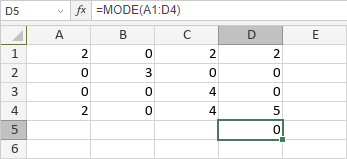
On VendorMode, enter this complete A1:D4 grid without headers inside the range:
| Row | A | B | C | D |
|---|---|---|---|---|
| 1 | 2 | 0 | 2 | 2 |
| 2 | 0 | 3 | 0 | 0 |
| 3 | 0 | 0 | 4 | 0 |
| 4 | 2 | 0 | 4 | 5 |
D5 =MODE(A1:D4) returns 0 in the vendor image. The MODE.SNGL image shows the same result for its spelling. There are eight zeros, four twos, two fours, one three and one five. Put the alternate spelling in F5 if you want both formulas visible without replacing D5.

Errors and input limits
Both help entries say a dataset with no repeated value returns #VALUE!. The pinned implementation instead uses its not_available error branch for that condition. This documentation/source discrepancy was not tested natively, so an exact no-repeat error token is not promised here.
The worked inputs are stored numbers. The checked source filters reference and array elements by numeric type, but mixed text, logical values, errors and empty cells were not part of this native test. Keep those cases separate from the demonstrated numeric contract, and do not hide a failed mode calculation by substituting zero: zero may itself be the real mode.