

SoftMaker PlanMaker field guide
PlanMaker Compatibility: Define a FreeOffice Exchange Contract
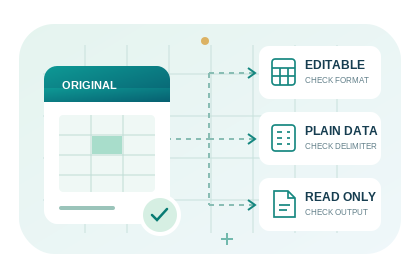
Choose an exchange format by what the recipient must do, then test the actual workbook rather than relying on its file extension.
The short answer
Agree on editable formulas, plain records or a readable report first. Keep the source master and approve an exchange only after the receiving application passes the required checks.
The free baseline is FreeOffice PlanMaker 2024 desktop. References to paid PlanMaker 2026 below explain that version only. Record your operating system and revision using versions and availability.
Editable workbook
Text identifiers
Conversion warning
Choose by the recipient’s requirement
The FreeOffice PlanMaker feature page documents opening and saving XLS/XLSX, opening OpenDocument Calc files, text import/export and PDF creation. “Open” and “save” are different promises: its OpenDocument statement alone does not establish an ODS writing workflow.
| Recipient needs | Candidate | Acceptance boundary |
|---|---|---|
| Edit an Excel workbook | XLSX, or another explicitly agreed supported format | Test formulas and dependencies in the named receiving application. Do not choose an older format just because it is familiar. |
| Transfer records | Delimited text such as CSV | Agree column order, delimiter, encoding, decimals and text identifiers. CSV is not a workbook backup. |
| Read or print a report | Check labels and page layout. It cannot satisfy a live-calculation editing requirement. | |
| Receive an ODS file | Unverified until the actual edition’s save capability is established | Opening ODS alone does not prove ODS export. Renaming an XLSX suffix does not convert it. |
Identify dependencies beyond the extension
List formulas, named ranges, external workbook references, charts, pivot reports, validation, protection and printing requirements that the actual file uses. Mark each as required, optional or removable with the owner’s agreement. This is an acceptance inventory, not a statement that every item transfers unchanged.
Treat automation as a separate requirement. Record what script or macro does, what launches it and what external files it reads. Do not infer that an Excel-format save transfers its execution environment. Unknown automation should not be enabled to test a routine handoff; an owner-approved replacement process is a separate decision.
SoftMaker’s PlanMaker 2026 Excel notes acknowledge incompatible calculation functions. That paid-version documentation is useful context for why checking matters, not certification of FreeOffice’s implementation. The existing named-range conversion exercise is explicitly 2026-scoped and should not be presented as a tested FreeOffice procedure.
An original acceptance record
Suppose the recipient needs a reorder list for IDs PART-004 and PART-009. Available quantities are 9 and 14; required quantities are 16 and 20. Expected shortages are 7 and 6, totaling 13. These are independent arithmetic targets, not PlanMaker observations.
For a static purchasing list, exact IDs and the two shortage values may be sufficient. For an editable planning model, the formulas must remain dependent on the original inputs. In a disposable receiving copy, increasing the first available quantity from 9 to 12 must reduce that shortage to 4, with total shortage 10. Compare the line results as well as the total.
Also agree what happens when stock exceeds requirement: this sample does not define whether a negative difference is allowed or should become zero. Resolving that business rule before migration prevents an apparently compatible formula from implementing the wrong policy.
Download a small identifier test
Use the existing product-codes.csv with its starter-file instructions. This original plain-text fixture has three data rows: codes 00123, 00007, 01200 and numeric stock values 4, 3, 2. Require those exact codes and a stock total of 9. There are no embedded formulas or formatting in the CSV; it is not a finished workbook template.
Check available import controls in your actual free edition before accepting the file. If identifiers cannot be preserved as text, cancel rather than repairing lost zeros by appearance. A correct total alone does not prove the identifiers survived. Download bytes and arithmetic were inspected; application import was not executed.
Approve, hold or choose another deliverable
Keep the source master, exchange candidate and external checklist separately. Have the recipient inspect and change a representative input in their actual application. Passing only a source-side reopen is insufficient. Record warnings and unresolved dependencies; use “prepared, recipient check pending” when destination access is unavailable.
For text identifiers, use the FreeOffice 2024 desktop CSV guide, which gives a documentation-qualified import route from the FreeOffice manual and keeps the paid PlanMaker 2026 reference separate. The free route has not been natively tested. For available practice inputs, consult the download catalogue. Retain the original until all required acceptance checks pass.
- Write down source edition/revision, destination application/version and required features before conversion.
- Save a separately named candidate without overwriting the master. Keep the raw CSV if using text inputs.
- In the receiver, compare identifiers, row results and totals, then change one representative input in a disposable copy.
- Inspect any required charts, named ranges, external references and print output separately. Record warnings even when a visible total matches.
- Accept only the requirements actually checked. Mark inaccessible recipient checks or unsupported save requirements held, not passed.
Independent guidance, not affiliated with PlanMaker. The guide illustrations and icons are original concept artwork, not application screenshots or official logos. Any application screenshot in the article has its own evidence note.