

BETA.INV in FreeOffice PlanMaker: Syntax and Worked Examples
Calculate beta quantiles with BETA.INV and BETAINV, rescale optional bounds, and check inverse accuracy in probability space.
Verification status: See the evidence and test scope described in this guide. How formula examples are checked
Quick answer
=BETA.INV(0.15625,2,2) has an independent expected quantile of 0.25. With bounds 10 and 14, =BETA.INV(0.15625,2,2,10,14) gives 11 mathematically. The input is a cumulative probability; the output is a coordinate on the modeled interval.
The official BETAINV page describes BETA.INV as an identical newer function. Unlike several distribution families, these two documented signatures have the same arguments.
Syntax and defaults
=BETA.INV(Probability, Alpha, Beta [, A, B])
=BETAINV(Probability, Alpha, Beta [, A, B])
The documented probability domain is greater than zero and at most one. Both shape parameters must be positive. A and B default to 0 and 1. Use A<B for a meaningful interval.
The default support is [0,1], not a normal distribution. The help’s normal-distribution wording for these bounds does not change the beta model. Alpha and Beta control the shape, while bounds change the output scale.
Step-by-step: a quantile with an exact polynomial check
Enter 0.15625 in A2 and 2 in B2 and C2. Enter =BETA.INV(A2,B2,C2) in D2. Compare =BETAINV(A2,B2,C2) in E2.
For the beta(2,2) model, the cumulative probability at t is 3t²−2t³. Substitution gives:
At t=0.25: 3×0.25²−2×0.25³ = 0.15625
At t=0.5: 3×0.5²−2×0.5³ = 0.5
Thus the 15.625th percentile is 0.25 and the median is 0.5. The inverse operates on the cumulative probability, not on the density, which is a different function.
Advanced use: a quantile in physical units
For a fictional measurement bounded between 10 and 14, use:
=BETA.INV(0.15625,2,2,10,14)
=BETAINV(0.15625,2,2,10,14)
The independent result is 10+(14−10)×0.25=11. This describes a model with 15.625% of its probability at or below 11. It is not a guarantee about the percentage in a particular finite sample.
To check a returned result q, first undo the bounds: t=(q−10)/4. Then compute 3t²−2t³ and compare with 0.15625. Applying the polynomial directly to q would check the wrong coordinate system.
Iteration tolerance and endpoints
The official help describes at most 100 iterations, with convergence measured against Probability to within approximately 3×10⁻⁷; failure is documented as #N/A. This tolerance is in probability space, not a uniform number of units in the returned quantile.
A small probability error can correspond to a larger coordinate error where the density is low. For a critical calculation, check the cumulative probability of the raw returned quantile independently, before rounding it. A successful small example does not establish accuracy for every extreme shape or tail.
Probability zero is outside the documented domain, although the mathematical lower-end quantile has a limit at A. Probability one is included in the help and corresponds mathematically to B. In the tested build, both spellings returned #NUM! at probability zero and 1 at probability one; see the native results below.
The reference does not list every malformed-input error. Validate probability, shapes and bound ordering explicitly, rather than relying on an undocumented conversion or error code.
Legacy spelling and compatibility
The BETAINV documentation explicitly calls the newer function identical. Paired examples use both names and the same bounds. That documentation does not establish every cross-version numerical detail.
The modern page cites Excel 2010 or later. It does not demonstrate export or recalculate the workbook in Excel. Keep the probability definition, shape parameters and measurement units alongside the result when sharing a model.
Native quantiles and probability residuals
Ten formulas were calculated in FreeOffice PlanMaker 2024 revision F1238.1005. Both names returned 0.50000011920929 at probability 0.5, 0.24999988079071 at probability 0.15625, and 10.9999995231628 for the latter probability on [10,14]. Independent polynomial CDF checks of the six raw quantiles had probability residuals no larger than 1.78814×10^-7, below the documented 3×10^-7 tolerance. These are small numerical approximations to the exact mathematical coordinates, even when the display rounds to 0.5, 0.25 or 11. Both spellings returned #NUM! at probability 0 and 1 at probability 1. All ten expressions and results survived PMDX save and reopen.
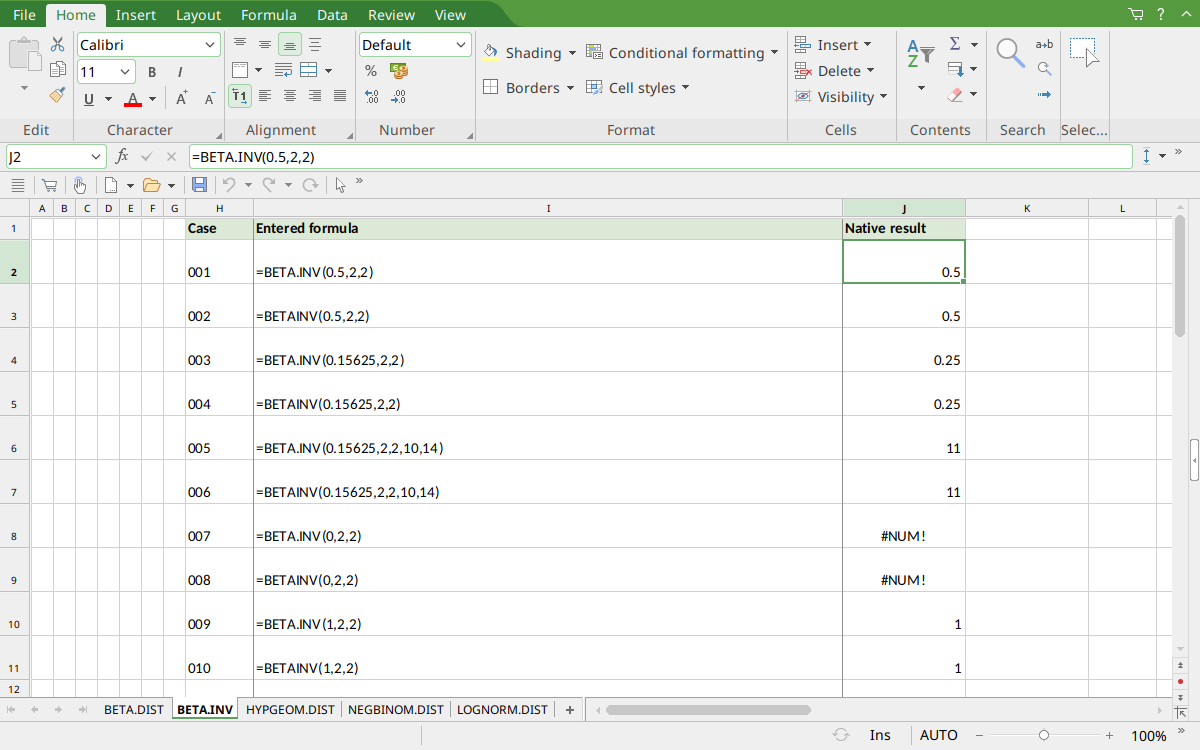
Selected J2 displays 0.5, rounded from the saved quantile 0.50000011920929. J4:J5 display 0.25, J6:J7 display 11, J8:J9 show #NUM!, and J10:J11 show 1.
Version and verification scope
The official FreeOffice PlanMaker 2024 reference was checked October 18, 2026. The installed application is FreeOffice PlanMaker 2024 revision F1238.1005. The original introduction version is not established by this evidence; the current reference does not identify the function as deprecated or retired. No availability claim for a different edition or a 2026 release is implied.
The native section identifies the exact scalar formulas calculated in revision F1238.1005 and preserved after native PMDX save and reopen. Independent mathematical expectations, extra arithmetic and observed approximations are distinguished. Cell-reference walkthroughs were not additional native cases. Excel compatibility statements are vendor guidance, not export tests. English formulas in this guide use commas; use the separators required by your formula settings.