

DSTDEV in FreeOffice PlanMaker: Syntax and Worked Examples
Estimate sample standard deviation for records matching database criteria, with an explicit n−1 calculation and singleton cautions.
Verification status: See the evidence and test scope described in this guide. How formula examples are checked
Quick answer
For the East values 2, 4 and 6 in the database below, =DSTDEV(A10:D16,"Value",D1:D2) is expected to return 2. DSTDEV estimates population variability from a selected sample, using the sample standard deviation rather than the population version.
The choice between sample and population is a modeling decision. Filtering records does not automatically make the resulting set a sample or a complete population.
Syntax and statistical meaning
=DSTDEV(DatabaseArea, Column, SearchCriteriaArea)
All arguments are required. DatabaseArea includes the field headings. Column can be a quoted heading or a one-based relative field number; here "Value" and 3 select the same numeric field. SearchCriteriaArea contains headings and conditions above the database.
For numeric sample values x, divide the sum of squared deviations from their mean by n−1, then take the square root. Standard deviation has the same unit as the original measurements. It is not a variance and not a standard error of the mean.
Build a headed database and criteria above it
Enter the following database in A10:D16, including its header row:
| Row | A: ID | B: Region | C: Value | D: Status |
|---|---|---|---|---|
| 10 | ID | Region | Value | Status |
| 11 | 1 | East | 2 | Open |
| 12 | 2 | East | 4 | Closed |
| 13 | 3 | East | 6 | Open |
| 14 | 4 | West | 8 | Open |
| 15 | 5 | West | 0 | Closed |
| 16 | 6 | South | −2 | Open |
Create these small criteria blocks above the database, leaving the blocks separate:
| Criteria range | Header cells | Condition cells | Meaning |
|---|---|---|---|
| D1:D2 | D1: Region | D2: East | East records |
| A1:B2 | A1: Region; B1: Status | A2: East; B2: Open | East AND Open |
| F1:F2 | F1: ID | F2: numeric 2 | Unique ID 2 |
| H1:H3 | H1: Region | H2: East; H3: West | East OR West |
| A5:A6 | A5: Region | A6: North | No matching record |
| C5:C6 | C5: Region | C6: South | One South record |
| E5:F6 | E5: Value; F5: Value | E6: >=0; F6: <=4 | Value between 0 and 4 inclusive |
Enter comparison criteria such as >=0 as cell content, not as a formula beginning with =. Header labels must correspond to the database fields. The repeated Value headings let two conditions apply to the same field in one criteria row.
The official database-function instructions require the criteria area to be above the database and not overlap it. Conditions on the same row combine with AND; separate criteria rows combine with OR. The database reference includes its headings; the criteria reference includes its own headings and the intended condition rows. Do not include an extra blank criteria row casually, because it changes the criteria structure.
Step-by-step: verify the sample calculation
Enter =DSTDEV(A10:D16,"Value",D1:D2). The matching values are 2, 4 and 6. Their mean is 4; deviations are −2, 0 and 2; squared deviations sum to 8. With n=3:
sample variance = 8/(3−1) = 4
sample standard deviation = sqrt(4) = 2
=DSTDEV(A10:D16,3,D1:D2) should select the same field and has the same expected result of 2.
Compare different selected samples
| Criteria range | Included values | Expected sample standard deviation |
|---|---|---|
| A1:B2, East AND Open | 2, 6 | 2.8284271247 approximately |
| H1:H3, East OR West | 2, 4, 6, 8, 0 | 3.1622776602 approximately |
| E5:F6, 0 through 4 | 2, 4, 0 | 2 |
For the two East/Open values, the mean remains 4 and squared deviations still sum to 8, but the denominator is now 1. This explains why removing the middle observation raises the sample standard deviation to √8.
For the five East/West values, the mean is 4 and squared deviations sum to 40. Dividing by 4 gives variance 10 and standard deviation √10. The zero value is a genuine observation in this calculation.
Practical interpretation and insufficient data
A filtered standard deviation describes the chosen subset. Changing Region or Status changes both the data and potentially the sample size. Report the selection rule and count alongside the result so a comparison is not mistaken for a change in the entire population.
The South criterion selects just −2. A sample standard deviation cannot be estimated with the n−1 formula when n=1. The function page does not specify the exact error token; the native check below records #DIV/0! for this singleton. The North criterion selects no records and is a separate insufficient-data case.
Do not report either case as “no variation” merely because only one value or no values are present. Zero measured variation from repeated identical observations is different from having too little data to estimate it.
Data quality and compatibility
The examples use numeric fields only. The official reference does not exhaustively define text, blank, Boolean or embedded-error treatment. Do not assume that every visible record contributes to the statistical count; validate the included numeric observations before interpreting a result.
Use DSTDEVP when the selected records constitute the entire population under study. Its denominator is n, so it generally gives a different value for the same nonconstant set. Cross-application checks should compare the selected records and sample/population convention, not just matching function names or rounded displays.
Native sample spread and insufficient-data results
The seven DSTDEV cases were calculated in FreeOffice PlanMaker 2024 revision F1238.1005. The first five results matched 2, 2, √8, √10 and 2, including the sample denominator n−1. Both the South singleton and the missing North selection returned #DIV/0!. The saved formulas and typed inputs were retained after native PMDX save and reopen. Screenshot decimals are rounded display values; the independent calculations above explain their underlying values.
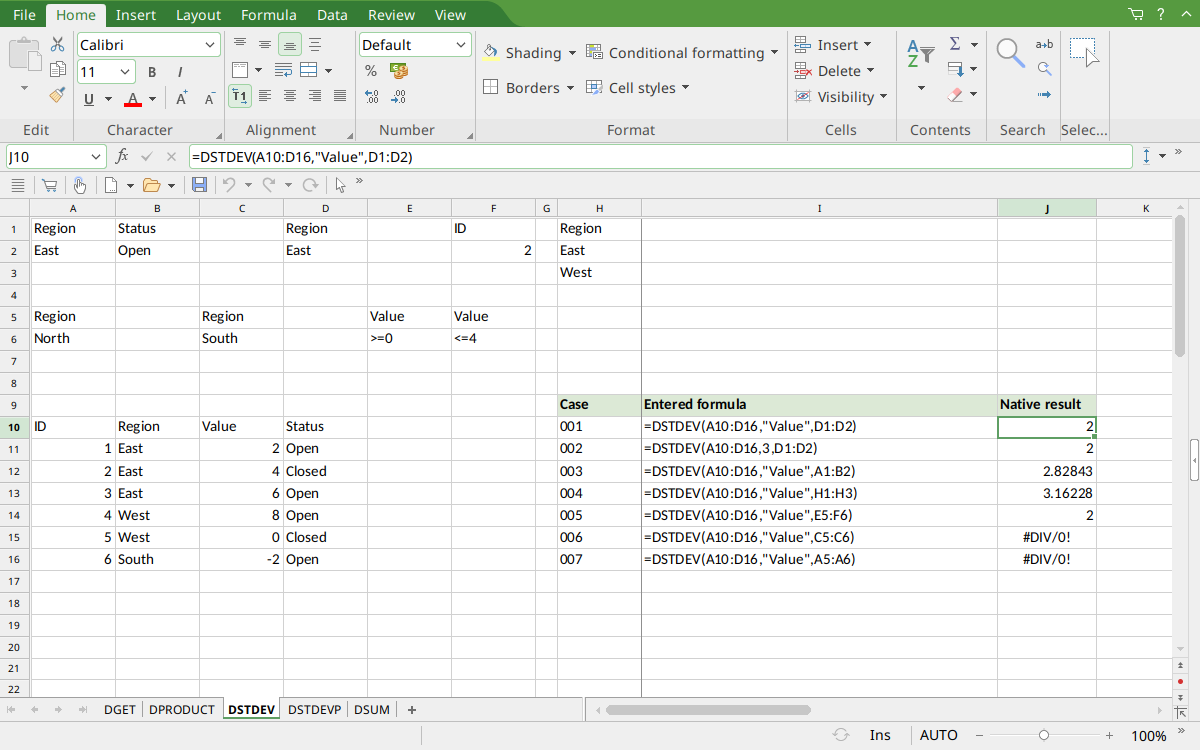
Selected J10 shows sample standard deviation 2. J12 displays 2.82843 and J13 displays 3.16228. J15 and J16 show #DIV/0! for the singleton and empty selections. The criteria remain above the database, including the East/West OR block in H1:H3; results occupy J10:J16 outside both input areas.
Version and verification scope
The official FreeOffice PlanMaker 2024 reference was checked October 18, 2026. The installed application is FreeOffice PlanMaker 2024 revision F1238.1005. The original introduction version is not established by this evidence; the current reference does not identify the function as deprecated or retired. No availability claim for a different edition or a 2026 release is implied.
The native section reports the exact tested subset and results from revision F1238.1005 after native PMDX save and reopen. Independent arithmetic is distinguished from saved observations. No Excel-export test was performed. English formulas in this guide use commas; use the separators required by your formula settings.