

PlanMaker EUROCONVERT Function: Convert legacy euro-area currency amounts
Use EUROCONVERT in FreeOffice PlanMaker 2024 with precise arguments, worked examples, independent checks and compatibility limits.
Verification status: See the evidence and test scope described in this guide. How formula examples are checked
Quick answer: =EUROCONVERT(100,"DEM","EUR") returns 51.13, converting 100 German marks using the fixed legacy conversion relationship. It is not a live foreign-exchange quotation service.
Syntax and supported codes
=EUROCONVERT(Number, From, To)
All three arguments are required: the numeric amount, source currency code, and destination currency code. Put literal codes in quotation marks. The FreeOffice 2024 reference documents a three-argument function; it does not document extra precision or triangulation-control arguments.
The documented ISO codes are EUR, ATS, BEF, DEM, EEK, ESP, FIM, FRF, GRD, IEP, ITL, LTL, LUF, LVL, MTL, NLG, PTE, SIT, and SKK. Treat this as the documented list for this edition, not an automatically updated list of euro-area membership or supported modern currencies.
PlanMaker also accepts its own abbreviations, including DM for DEM and € for EUR. Codes are documented as case-insensitive. Prefer ISO codes when exchanging formulas: the help specifically warns that Excel supports the ISO codes rather than PlanMaker’s alternative codes.
Build a reproducible conversion table
Use a blank sheet:
| Cell | Enter |
|---|---|
| A1 | Amount |
| B1 | Source |
| C1 | Target |
| D1 | Converted amount |
| A2 | 100 |
| B2 | DEM |
| C2 | EUR |
| D2 | =EUROCONVERT(A2,B2,C2) |
| A3 | 100 |
| B3 | DEM |
| C3 | ATS |
| D3 | =EUROCONVERT(A3,B3,C3) |
The official examples give 51.13 EUR in D2 and 703.55 ATS in D3. Matching literal-argument formulas returned both values in FreeOffice PlanMaker 2024 rev F1238.1005. For a separate code-equivalence check, =EUROCONVERT(100,"DM","€") also gives 51.13 in the reference.
The independent rate calculation uses 1 EUR = 1.95583 DEM and 1 EUR = 13.7603 ATS. Dividing 100 by 1.95583 gives approximately 51.1291881196 EUR, which rounds to 51.13. Carrying the intermediate precision through multiplication by 13.7603 gives approximately 703.5529672824 ATS, rounding to 703.55. These fixed factors are recorded in Eurostat’s conversion-factor reference, checked October 18, 2026.
Advanced use: avoid premature intermediate rounding
For a legacy DEM-to-ATS conversion, use one direct call with the source and target codes. If you instead take a displayed 51.13 EUR and multiply it by 13.7603, you obtain 703.5641439 ATS, which rounds to 703.56. That differs from the documented direct conversion by one cent of the target unit.
The difference comes from rounding the intermediate amount, not a changing exchange rate. The PlanMaker reference describes conversion through euros and warns that triangulation can produce a 0.01 rounding difference. Its short description does not establish every internal precision or rounding-tie rule. Preserve the original amount and source code so that a conversion can be recalculated without repeatedly converting already-rounded results.
For a multi-row historical amount table, calculate each amount in a target currency before combining amounts. Keep the currency code next to each numeric result. Do not sum source amounts with different currency units. Whether to round each line or only a total depends on the intended calculation; this guide illustrates spreadsheet mechanics, not an accounting or legal rounding policy.
Limits and error handling
- This function has no date parameter and does not fetch a contemporary exchange rate. USD, GBP, and other currencies absent from the documented table are not covered by this conversion mechanism.
- A PM abbreviation may work in PlanMaker but fail after transfer to another program. ISO codes avoid that particular incompatibility.
- Do not assume a currency adopted after the documented edition is supported. Confirm the installed edition’s own table and results.
- In the tested build,
=EUROCONVERT(100,"USD","EUR")returns#NUM!. This observation does not establish every unsupported-code or nonnumeric-input case. Check source and destination strings before treating an error as a missing rate. - Numeric formatting and calculation precision are different. Showing two decimals does not explain how intermediate values were rounded internally.
Compatibility and related functions
Use the documented three arguments in this edition. Do not paste additional arguments from another spreadsheet’s EUROCONVERT syntax without checking support. The tested build returns 100 for =EUROCONVERT(100,"EUR","EUR"), -51.13 for =EUROCONVERT(-100,"DEM","EUR"), and 51.13 for lowercase codes "dem","eur". These observations cover the listed cases, not every currency pair.
ROUND provides explicit numeric rounding when needed after conversion. SUM totals amounts already expressed in the same unit. IF can route known currency categories, but cannot supply a current market rate.
Native example
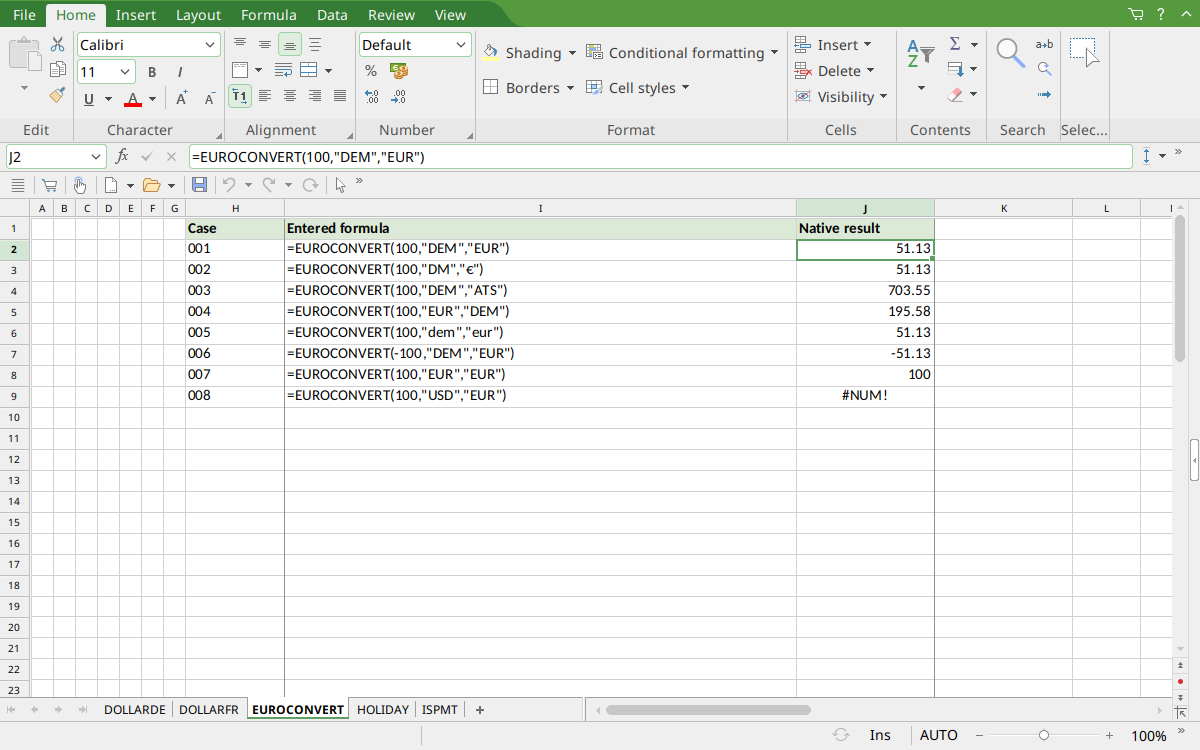
FreeOffice PlanMaker 2024 rev F1238.1005: selected cell J2 converts 100 DEM to 51.13 EUR. The other rows include the documented 703.55 ATS triangulation result and an unsupported USD-code error.
Version and evidence scope
This guide uses the official FreeOffice PlanMaker 2024 EUROCONVERT reference, checked October 18, 2026. The first release introducing the function is not established by that reference. It is documented in this edition; no retirement or deprecation is inferred. Availability in a different edition or year is not assumed.
Selected formulas were tested on October 18, 2026 in FreeOffice PlanMaker 2024 rev F1238.1005, 64-bit. The 8 listed native cases for this function were saved in native PMDX format and reopened with their formulas preserved. Independent arithmetic remains separate from those observations; the cell-reference teaching layout and advanced extensions were not each separately executed. The proprietary implementation has not been inspected. Untested inputs, other editions, and export behavior beyond the documented cautions are not inferred from these results.