

FREQUENCY in FreeOffice PlanMaker: Syntax and Worked Examples
Count observations in vertical bins with FREQUENCY, retaining the overflow entry and distinguishing array workflow from scalar component checks.
Verification status: See the evidence and test scope described in this guide. How formula examples are checked
Quick answer
FREQUENCY returns counts for intervals defined by upper limits. Three bin limits produce four result entries: the three bounded intervals plus an overflow count above the highest limit.
For limits 10,15,42, the intervals are ≤10, greater than 10 through 15, greater than 15 through 42, and greater than 42. Each upper endpoint belongs to its own bin, not the following bin.
Syntax and result shape
=FREQUENCY(Values, Bins)
Both arguments must be vertical ranges or arrays with no more than one column. The official help says blank cells and text strings in Values are ignored. Numeric zero is a number and participates in the counts.
The output is vertical and has one more row than Bins. Allocate that extra row even when the overflow count is zero. Omitting it can conceal observations outside the chosen reporting limits.
Worked example: boundaries, zero and ignored entries
Enter the following in A2:A11: 1,10,10,11,15,16,42,43,0, then the text note. Leave A12 empty. Enter 10,15,42 in C2:C4.
Independent counting gives:
| Output row | Interval | Included numbers | Count |
|---|---|---|---|
| 1 | x≤10 | 1,10,10,0 | 4 |
| 2 | 10<x≤15 | 11,15 | 2 |
| 3 | 15<x≤42 | 16,42 | 2 |
| 4 | x>42 | 43 | 1 |
The counts sum to nine numeric observations. Text note and the genuinely blank cell are excluded; zero is retained. This is a frequency count, not a sum of the values or a relative-frequency percentage.
For a full output, the official array workflow instructs selecting the destination range, entering the array expression and confirming with Ctrl+Shift+Enter. Here a four-row, one-column destination is needed for =FREQUENCY(A2:A12,C2:C4).
Inspect individual components
The bounded native checks use expressions such as:
=INDEX(FREQUENCY(A2:A12,C2:C4),1,1)
=INDEX(FREQUENCY(A2:A12,C2:C4),4,1)
The independent expected values are 4 and 1. These scalar readbacks inspect components of the computed array. They do not demonstrate selecting a multi-cell output region, entering an array with Ctrl+Shift+Enter, or automatic spilling. The documented workflow and the actual test scope are distinct.
Advanced use: change reporting limits without losing overflow
If Bins is reduced to C2:C3, the result has three entries: 4,2,3. The last count now includes 16,42,43 because all exceed 15. It is not merely the former last entry copied into a smaller report.
To show relative frequencies for the original four bins, divide the counts by nine, giving approximately 44.444%,22.222%,22.222%,11.111%. Those percentages are independent arithmetic derived from counts, not additional native FREQUENCY tests. Use a numeric-observation denominator rather than the physical size of a range containing blanks or labels.
Input and interpretation safeguards
Use intentionally ordered bin limits and label the intervals explicitly. The documented vertical-range requirement should not be generalized into a promise that horizontal inputs are accepted. The help does not specify all behaviors for unsorted or repeated bin limits, errors among Values, or nonnumeric bin entries.
A histogram depends on the selected boundaries. Changing the limits can change the appearance of a distribution without changing the data. Retain the underlying observations and report the limits alongside the counts.
Compatibility and verification scope
The reference requires array entry for the full result. Do not assume a dynamic-spill workflow from another spreadsheet applies. The native checks below are deliberately limited to scalar component readbacks and saved values; a multi-cell array-entry operation is not claimed.
Native scalar frequency readbacks
Seven scalar INDEX formulas were calculated in FreeOffice PlanMaker 2024 revision F1238.1005. The three-bin result components were 4,2,2,1; the two-bin components were 4,2,3. Numeric zero was counted, text note was ignored and A12 remained genuinely blank. All seven expressions and thirteen stored input cells survived native PMDX save and reopen. These are separate scalar component checks, not a demonstration of native multi-cell array entry or spill behavior. Relative percentages above are independent additional arithmetic.
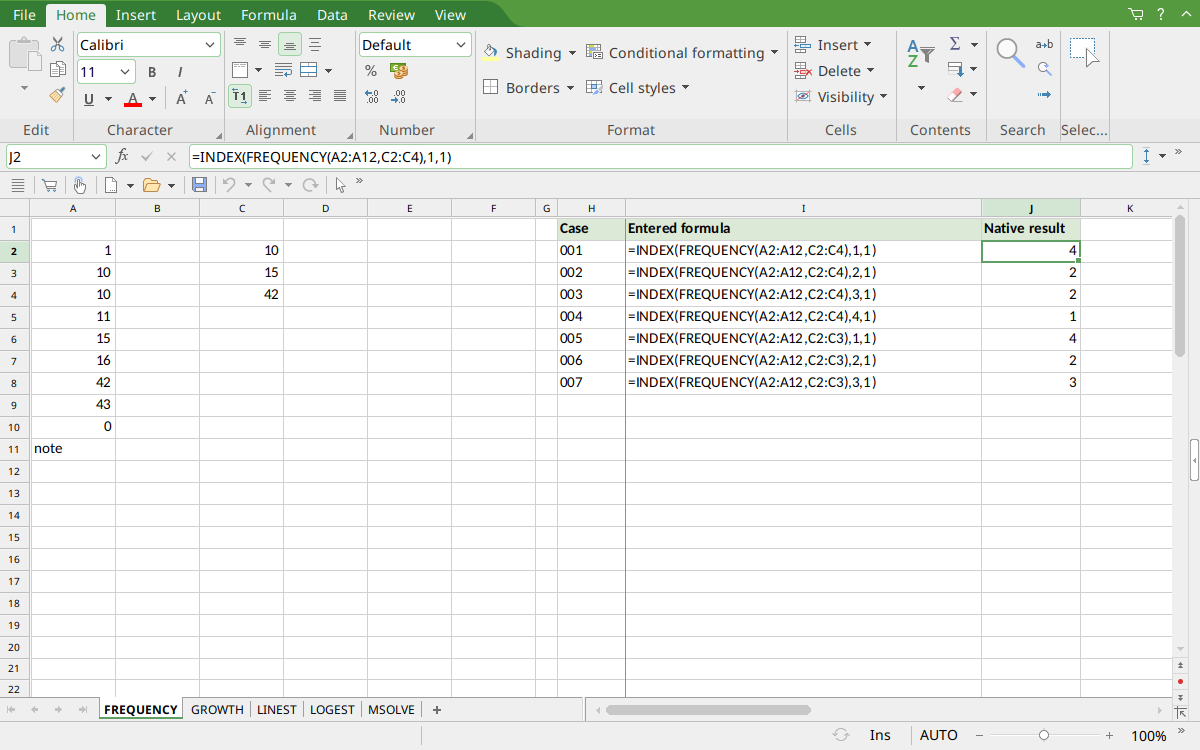
Selected J2 displays the first component 4. J2:J5 contain the four separate three-bin readbacks; J6:J8 contain the three two-bin readbacks. They are individual INDEX formulas, not one entered output array.
Version and verification scope
The official FreeOffice PlanMaker 2024 reference was checked October 18, 2026. The installed application is FreeOffice PlanMaker 2024 revision F1238.1005. The original introduction version is not established by this evidence; the current reference does not identify the function as deprecated or retired. No availability claim for a different edition or a 2026 release is implied.
The native section records scalar INDEX component readbacks or residual expressions calculated in revision F1238.1005 and preserved after PMDX save and reopen. It does not demonstrate multi-cell native array entry or automatic spilling. Official array workflow instructions are documentation-derived. Independent additional arithmetic and untested cases are identified separately. English formulas in this guide use commas; use the separators required by your formula settings.