

LASTPRINTED in FreeOffice PlanMaker: Syntax and Worked Examples
Read a document’s last-print date with LASTPRINTED, distinguish print metadata from export or save events, and preserve native formulas.
Verification status: See the evidence and test scope described in this guide. How formula examples are checked
Quick answer
=LASTPRINTED() returns the date when the current document was last printed, according to the official PlanMaker reference. It takes no arguments.
Important observed limitation: in revision F1238.1005, opening the print dialog already changed the live result before a job was submitted. A LASTPRINTED timestamp alone therefore does not prove successful printing.
The result belongs to the document’s print history. It is not documented as the current date, last-save date, file modification time or evidence that a physical page reached a recipient.
Syntax and presentation
=LASTPRINTED()
Keep the parentheses even though there are no arguments. Apply a suitable date display if the returned value needs formatting. The short reference does not specify time-of-day precision, time zone, the never-printed result, or which print/export routes update the metadata.
For those details, distinguish an observed value in a particular document and runtime from a general promise.
Practical example: a document-history label
Place the text “Document last printed” beside a cell containing =LASTPRINTED(). When an actual print event has been established, the label can help a reader interpret the returned document metadata.
A useful check compares the value before and after a controlled local print-to-file operation, with actual event times recorded independently. That comparison must use a print operation; merely saving a workbook or exporting a PDF does not, by itself, establish that the last-print field was updated.
In the native example below, the initial never-printed state returned #N/A. A later local print-to-file operation produced an actual output file, independently establishing that bounded print result. The earlier dialog-opening timestamp remains a separate observation.
Advanced use: distinguish a live formula from an archive label
A live formula can reflect document metadata when evaluated; a fixed label records only whatever was captured at a particular point. Decide which behavior the document needs, and describe it accurately to readers.
Neither form establishes delivery, page completeness or a recipient’s actions. A print-history date is not a substitute for an audit trail that records the document version, output destination and actual delivery confirmation.
The reference does not establish whether changing or recalculating the workbook alone updates the value. Avoid describing it as volatile or as an automatically refreshed clock without separate evidence. Likewise, a displayed date cannot reveal more time precision than the stored value and formatting provide.
Excel compatibility
The official help states that LASTPRINTED is unavailable in Excel and that saving an Excel-format document replaces calculations using it with their current fixed results. Preserve a native PMDX copy when retaining the live function matters.
That is a vendor compatibility warning, not an Excel-export test performed for this guide. A fixed exported date might still be useful as a historical label, but it should not be presented as a working LASTPRINTED formula in the receiving program.
Limits of the reference
The available page establishes the no-argument contract and its last-print meaning. It does not enumerate error values, initialization rules, printer-driver behavior or differences between local print-to-file and PDF export. The native evidence below is restricted to the exact local print-to-file operation and the separately observed dialog-opening behavior.
Native print-state observations
In FreeOffice PlanMaker 2024 revision F1238.1005, the saved never-printed document returned #N/A. Merely opening the native print dialog then changed the live result to 2026-10-18 02:59:11 in the test machine’s America/Toronto time zone, before a job was submitted.
A subsequent native Print to file operation was limited to page 1, one copy, and a generic local destination. It produced a one-page PDF file. This used the print dialog, not a PDF-export command. After that operation, LASTPRINTED displayed 2026-10-18 03:00:14 EDT. The saved numeric value was 46313.125162037, and the document’s lastPrinted property recorded 2026-10-18T07:00:14Z, the same instant in UTC.
The actual output file separately confirms this local print result. The earlier dialog-open update shows why the formula’s timestamp alone cannot establish successful completion. These observations do not establish every printer driver’s behavior or a guarantee that opening, canceling or completing another print route behaves identically.
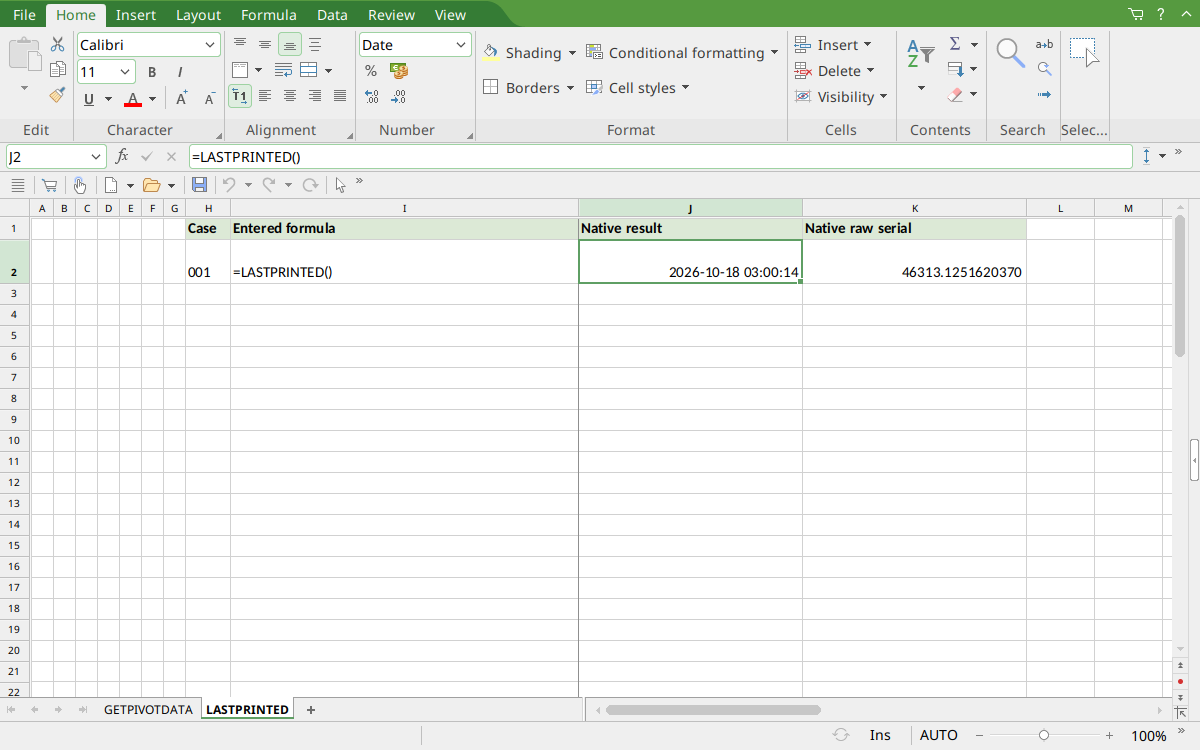
Selected J2 displays the reopened after-print timestamp 2026-10-18 03:00:14. K2 displays the same date/time value in numeric-serial form. The worksheet label 001 identifies the original formula row; this capture shows that same row after the local print event, not the earlier never-printed state.
Version and verification scope
The official FreeOffice PlanMaker 2024 reference was checked October 18, 2026. The installed application is FreeOffice PlanMaker 2024 revision F1238.1005. The original introduction version is not established by this evidence; the current reference does not identify the function as deprecated or retired. No availability claim for a different edition or a 2026 release is implied.
The native result was preserved after PMDX save and reopen. The observed print-dialog behavior, actual local output file and saved timestamp are distinct evidence. No physical or network printing, PDF-export command or Excel-export test was performed. The recorded times use the test machine’s America/Toronto zone, not a universal display-zone guarantee.