

PlanMaker LASTSAVED Function: Show the document save-related date
Use LASTSAVED in FreeOffice PlanMaker 2024 with reproducible examples, precise document or reference semantics and compatibility limits.
Verification status: See the evidence and test scope described in this guide. How formula examples are checked
Quick answer: =LASTSAVED() returns the date on which the current document was last saved according to PlanMaker’s document context. It is not a substitute for the current clock or a filesystem modification-time query.
Syntax and scope
=LASTSAVED()
No arguments are required. The official reference describes the document’s last-save date but does not spell out all recalculation timing, unsaved-document behavior, timezone handling, or sub-day precision. Those details need observation in a specific build rather than assumptions based on the function name.
A cell displaying a save date is not proof that every visible edit has been saved. Edits can occur after a save, and a formula cache can be recalculated at a different point in the save/reopen sequence. Keep the application’s modified-document indicator and actual save operation separate from the value displayed in this cell.
A reproducible save observation
Use a disposable, generically named PMDX document:
- Enter
=LASTSAVED()in B2 and apply a date-and-time number format. - Enter
=INT(LASTSAVED())in B3 and=MOD(LASTSAVED(),1)in B4 with ordinary numeric formatting. - Enter
=YEAR(LASTSAVED()),=MONTH(LASTSAVED())and=DAY(LASTSAVED())in B5:B7. - Record the actual local and UTC clock bounds around a save. Recalculate as appropriate, close the document, reopen it, and observe the formula and value again.
- Record the order of save, recalculation and reopen rather than assigning an invented exact save instant to the cell.
These helper formulas split a serial into whole-day and fractional-day parts and expose its calendar components. They do not independently verify which save event the underlying metadata represents. If only a date is displayed, time-of-day information may be hidden by formatting; conversely, displaying hours and minutes does not prove the application updates them with second-level precision.
No fixed date is an expected answer for every reader. The useful result is a documented relationship between the actual document state, the saved formula cache and its visible formatting.
Practical use: label a printed or exported snapshot
A report footer can show a field labelled “Document last saved” beside FILENAME. Keep this label different from “Data refreshed,” “Report approved” or “Published”: none of those events is established merely by saving a workbook.
A separate CREATEDATE cell can identify recorded document creation. Subtracting the two date serials, if their date systems and context are consistent, yields elapsed calendar days between those metadata values. It does not measure editing time, working hours, time spent analysing data, or how current the underlying source data are.
For reproducible reporting, retain the document version and the save/reopen observation sequence. A screenshot of LASTSAVED alone cannot prove that the screenshot corresponds to the latest disk state or to a particular externally delivered copy.
Metadata versus filesystem timestamps
The operating system’s modification timestamp can change when a file is copied, replaced or transferred. A document’s internal save property and a cached LASTSAVED result can have their own lifecycle. Comparing them is useful diagnostic evidence, but they should not be labelled as the same field without verification.
The short documentation does not promise that a copy, Save As, imported document, or different timezone will update every related field identically. An unexpected old value should prompt a check of the actual active document, recalculation and save order. It is not enough to change the number format, because formatting cannot refresh a cached value.
The native example below shows why the distinction matters: the reopened live LASTSAVED display differs from the formula cache stored in the PMDX and from the document’s core modified property. Do not report any one of these fields as though all three were the same timestamp.
Compatibility and preservation
SoftMaker explicitly says LASTSAVED does not exist in Microsoft Excel. Saving a document in Excel format replaces calculations using this function with their current results as fixed values. The snapshot may continue to display a date after export even though it no longer recalculates from document context.
Preserve the PMDX original when a live field is required. Inspect formulas after conversion rather than inferring successful preservation from an unchanged display. The official page supplies no introduction release or retirement announcement; current support is documented for FreeOffice PlanMaker 2024.
Native example and observed limits
The real demonstration document was saved, edited in formatting, saved again, explicitly recalculated and saved once more. It was closed and reopened at approximately 06:27:09 UTC on October 18, 2026. In the recorded EDT environment (UTC−04:00), the live formula then displayed 2026-10-18 02:27:00, with numeric companion 46313.1020833333.
The following values were genuinely different:
| Observed field | Recorded value |
|---|---|
| Reopened live LASTSAVED display | 2026-10-18 02:27:00 EDT |
| Formula cache stored in the saved PMDX | Serial 46313.1017939815, corresponding to 02:26:35 EDT |
| Core document modified property | 2026-10-18 06:26:34 UTC |
| Actual file modification timestamp after the last save | 2026-10-18 06:27:00 UTC |
In this sequence, the reopened live result corresponded to the actual file’s later save-time timestamp, while the stored formula cache represented an earlier save. This correspondence is an observation, not proof of a universal filesystem-based implementation. The core modified property also did not match the live value.
The screenshot was taken after that genuine reopen. The document was then closed without another save, preserving the earlier on-disk cache. Consequently the screenshot’s live 02:27:00 and the saved cache’s 02:26:35 must not be described as an identical round-trip result. For a report that relies on a precise save time, inspect the actual live value after reopening and state which field you are reporting.
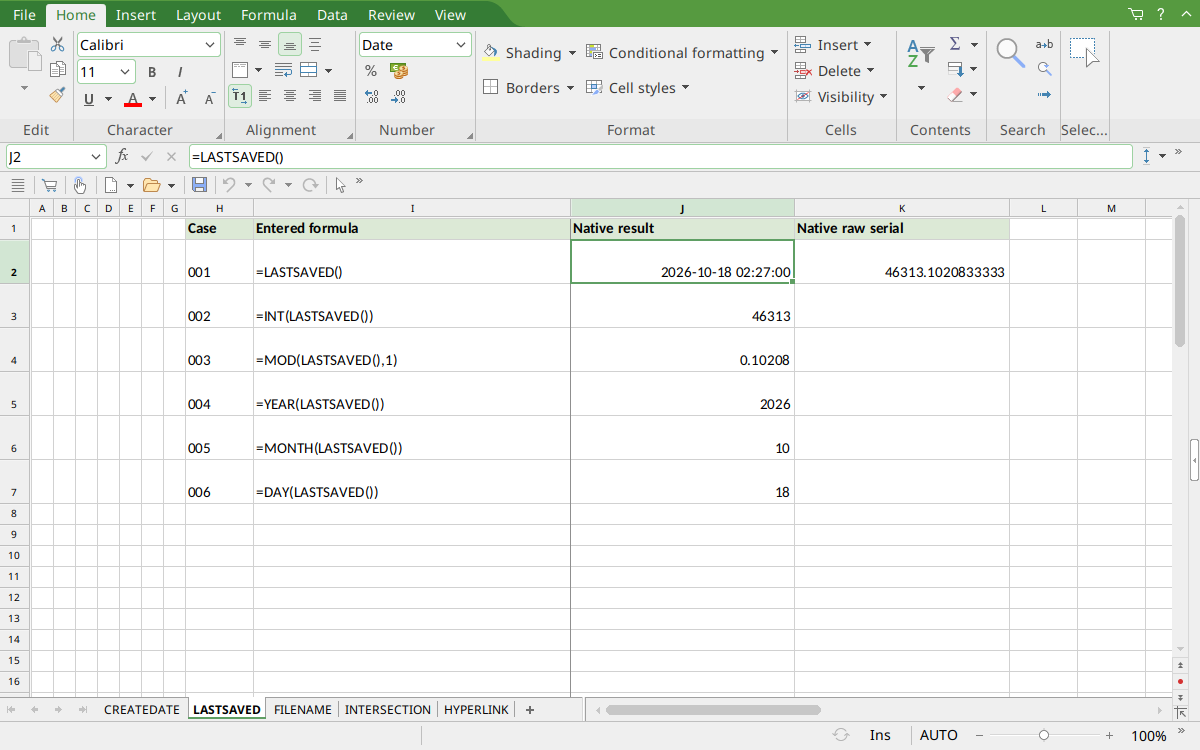
FreeOffice PlanMaker 2024 rev F1238.1005: selected J2 contains =LASTSAVED() and displays 2026-10-18 02:27:00. This is the reopened live value, not the earlier formula cache stored in the PMDX; K2 displays the live serial 46313.1020833333.
Version and evidence scope
Official FreeOffice PlanMaker 2024 reference, checked October 18, 2026. The first introduction release is not established by this reference, and current documentation does not imply retirement or identical behavior in every edition.
The selected formulas were tested on October 18, 2026 in FreeOffice PlanMaker 2024 rev F1238.1005, 64-bit. The generic PMDX document was genuinely saved, closed and reopened at its original local path, then captured and closed without saving again. Its formulas were preserved in the saved document. Teaching layouts and additional practical expressions are distinct from the selected native controls. Proprietary implementation code has not been inspected. The live reopened value and the earlier stored formula cache are explicitly distinguished above; they were not identical.