

PlanMaker CREATEDATE Function: Display the current document creation date and time
Use CREATEDATE in FreeOffice PlanMaker 2024 with reproducible examples, precise document or reference semantics and compatibility limits.
Verification status: See the evidence and test scope described in this guide. How formula examples are checked
Quick answer: =CREATEDATE() returns the current document’s creation date and time. Its result depends on the document you are using, so there is no single timestamp that every reader should reproduce.
Syntax and what the date belongs to
=CREATEDATE()
No arguments are supplied. The official FreeOffice PlanMaker 2024 reference describes document creation metadata, not the current clock. Opening an older document today does not make its documented creation date today.
Keep document metadata distinct from filesystem timestamps. Copying a file can change its operating-system creation or modification timestamps without necessarily changing the creation property stored inside the document. An imported workbook may already carry a creation property. Neither a copied file’s location nor its filesystem modification time independently proves when the underlying document was first authored.
This function is useful for showing a document’s own recorded origin on a cover sheet. It is not a tamper-proof audit timestamp, proof of authorship, or a legal record of when work began.
Reproduce the display in your own document
- Open a generic demonstration document and save it in PlanMaker’s PMDX format.
- Enter
=CREATEDATE()in B2. - Apply a date-and-time number format through the Home tab’s Number controls. Include both the date and time so a hidden time component is not mistaken for midnight.
- Enter
=INT(CREATEDATE())in B3 and=MOD(CREATEDATE(),1)in B4. Format these two cells as ordinary numbers. - Enter
=YEAR(CREATEDATE()),=MONTH(CREATEDATE())and=DAY(CREATEDATE())in B5:B7.
The returned year, month and day should agree with the displayed calendar date for that document. The INT and MOD expressions separate the whole-day serial from the fractional-day component. They do not create an independent clock measurement. Retain the full raw number when comparing it with a date-and-time display.
The help expressly permits selecting a format that displays the date only, time only, or both. A date-only display hides the time; it does not establish that the underlying value has no time component. Regional formats can also reorder day and month, so an unambiguous year-month-day display is helpful when sharing a screenshot.
Practical use: a document information panel
Place labels such as “Document created,” “Last saved” and “File name” beside separate formula cells. Use CREATEDATE for the recorded creation value, LASTSAVED for the save-related value, and FILENAME for the document’s current name.
Do not silently relabel CREATEDATE as “report period.” The period covered by a report is usually a user-controlled input and can differ from the date the workbook was created. Likewise, copying a template for a new report does not justify assuming that the copied document’s creation metadata was reset. Inspect the actual returned value.
For a conditional consistency check, a separate sheet can compare creation and save-related serials, but a surprising order should trigger investigation of import properties, clocks, timezone and save/recalculation timing. It should not automatically be interpreted as fraud or corruption.
Timezone, precision and limitations
The short reference does not define a universal UTC conversion rule, metadata migration behavior, or every unsaved-document case. A displayed local date/time must be identified with the application environment in which it was observed. A numeric serial by itself does not contain a visible timezone label.
The native example below uses a real generic document imported with an existing creation property. Its creation value remains that imported document metadata; it is not reset to the start of the editing session. The recorded local timezone was America/Toronto, EDT (UTC−04:00). This observation does not establish a universal timezone rule for every environment.
PMDX and Excel export
The official reference says CREATEDATE does not exist in Microsoft Excel. Saving to Excel format replaces calculations using it with their current results as fixed values. A displayed timestamp in the exported file can therefore look correct while no longer being a live CREATEDATE formula.
Keep a PMDX working copy if the formula must remain active. Reopening an Excel export and observing the same date is not evidence that the context function survived. Inspect the formula, not only the display, and treat a deliberately exported fixed timestamp as a snapshot.
Native example and observed limits
The demonstration document carried creation metadata 2026-10-18 06:23:55 UTC before it was imported into PlanMaker. In the EDT environment, =CREATEDATE() displayed 2026-10-18 02:23:55. The numeric companion displayed 46313.0999421296; its whole-day component was 46313 and its calendar components were year 2026, month 10 and day 18.
The document was opened in the native application after 06:25:32 UTC, saved as PMDX, subsequently saved again, and reopened at approximately 06:27:09 UTC. The creation result remained the earlier imported metadata value. Thus this example does not claim that CREATEDATE measures the time of opening, copying or starting the current editing session.
The screenshot shows the date/time and numeric serial side by side. Converting the UTC creation property to EDT subtracts four hours in this observation; formatting alone does not explain or authorize a universal timezone conversion for other workbooks.
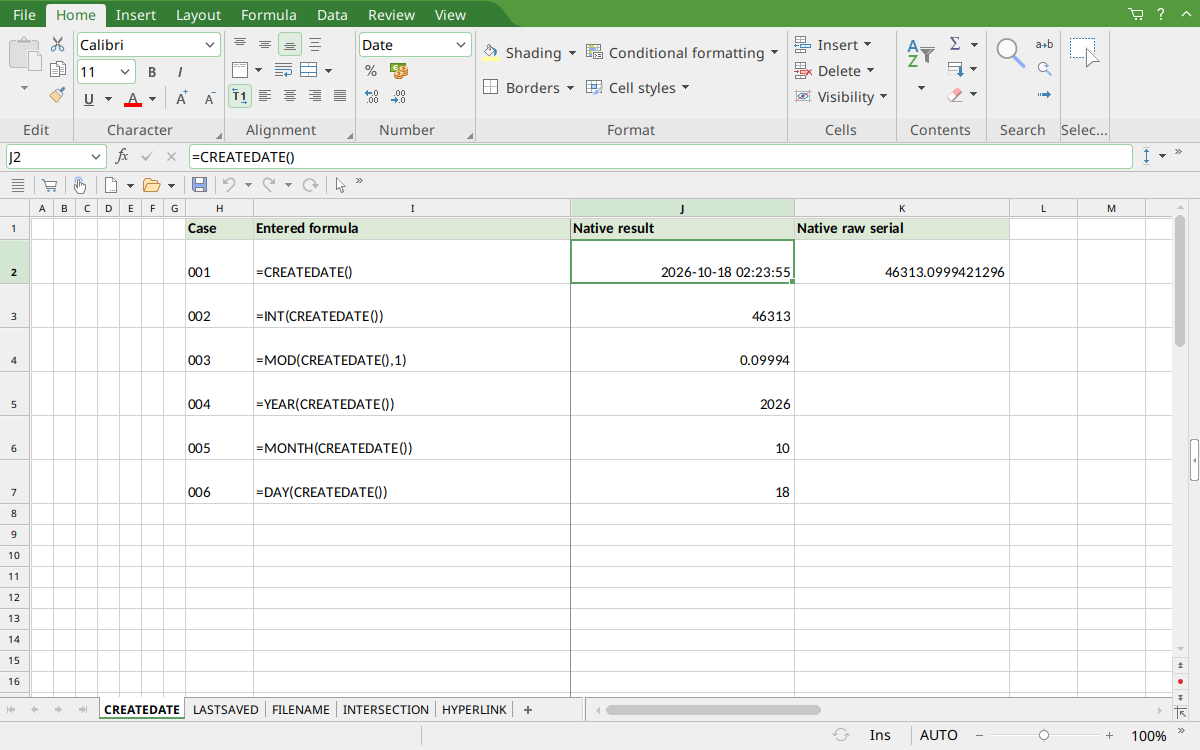
FreeOffice PlanMaker 2024 rev F1238.1005: selected J2 contains =CREATEDATE() and displays 2026-10-18 02:23:55. The adjacent K2 numeric companion displays 46313.0999421296.
Version and evidence scope
Official FreeOffice PlanMaker 2024 reference, checked October 18, 2026. The first introduction release is not established by this reference, and current documentation does not imply retirement or identical behavior in every edition.
The selected formulas were tested on October 18, 2026 in FreeOffice PlanMaker 2024 rev F1238.1005, 64-bit. The generic PMDX document was genuinely saved, closed and reopened at its original local path, then captured and closed without saving again. Its formulas were preserved in the saved document. Teaching layouts and additional practical expressions are distinct from the selected native controls. Proprietary implementation code has not been inspected. The observed creation timestamp comes from the actual imported document property, not from a filesystem timestamp or a hypothetical example.