

PlanMaker FILENAME Function: Display the active document name or full path
Use FILENAME in FreeOffice PlanMaker 2024 with reproducible examples, precise document or reference semantics and compatibility limits.
Verification status: See the evidence and test scope described in this guide. How formula examples are checked
Quick answer: =FILENAME() returns the current document’s file name. =FILENAME(TRUE) includes its path, while =FILENAME(FALSE) uses the same basename-only mode as the omitted argument.
Syntax and default
=FILENAME([IncludePath])
IncludePath is optional. FALSE or omission excludes the path; TRUE includes it. Use a Boolean explicitly if the distinction matters to a report layout. The function describes the current document; it does not return the name of an arbitrary file supplied as an argument.
The exact text is context-dependent. A Windows document can have a drive-letter path, while another environment can use a different path representation. Do not copy a vendor’s sample path and present it as your own document’s observed output.
Reproduce three modes safely
Save a demonstration workbook with a generic basename, such as document-context.pmdx, in a generic local folder. In separate cells enter:
| Formula | Documented meaning |
|---|---|
=FILENAME() |
Current document basename |
=FILENAME(FALSE) |
Current document basename |
=FILENAME(TRUE) |
Current document path and basename |
The first two cells should agree under the documented contract. The third must be compared with the actual document location at the time of recalculation. A later copied workbook may retain an earlier cached path until recalculated.
Widen the result column or enable suitable text wrapping so the path is readable. A clipped cell display is not proof that the underlying string is truncated. Selecting the cell shows the formula, while the returned text should be inspected separately.
Saving, copying and reopening are different operations. If a workbook is copied to another folder after a screenshot, the snapshot’s formula cache may still contain the earlier location. Do not call that earlier string the current path of the copied artifact without reopening and recalculating it in that location.
Practical use: a report identification panel
A basename-only field works well in a printed footer or summary sheet because it is shorter and avoids exposing folder structure. A full-path field can help distinguish two same-named local files during internal troubleshooting.
For example, a label expression such as ="Workbook: "&FILENAME() combines a human-readable prefix with the current basename. It does not rename the document or change its save destination. The result changes only according to the function’s actual context and recalculation behavior.
Pair this field with CREATEDATE and LASTSAVED when you need separate document-origin and save-related information. Neither timestamp should be inferred from the filename itself.
Privacy and interpretation
A full local path can reveal user names, client names, project names or internal directory structure. Inspect it before sharing a screenshot or exported workbook. A basename can also contain confidential information, so FALSE is not a complete privacy guarantee.
This guide uses only a generic demonstration document. It does not require reading account details, licence data, personal folders or credentials. A full-path result is ordinary document context, not evidence of file permissions or proof that another person can open that path.
A returned path also does not establish that the document is uploaded, backed up, synchronized or published. It identifies a location in the observed environment, not a shareable URL. Do not automatically turn a local path into an external download link.
Boundaries and conversion
The short reference does not comprehensively define the result for a never-saved document, arbitrary non-Boolean IncludePath values, or every import/copy/recalculation sequence. Use a saved PMDX and the documented TRUE/FALSE modes for predictable examples. The native strings below are tied to the generic document’s actual active location; they are not portable constants or a promise about a later copy.
The official compatibility note says FILENAME does not exist in Microsoft Excel. Saving to Excel format replaces calculations using this function with their current results as fixed values. That can leave a visible old path in a file moved elsewhere; the text is a snapshot, not a live location query.
Keep a PMDX working copy when the context formula must survive. Inspect formula preservation after conversion. The documentation establishes current FreeOffice PlanMaker 2024 support but does not give a first introduction release or declare the function retired.
Native example and observed limits
The active document was genuinely saved and reopened as /tmp/PlanMakerExamples/document-context.pmdx in the demonstration environment. Both =FILENAME() and =FILENAME(FALSE) returned document-context.pmdx. =FILENAME(TRUE) returned the full generic local path shown above.
The screenshot belongs to that active location. After capture, the document was closed without another save and an identical-byte copy was retained elsewhere. That later copy was not reopened for this example, so the screenshot does not claim to show the copy’s new path. A reader opening a different copy should expect context to depend on the actual location and recalculation behavior.
The visible path is generic and contains no account or project identity. It is a local filesystem path, not a publicly accessible document URL.
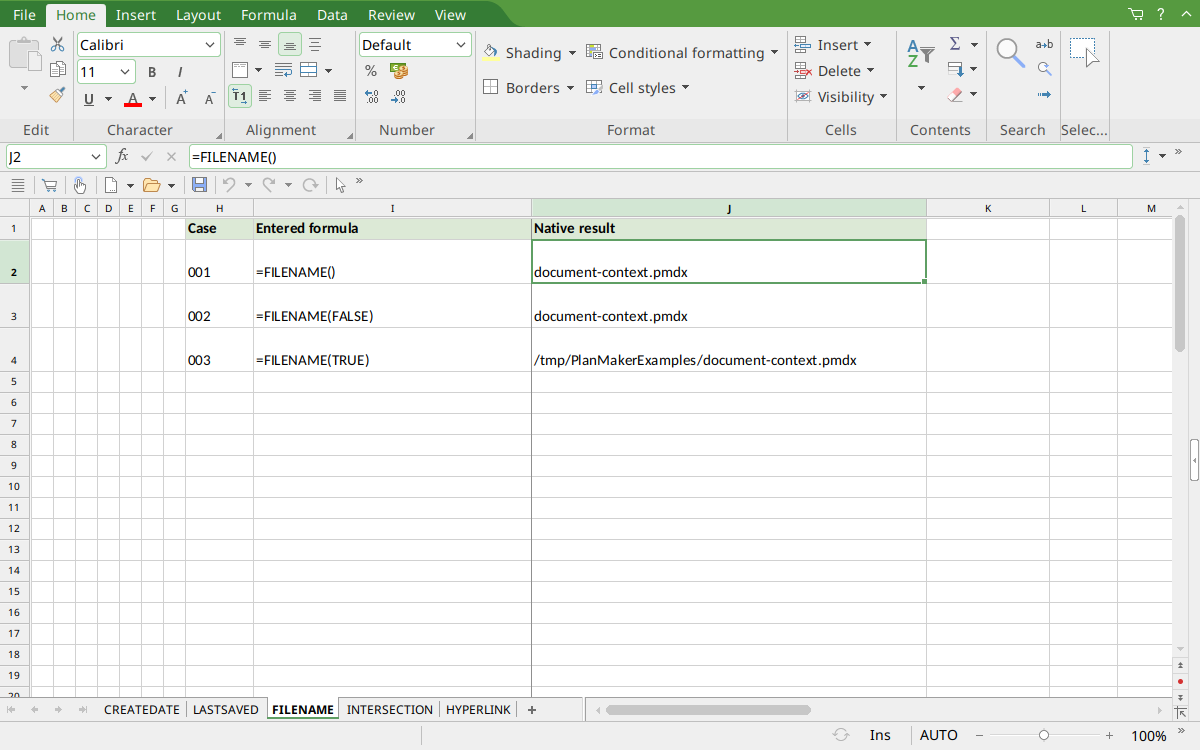
FreeOffice PlanMaker 2024 rev F1238.1005: selected J2 contains =FILENAME() and displays document-context.pmdx. J3 shows the same basename with FALSE, and J4 shows the actual active full path with TRUE.
Version and evidence scope
Official FreeOffice PlanMaker 2024 reference, checked October 18, 2026. The first introduction release is not established by this reference, and current documentation does not imply retirement or identical behavior in every edition.
The selected formulas were tested on October 18, 2026 in FreeOffice PlanMaker 2024 rev F1238.1005, 64-bit. The generic PMDX document was genuinely saved, closed and reopened at its original local path, then captured and closed without saving again. Its formulas were preserved in the saved document. Teaching layouts and additional practical expressions are distinct from the selected native controls. Proprietary implementation code has not been inspected. The reported path belongs to the active generic document, not to a later relocated copy.