

LOGNORM.DIST in FreeOffice PlanMaker: Syntax and Worked Examples
Use LOGNORM.DIST density or cumulative mode and LOGNORMDIST cumulative-only syntax, with mean and deviation in natural-log space.
Verification status: See the evidence and test scope described in this guide. How formula examples are checked
Quick answer
=LOGNORM.DIST(1,0,1,TRUE) has an independent expected result of 0.5. Its FALSE-mode density is approximately 0.3989422804. The older =LOGNORMDIST(1,0,1) calculates the cumulative probability only.
Mean and StdDev describe the natural logarithm of the variable. They are not the arithmetic mean and standard deviation of the positive measurements themselves.
Syntax and scale
=LOGNORM.DIST(x, Mean, StdDev, Cumulative)
=LOGNORMDIST(x, Mean, StdDev)
The documented domain requires x>0 and StdDev>0. Mean can be negative, zero or positive because a natural logarithm can have any real value. TRUE returns the probability at or below x; FALSE returns density per unit of x.
If Y=LN(X) is normally distributed with mean μ and standard deviation σ, X is lognormal. Define z=(ln(x)−μ)/σ. Independent mathematics gives:
CDF(x) = Phi(z)
Density(x) = exp(−z²/2) / (x × σ × sqrt(2π))
The factor 1/x is essential. The output in FALSE mode is a lognormal density in the original measurement units, not simply a normal density evaluated at LN(x).
Worked example: log-space mean zero
- Enter 1 in A2, 0 in B2 and 1 in C2.
- Calculate
=LOGNORM.DIST(A2,B2,C2,TRUE). - Compare
=LOGNORMDIST(A2,B2,C2)with the cumulative result. - Change the modern switch to FALSE to calculate density.
At x=1, ln(x)=0 and z=0. Half of a standard normal distribution lies below zero, so the cumulative probability is 0.5. The density is 1/sqrt(2π), approximately 0.3989422804.
| Formula | Independent expected value |
|---|---|
=LOGNORM.DIST(EXP(1),0,1,TRUE) |
0.8413447461 approximately |
=LOGNORMDIST(EXP(1),0,1) |
0.8413447461 approximately |
=LOGNORM.DIST(EXP(1),0,1,FALSE) |
0.0890160549 approximately |
At x=e, z=1. The density is exp(−1/2)/(e×sqrt(2π)), or exp(−3/2)/sqrt(2π). Leaving out the division by e would give the wrong original-scale density.
Advanced use: an interval for a positive measurement
For a fictional positive measurement modeled with μ=0 and σ=1, the probability between exp(−1) and exp(1) is Phi(1)−Phi(−1), approximately 0.6826894921. Compute it as the difference of cumulative results at the upper and lower limits.
This interval is multiplicatively symmetric around one, rather than additively symmetric in the original units. In the same model the median is exp(μ)=1, while the arithmetic mean is exp(μ+σ²/2)=exp(0.5), approximately 1.6487212707. Substituting that arithmetic mean into the Mean argument would change the model.
The positive support and asymmetry make this a possible modeling family, not proof that a particular dataset follows it. The function does not fit parameters or validate a distributional assumption.
Domain and probability safeguards
Zero is outside the documented function domain even though the mathematical cumulative distribution approaches zero as x approaches zero from above. Both spellings returned #NUM! for zero x in the tested build, as detailed below. Do not assume a limiting mathematical value is an accepted application argument.
A continuous variable has zero probability of taking one exact value. Density is useful for model evaluation but must be integrated, or replaced by a difference of cumulative probabilities, to obtain interval probability. A density greater than one can be valid for sufficiently concentrated distributions.
The help does not enumerate all malformed-input errors or certify extreme-tail precision. Retain raw values for calculations and choose display rounding separately.
Legacy contract and compatibility
The LOGNORMDIST page documents cumulative-only behavior. Its matching modern mode is TRUE; FALSE is additional functionality and cannot be obtained merely by renaming the legacy expression.
The modern name is documented as supported by Excel 2010 or later. This is not an export test or a statement of when PlanMaker first introduced it. Both spellings remain documented in the 2024 reference.
Native log-space and density checks
Eight formulas were calculated in FreeOffice PlanMaker 2024 revision F1238.1005. Both cumulative spellings returned 0.5 at x=1 and approximately 0.8413447461 at x=exp(1), with Mean=0 and StdDev=1. Modern density returned approximately 0.3989422804 at x=1 and 0.0890160549 at x=exp(1), agreeing with the density transformation including 1/x. Both zero-x cumulative probes returned #NUM!. All eight expressions survived native PMDX save and reopen. The interval probability and arithmetic mean in the advanced example are independent calculations, not additional native tests.
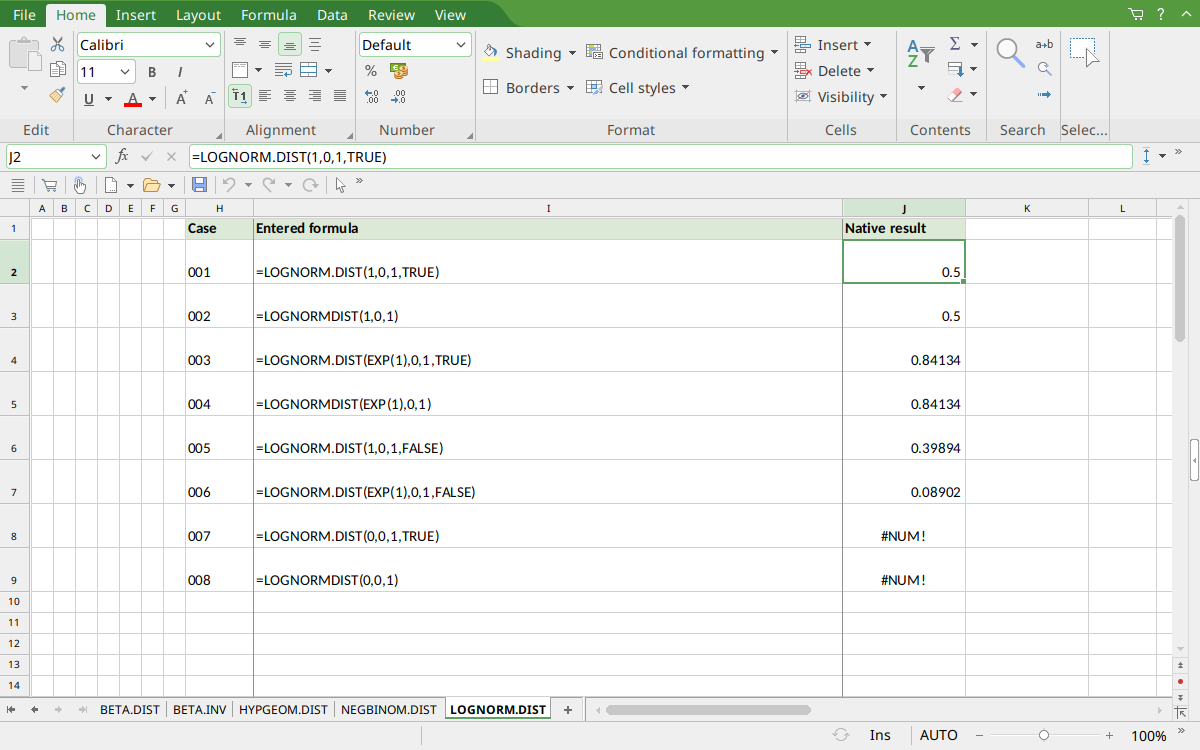
Selected J2 displays 0.5. J4:J5 display cumulative 0.84134, J6:J7 display densities 0.39894 and 0.08902, and J8:J9 show #NUM! for zero x.
Version and verification scope
The official FreeOffice PlanMaker 2024 reference was checked October 18, 2026. The installed application is FreeOffice PlanMaker 2024 revision F1238.1005. The original introduction version is not established by this evidence; the current reference does not identify the function as deprecated or retired. No availability claim for a different edition or a 2026 release is implied.
The native section identifies the exact scalar formulas calculated in revision F1238.1005 and preserved after native PMDX save and reopen. Independent mathematical expectations, extra arithmetic and observed approximations are distinguished. Cell-reference walkthroughs were not additional native cases. Excel compatibility statements are vendor guidance, not export tests. English formulas in this guide use commas; use the separators required by your formula settings.