

PlanMaker SKEW Function: Measure signed sample asymmetry
Use SKEW in FreeOffice PlanMaker 2024 with exact datasets, independent calculations, statistical interpretation and compatibility limits.
Verification status: See the evidence and test scope described in this guide. How formula examples are checked
Quick answer: the observations 1,1,1,5 have independently calculated corrected sample skewness 2. Enter them in A2:A5 and use =SKEW(A2:A5). The positive sign reflects the contribution of the long right-side deviation, even though most observations lie below the mean.
Syntax and interpretation
=SKEW(Number1, Number2, Number3 [, Number4 ...])
=SKEW(Range1 [, Range2 ...])
The official reference requires at least three numeric observations and says empty cells, text, and logical values are ignored. Ranges are accepted; a single range can contain many observations. A maximum number of arguments is not established here.
Skewness summarizes signed third-moment asymmetry. Large positive deviations and large negative deviations contribute with opposite signs, and cubing makes distant observations influential. A positive result is associated with greater right-tail influence; a negative result with greater left-tail influence. It is not a count of how many values lie on either side of the mean.
Near-zero skewness does not prove symmetry or normality. Opposing third-moment contributions can cancel, and a finite sample is only one view of a distribution. SKEW supplies no significance threshold, confidence interval, or probability that a hypothesis is true.
Reproduce the four-value example
Create A2:A5 with values 1, 1, 1, 5. Enter =SKEW(A2:A5) in J2. The native result is 2, agreeing with the independent calculation; =SKEW(1,1,1,5) is the equivalent literal-argument example.
The corrected sample-skewness model used for the independent calculation is:
s² = sum((x - mean)²) / (n - 1)
G = n/((n-1)*(n-2)) * sum(((x-mean)/s)^3)
For n=4, mean=2 and s=2. Standardized deviations are −0.5,−0.5,−0.5,1.5. Their cubes sum to −0.125−0.125−0.125+3.375 =3. Multiplying by 4/(3×2) gives 2.
Only one of the four observations is above the mean, yet skewness is positive. This directly illustrates why “more values to the right of the mean” is not a reliable definition of positive skewness. The calculation uses the magnitudes and signs of deviations, not a majority vote.
Compare a reflection and a change of units
| Cells | Values | Formula | Independently expected SKEW |
|---|---|---|---|
| D2:D5 | -1,-1,-1,-5 | =SKEW(D2:D5) |
-2 |
| E2:E6 | 1,2,3,4,5 | =SKEW(E2:E6) |
0 |
| F2:F5 | 12,12,12,20 | =SKEW(F2:F5) |
2 |
Reflection reverses the sign of every third-power standardized deviation, so it reverses skewness. A positive rescaling plus a constant shift leaves standardized skewness unchanged. The evenly spaced symmetric sequence 1 through 5 has canceling cubic deviations, giving zero in exact arithmetic. A native floating-point result close to zero should be distinguished from a mathematical guarantee of exact zero.
Practical use: inspect asymmetry alongside location and spread
For a simple descriptive report, show the numeric count and mean beside SKEW. In the main dataset the count is 4 and the mean 2. This prevents a large unitless skewness from being mistaken for an amount in the original measurement unit.
Repeated observations must remain repeated. If your source lists value 1 with frequency 3 and value 5 with frequency 1, do not pass the value and frequency columns as though every cell were an observation. Expand the observation list, or use a separately justified weighted calculation. SKEW has no documented frequency-weight argument.
For a type-control range, place 1, 1, 1, 5,note,TRUE in C2:C7 and leave C8 genuinely empty. The native test returned 2 for =SKEW(C2:C8), matching the documented exclusion rule and the calculation on the four numbers. This does not establish every coercion case, such as text numerals supplied directly, error-valued cells, or formulas returning empty text.
Errors and small samples
The official reference specifies #DIV/0! when fewer than three numeric observations contribute. =SKEW(A2:A3) is the two-value example. A constant range has zero sample standard deviation, making the standardized expression undefined; in the tested build, =SKEW(B2:B5) on four repeated 3 values returned #DIV/0!. The two-value minimum-count example also returned #DIV/0!.
With only a few measurements, changing one value can change skewness substantially. Do not interpret the sign as a permanent property of a process without considering the data and collection method. SKEW is descriptive and does not establish causation or classify an observation as erroneous.
Very large magnitudes and cancellation can affect floating-point calculations. The small exact-arithmetic derivation explains the bounded examples, not the internal numerical method used by the proprietary application.
Compatibility and related functions
Follow your locale’s formula separators. Some statistical tools use an unadjusted population moment rather than the corrected sample coefficient; equal data alone does not guarantee identical skewness values across definitions.
KURT uses fourth powers and does not indicate the direction of skew. AVERAGE and COUNT provide useful companion summaries. Neither a zero SKEW nor a near-zero KURT establishes a normal distribution.
Native example
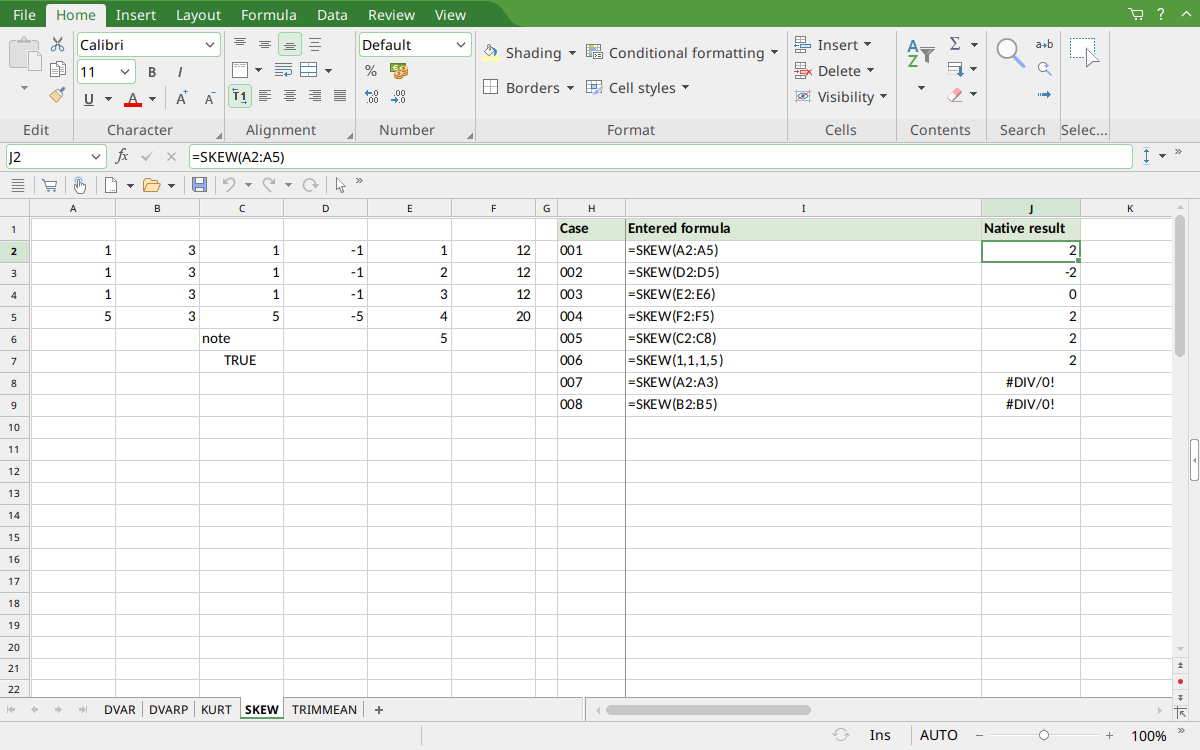
FreeOffice PlanMaker 2024 rev F1238.1005: selected cell J2 contains =SKEW(A2:A5) and displays 2. The reflected dataset returns -2, while the symmetric five-value dataset returns 0.
Version and evidence scope
The official FreeOffice PlanMaker 2024 SKEW reference was checked October 18, 2026. The first introduction release is unknown from this reference; documentation in this edition does not establish retirement, deprecation, or support in every other edition.
Selected formulas were tested on October 18, 2026 in FreeOffice PlanMaker 2024 rev F1238.1005, 64-bit. The 8 native cases for this function were saved in PMDX format, closed, and reopened with formulas and results preserved. Typed inputs, including genuine blanks and Boolean values, were checked separately. The primary dataset and listed comparison formulas agree with the independent calculations; advanced derived comparisons and interpretation are not all separately executed formulas. The proprietary implementation has not been inspected, so mathematical models explain the observed bounded results without claiming a source-code trace or universal cross-version behavior.