

PlanMaker T.DIST Function: Separate a left-tail probability from t density
Use T.DIST in FreeOffice PlanMaker 2024 with distinct signatures, probability modes, worked calculations and numerical limits.
Verification status: See the evidence and test scope described in this guide. How formula examples are checked
Quick answer: with one degree of freedom, =T.DIST(1,1,TRUE) has mathematical value 0.75, while =T.DIST(1,1,FALSE) has value 1/(2π)≈0.1591549431. The first is a left-tail probability; the second is a density.
Syntax and input meaning
=T.DIST(X, DegreesFreedom, Cumulative)
All three arguments are required. TRUE returns the left cumulative probability P(T ≤ X), while FALSE returns the density at X. DegreesFreedom must be at least 1 according to the official reference; fractional parts are truncated. Prefer an explicit positive integer so the fitted statistical model is visible.
The official page also restricts X to nonnegative values, despite the mathematical Student t distribution extending over the whole real line. Keep this documented nonnegative domain: in the tested build, =T.DIST(-1,1,TRUE) returns approximately 0.749999990996325, matching the positive-magnitude result rather than the mathematical signed left-tail value 0.25. Do not use a negative argument here to obtain a signed left-tail probability. The worked calculations below stay within the documented domain.
T.DIST is distinct from T.DIST.RT, T.DIST.2T and TDIST. The last argument here is a cumulative/density switch, not a one-tail/two-tail selector. Replacing TRUE with 2 is not a reliable way to request two tails.
Reproduce small analytic cases
In a fresh sheet, enter 1 in B2 and 1 in B3. Use =T.DIST(B2,B3,TRUE) in B5 and =T.DIST(B2,B3,FALSE) in B6. Compare with these independent references:
| Formula | Mathematical result |
|---|---|
=T.DIST(0,1,TRUE) |
0.5 |
=T.DIST(0,1,FALSE) |
0.3183098862 |
=T.DIST(1,1,TRUE) |
0.75 |
=T.DIST(1,1,FALSE) |
0.1591549431 |
=T.DIST(2,2,TRUE) |
0.9082482905 |
=T.DIST(2,2,FALSE) |
0.0680413817 |
For df=1, the distribution is the standard Cauchy distribution. Its CDF is 0.5+ATAN(x)/PI() and its density is 1/(PI()*(1+x^2)). At x=1, atan(1)=π/4, giving CDF 0.75 exactly in mathematics.
For df=2, the CDF is 0.5+x/(2*SQRT(x^2+2)) and the density is (x^2+2)^(-1.5). These closed forms are independent mathematical checks, not a claim about PlanMaker’s internal algorithm. Its proprietary implementation has not been inspected.
The documented truncation rule means =T.DIST(1,1.9,TRUE) uses df=1 and has the same mathematical reference 0.75.
Practical use: turn a statistic into the right area
Suppose a one-sample t statistic is +1 with df=1. The left-tail probability is 0.75. Its upper-tail probability is 1−0.75=0.25, and the symmetric two-tail probability is 2×0.25=0.5. They answer different questions; the density 0.1591549431 is none of those p-values.
A simple mechanical example uses observations 0 and 2. Their mean is 1, sample standard deviation is sqrt(2), and standard error is 1. Comparing the mean with a reference value 0 gives t=1 and df=1. This tiny dataset explains the arithmetic, not a recommendation to draw a strong conclusion from two observations. A model-based t procedure relies on its own sampling and distribution assumptions, which T.DIST does not check.
For a nonnegative cutoff c, the central interval area P(−c ≤ T ≤ c) is 2*T.DIST(c,df,TRUE)-1 mathematically. With c=1 and df=1 it is 0.5. Use the tail functions when the requested result is specifically a right or two-tail area.
Errors, rounding, and interpretation
Degrees of freedom zero violate the documented domain. The tested =T.DIST(1,0,TRUE) returns #NUM!. The negative-x density call =T.DIST(-1,1,FALSE) returns approximately 0.159154943091889, matching the positive-x density, which is mathematically symmetric. That density symmetry does not make the negative-x cumulative result correct as a signed left tail. Boolean coercion, strings and omitted arguments are not exhaustively documented on the short page.
For continuous models, density at a point is not the probability of the exact observation. Keep full precision during complementary-tail calculations; subtracting a rounded CDF near 1 can lose useful digits. Neither a CDF nor a tail probability is the probability that a hypothesis is true.
The dotted functions are documented for FreeOffice PlanMaker 2024. The Excel 2010 note is an interoperability note and does not identify PlanMaker’s first supporting release. The older TDIST contract remains documented; it is not an exact replacement for T.DIST’s cumulative/density modes.
Native results and visible precision
The native df=1 CDF at 1 is approximately 0.749999990996325, with density 0.159154943091889. At x=2, df=2, the native CDF is approximately 0.908248291559554, with density 0.068041381743977. Fractional df=1.9 matches the df=1 cumulative result. These are numerical approximations to the independent references above; the inverse-function tolerance is not a universal forward-function accuracy guarantee.
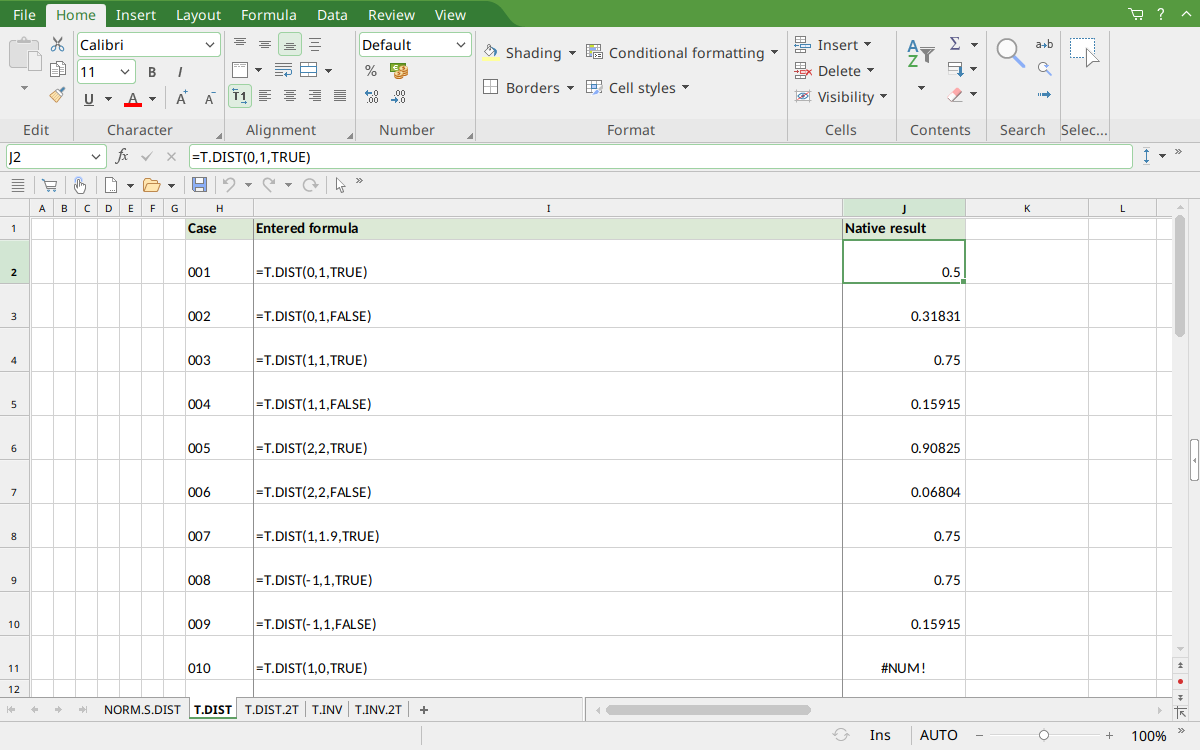
FreeOffice PlanMaker 2024 rev F1238.1005: selected J2 contains =T.DIST(0,1,TRUE) and displays 0.5. Display rounding is separate from the raw saved values described above.
Version and evidence scope
Official FreeOffice PlanMaker 2024 references checked October 18, 2026: reference 1. First introduction release is unknown from these references. Documentation for this edition does not establish identical behavior in every other edition.
The 10 selected scalar formulas for this guide were tested on October 18, 2026 in FreeOffice PlanMaker 2024 rev F1238.1005, 64-bit, saved in PMDX format and reopened with formulas and results preserved. The native observations are distinct from independent mathematical references and from teaching layouts or advanced expressions not individually executed. Proprietary implementation code has not been inspected. These bounded cases do not establish every argument, input type, edition or export behavior.