

PlanMaker T.DIST.2T Function: Choose two tails, a right tail, or TDIST mode
Use T.DIST.2T, T.DIST.RT, TDIST in FreeOffice PlanMaker 2024 with distinct signatures, probability modes, worked calculations and numerical limits.
Verification status: See the evidence and test scope described in this guide. How formula examples are checked
Quick answer: =T.DIST.2T(1,1) has mathematical value 0.5, while =T.DIST.RT(1,1) has value 0.25. Legacy TDIST selects those results with Tails=2 or Tails=1 respectively.
Use nonnegative cutoffs. In the tested build, =T.DIST.RT(-1,1) returns approximately 0.25, not the mathematical upper-tail probability 0.75 at −1. For signed directional statistics, use the symmetry construction below instead of passing a negative cutoff.
Three signatures with distinct contracts
=T.DIST.2T(X, DegreesFreedom)
=T.DIST.RT(X, DegreesFreedom)
=TDIST(X, DegreesFreedom, Tails)
For a nonnegative cutoff X, T.DIST.RT returns P(T > X). T.DIST.2T returns the combined outside area P(|T| > X), which is twice the right-tail area for a symmetric t distribution. TDIST requires a third argument: 1 for the right-tail result or 2 for the two-tail result.
The official references document X ≥ 0 and DegreesFreedom ≥ 1. They say fractional degrees of freedom are truncated. Use an explicit integer df and an explicit TDIST tail selector. The functions share conditional equivalences, but they are not interchangeable with the same argument list: TDIST needs a selector, and the two modern functions return different areas.
A worksheet that makes the difference visible
Enter 1 in B2 for the cutoff and 1 in B3 for degrees of freedom. In B5 enter =T.DIST.2T(B2,B3), in B6 =T.DIST.RT(B2,B3), in B7 =TDIST(B2,B3,2), and in B8 =TDIST(B2,B3,1).
| Formula | Independent mathematical result |
|---|---|
=T.DIST.2T(1,1) |
0.5 |
=T.DIST.RT(1,1) |
0.25 |
=TDIST(1,1,2) |
0.5 |
=TDIST(1,1,1) |
0.25 |
=T.DIST.2T(0,2) |
1 |
=T.DIST.RT(0,2) |
0.5 |
=T.DIST.2T(2,2) |
0.1835034191 |
For df=1, CDF(x)=0.5+atan(x)/π. At x=1 the CDF is 0.75, leaving 0.25 to the right and 0.5 across both tails. For df=2, CDF(x)=0.5+x/(2sqrt(x²+2)); at x=2 the combined tail is 1−2/sqrt(6). These formulas provide transparent independent arithmetic controls.
The documented truncation rule predicts =T.DIST.2T(1,1.9) behaves like df=1. That does not mean rounding a genuinely estimated df to the nearest integer is statistically appropriate; it describes this function’s input contract.
Practical use: two-sided versus directional comparisons
For a signed statistic t=−2 with df=2, a two-sided comparison uses its magnitude: =T.DIST.2T(ABS(-2),2). The mathematical result is approximately 0.1835034191. The corresponding lower directional tail is approximately 0.0917517095 by symmetry.
For an upper-direction alternative, the same negative statistic instead has a large upper-tail area, approximately 0.9082482905. Taking ABS and calling that small right tail an upper-direction result would change the question. Under the documented nonnegative contract, the upper tail at −a can be represented mathematically as 1-T.DIST.RT(a,df) for a≥0.
Choose the direction before examining a result. A two-tail p-value is not an effect size or the probability that the null hypothesis is true. The function does not establish independent observations, estimate a standard error, or validate a t-distribution assumption.
Central area and inverse checks
The central area is one minus the two-tail area. At cutoff 2 and df=2 it is approximately 0.8164965809. Use =1-T.DIST.2T(2,2) for that central area, rather than calling the returned outside area a confidence level.
T.INV.2T finds a nonnegative cutoff from a requested combined tail. T.DIST supplies a left cumulative mode and density mode; neither is selected through the Tails argument of TDIST.
Errors and interoperability
Negative cutoffs, df=0, and TDIST Tails=3 are outside the documented contract. In the tested build, =T.DIST.2T(-1,1) returns approximately 0.500000018007351, and =T.DIST.RT(-1,1) returns approximately 0.250000009003676, matching positive-magnitude calls. The latter is not the mathematical upper tail at −1, which is 0.75. Keep X nonnegative and use the explicit symmetry transformation above. =TDIST(1,1,3) and =TDIST(1,0,2) both return #NUM!. Do not silently convert an invalid tail selector to 1 or 2.
The short pages do not specify every coercion or fractional-Tails behavior. Keep Tails exactly 1 or 2 and df explicitly integral. Finite-precision tail calculations can lose significance if obtained by subtracting a rounded CDF from 1, so preserve raw precision.
The official notes identify modern functions as supplements to TDIST, not blanket exact aliases. TDIST remains documented without a retirement declaration. Excel 2010 compatibility for the dotted names does not establish their first PlanMaker release. Use your locale’s formula separators.
Native results and visible precision
At x=1, df=1, native two-tail probability is approximately 0.500000018007351, while the right tail is 0.250000009003676. TDIST with Tails=2 and Tails=1 matches those respective results. At x=0, df=2, the two-tail and right-tail results are 1 and 0.5. At x=2, df=2, the native two-tail result is approximately 0.183503416880893.
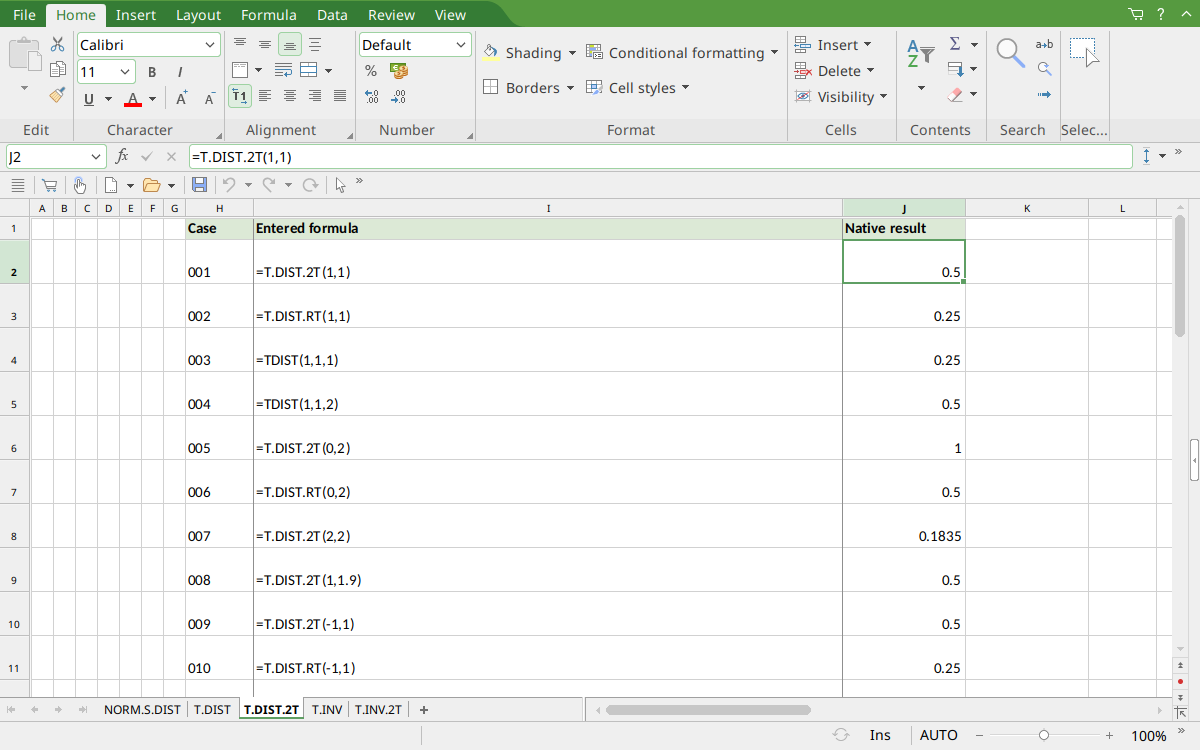
FreeOffice PlanMaker 2024 rev F1238.1005: selected J2 contains =T.DIST.2T(1,1) and displays 0.5. Display rounding is separate from the raw saved values described above.
Version and evidence scope
Official FreeOffice PlanMaker 2024 references checked October 18, 2026: reference 1, reference 2, reference 3. First introduction release is unknown from these references. Documentation for this edition does not establish identical behavior in every other edition.
The 12 selected scalar formulas for this guide were tested on October 18, 2026 in FreeOffice PlanMaker 2024 rev F1238.1005, 64-bit, saved in PMDX format and reopened with formulas and results preserved. The native observations are distinct from independent mathematical references and from teaching layouts or advanced expressions not individually executed. Proprietary implementation code has not been inspected. These bounded cases do not establish every argument, input type, edition or export behavior.