

PlanMaker T.INV.2T Function: Find a nonnegative two-tail t cutoff
Use T.INV.2T and its documented legacy alias TINV in FreeOffice PlanMaker 2024 with two-tail cutoffs, worked calculations and numerical limits.
Verification status: See the evidence and test scope described in this guide. How formula examples are checked
Quick answer: =T.INV.2T(0.1,2) has mathematical value approximately 2.9199855804. It leaves a combined probability of 0.1 outside the symmetric cutoffs −t and +t. The documented legacy spelling TINV has the same two-tail contract.
Syntax and tail allocation
=T.INV.2T(Probability, DegreesFreedom)
=TINV(Probability, DegreesFreedom)
Probability is the combined area in both tails. For p between 0 and 1, the returned mathematical cutoff c is nonnegative and satisfies P(|T|>c)=p. Each symmetric tail has area p/2; the left cumulative area at +c is 1−p/2.
DegreesFreedom must be at least 1, and the official help says fractional parts are truncated. Prefer an explicit positive integer. The page’s 0-to-1 probability wording should not be taken as a guarantee about finite endpoint calculations: p=0 requires an infinite mathematical cutoff, while p=1 has cutoff zero.
Unlike T.INV, this function does not return a signed percentile from a left-tail probability. Passing the same p to those two contracts generally gives different answers.
Worked worksheet and independent arithmetic
Enter 0.1 in B2 and 2 in B3. In B5 enter =T.INV.2T(B2,B3) and in B6 enter =TINV(B2,B3). Both documented spellings share the same mathematical reference approximately 2.9199855804.
| Formula | Mathematical reference |
|---|---|
=T.INV.2T(0.5,1) |
1 |
=TINV(0.5,1) |
1 |
=T.INV.2T(0.1,2) |
2.9199855804 |
=TINV(0.1,2) |
2.9199855804 |
=T.INV.2T(0.5,1.9) |
1, after df truncation |
For df=1, the combined tail at c≥0 is 1−2atan(c)/π, giving cutoff cot(πp/2). For df=2, the tail is 1−c/sqrt(c²+2), giving cutoff sqrt(2)×(1−p)/sqrt(p(2−p)). Substitution of p=0.1 yields the stated value. These are independently derived special-case formulas, not a description of PlanMaker’s proprietary implementation.
Check probability residuals, not arbitrary digits
The official reference describes at most 100 inverse iterations and a target approximately ±3×10⁻⁷ from Probability. Failure to meet it within the iteration limit is documented as #N/A.
The target is in two-tail probability space. It does not promise a particular number of correct decimal places in the cutoff, especially in very small tails. Retain the raw returned value rather than a rounded display when checking it.
For the df=2 example, if B5 contains the inverse result, an independent residual calculation is =1-B5/SQRT(B5^2+2). Compare that with 0.1. For df=1, use =1-2*ATAN(B5)/PI() with the appropriate df=1 result and target. These controls must not be reused for arbitrary degrees of freedom.
Practical use: convert a central level to a tail probability
A central 90% interval uses combined tail probability 1−0.90=0.10. It therefore uses =T.INV.2T(1-0.9,2), not =T.INV.2T(0.9,2). Confusing the central level with the outside probability produces a much narrower cutoff.
For an estimate 20 with standard error 2 and df=2, the mathematical half-width is 2×2.9199855804≈5.8399711607. The transformed endpoints are approximately 14.1600288393 and 25.8399711607. This is a model-based mean-interval calculation using supplied inputs, not a guarantee about future individual observations or a validation of the sample assumptions.
For an observed statistic t=2 with df=2, T.DIST.2T instead returns the combined tail approximately 0.1835034191. A cutoff and a p-value are different quantities: this inverse maps a chosen probability into a threshold.
Errors and the legacy name
Degree zero is outside the documented domain. The tested calls =T.INV.2T(0,1), =T.INV.2T(1,1) and =T.INV.2T(0.5,0) all return #NUM!. In particular, this build rejects p=1 even though the mathematical two-tail cutoff there is zero. Use strictly interior probabilities rather than assuming the help’s endpoint wording guarantees acceptance.
The short reference does not fully specify every text, logical or missing-argument conversion. Use explicit numeric probabilities and integer degrees of freedom. English examples use commas; locale-specific separators may differ.
The official pages explicitly equate TINV and T.INV.2T for two-tail percentiles. They do not equate either with T.INV’s signed left-tail contract. TINV remains documented, with no retirement declaration. The Excel 2010 compatibility statement concerns the newer Excel spelling and is not a PlanMaker introduction date.
Native results and visible precision
The native cutoff at p=0.5, df=1 is approximately 1.00000008940697; at p=0.1, df=2 it is approximately 2.91998550295830. TINV returns the same saved values for both controls, and df=1.9 matches df=1. Independent two-tail evaluations at all five raw inverse controls meet the documented 3×10⁻⁷ probability-space criterion.
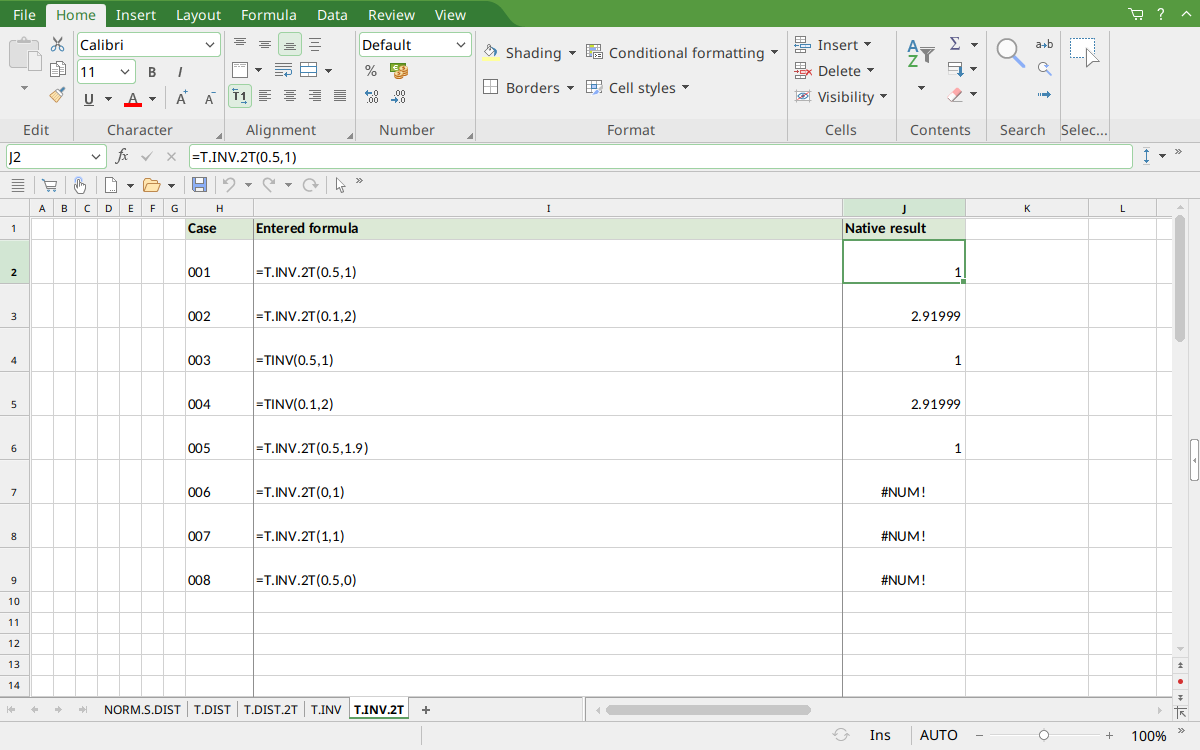
FreeOffice PlanMaker 2024 rev F1238.1005: selected J2 contains =T.INV.2T(0.5,1) and displays 1. Display rounding is separate from the raw saved values described above.
Version and evidence scope
Official FreeOffice PlanMaker 2024 references checked October 18, 2026: reference 1, reference 2. First introduction release is unknown from these references. Documentation for this edition does not establish identical behavior in every other edition.
The 8 selected scalar formulas for this guide were tested on October 18, 2026 in FreeOffice PlanMaker 2024 rev F1238.1005, 64-bit, saved in PMDX format and reopened with formulas and results preserved. The native observations are distinct from independent mathematical references and from teaching layouts or advanced expressions not individually executed. Proprietary implementation code has not been inspected. These bounded cases do not establish every argument, input type, edition or export behavior.