

PlanMaker WEIBULL.DIST Function: Weibull probabilities, densities and scale
Use WEIBULL.DIST in FreeOffice PlanMaker 2024 with clear parameters, independent probability calculations, legacy syntax and numerical limits.
Verification status: See the evidence and test scope described in this guide. How formula examples are checked
Quick answer: =WEIBULL.DIST(3,2,3,TRUE) is mathematically 1−exp(−1)≈0.6321205588. The FALSE version returns density 2×exp(−1)/3≈0.2452529608. These two quantities have different meanings and units.
Syntax and parameters
=WEIBULL.DIST(x, Alpha, Beta, Cumulative)
=WEIBULL(x, Alpha, Beta, Cumulative)
All four arguments are required. The official domain is x≥0, Alpha>0, and Beta>0. Alpha is the dimensionless shape parameter. Beta is a scale parameter with the same units as x; it is not generally the mean. TRUE returns the left-tail cumulative probability, while FALSE returns the density.
For positive x, the independent formulas are:
CDF = 1 - exp(-(x/Beta)^Alpha)
PDF = Alpha/Beta * (x/Beta)^(Alpha-1) * exp(-(x/Beta)^Alpha)
A density is measured in inverse units of x. It is not the probability that a continuous variable equals exactly x. A CDF is unitless and lies between 0 and 1.
Enter a small shape-and-scale example
Put 3 in B2 for x, 2 in B3 for Alpha, and 3 in B4 for Beta. In B6 enter =WEIBULL.DIST(B2,B3,B4,TRUE), and in B7 enter the same formula with FALSE.
| Formula | Independent mathematical value |
|---|---|
=WEIBULL.DIST(3,2,3,TRUE) |
0.6321205588 |
=WEIBULL.DIST(3,2,3,FALSE) |
0.2452529608 |
=WEIBULL.DIST(6,2,3,TRUE) |
0.9816843611 |
=WEIBULL.DIST(0,2,3,TRUE) |
0 |
At x=Beta, the ratio x/Beta is 1, so the CDF is 1−exp(−1), regardless of the positive shape. At x=6 with Beta 3 and Alpha 2, the exponent is −4, giving 1−exp(−4).
The legacy WEIBULL spelling is paired with both the main CDF and density formulas. The official help calls WEIBULL.DIST an identical function, so both names use the same documented calculation.
Practical use: interval and survival probabilities
Under this specified model, the probability between 3 and 6 is:
=WEIBULL.DIST(6,2,3,TRUE)-WEIBULL.DIST(3,2,3,TRUE)
The independent result is exp(−1)−exp(−4)≈0.3495638023. The probability above 6 is exp(−4)≈0.0183156389. The CDF describes values at or below a threshold; its complement describes values above it. Do not subtract densities to calculate either quantity.
The median solves the CDF equation at 0.5. For this shape and scale it is 3×sqrt(LN(2))≈2.4976638335. That differs from the scale 3, illustrating why Beta should not be labeled “mean” or “median” without a derivation.
These equations can describe a chosen positive-variable model, but they do not fit Alpha and Beta, certify reliability, or predict an individual outcome. The function does not determine whether a Weibull model is appropriate for the observations.
Shape 1 and behavior at zero
With Alpha=1, the model becomes exponential with rate 1/Beta. For Beta 2, its density at 0 has right-hand value 1/2. With Alpha=2, the density at 0 is 0. Thus the independent controls are =WEIBULL.DIST(0,1,2,FALSE) →0.5 and =WEIBULL.DIST(0,2,3,FALSE) →0.
For 0<Alpha<1, the density grows without bound as x approaches 0 from the right. A finite spreadsheet cell cannot represent that limit as an ordinary finite density. In the tested build, =WEIBULL.DIST(0,0.5,3,FALSE) returns #NUM!. The native error is consistent with there being no finite right-hand density limit, but the mathematical limit alone would not establish that error token.
Errors and numerical limits
Negative x and nonpositive parameters violate the documented domain. In this build, =WEIBULL.DIST(-1,2,3,TRUE) and =WEIBULL.DIST(3,0,3,TRUE) both return #NUM!. Other invalid parameter combinations were not exhaustively tested. The meaning of omitted arguments or coercion of arbitrary text into the cumulative flag is outside these examples.
For large x/Beta, the CDF may round to 1, and subtracting it from 1 can lose tail precision. A closed-form survival calculation can be useful mathematically, but this guide does not establish every underflow or overflow boundary of the application. Keep raw precision for checks and round only the displayed explanation.
Legacy name and related functions
The legacy spelling WEIBULL is documented as identical, not retired or deprecated. The help’s Excel 2010 note concerns the newer dotted name and does not establish when PlanMaker introduced it.
EXP and LN express the independent formulas. NORM.DIST is a different distribution with location and standard-deviation parameters; do not reuse its arguments as though they were Weibull shape and scale. Follow your locale’s separators when entering formulas.
Native results and displayed precision
The native main CDF is approximately 0.632120558828558 and the native main density approximately 0.245252960780962. The matching WEIBULL calls returned the same saved values. The tested x=0 controls gave CDF 0 for shape 2, density 0.5 for shape 1/scale 2, and density 0 for shape 2/scale 3. These observations cover the listed calls, not every boundary combination.
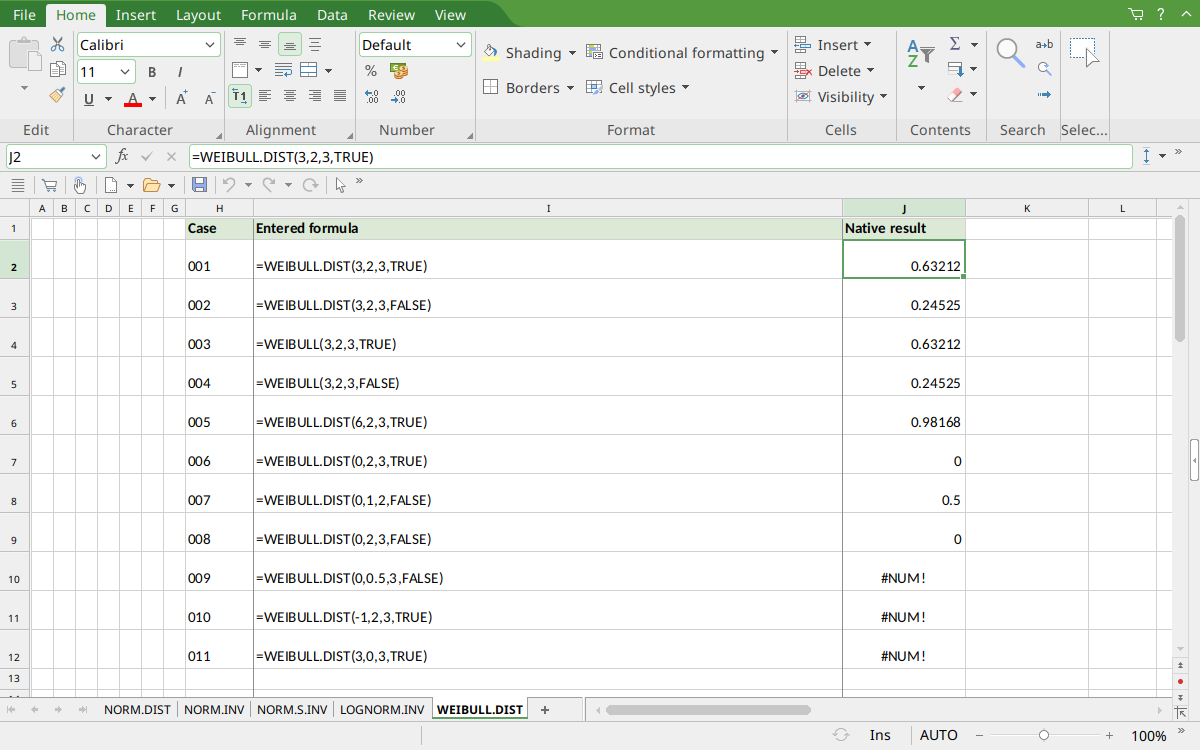
FreeOffice PlanMaker 2024 rev F1238.1005: selected cell J2 contains =WEIBULL.DIST(3,2,3,TRUE) and displays 0.63212. The saved numeric results retain more digits than the screenshot display; the mathematical references and native approximations are distinguished above.
Version and evidence scope
Official FreeOffice PlanMaker 2024 references checked October 18, 2026: reference 1, reference 2. The first PlanMaker introduction release is unknown from these references. Documentation and the Excel compatibility note do not establish support in every edition or imply retirement of a legacy spelling.
The 11 selected formula cells for this function were tested on October 18, 2026 in FreeOffice PlanMaker 2024 rev F1238.1005, 64-bit, saved in native PMDX format, and reopened with their calculation meaning preserved. Paired legacy calls were included. Native results remain distinct from independent mathematical references, cell-reference teaching layouts, and advanced interval examples that were not each separately executed. The proprietary implementation has not been inspected; these bounded observations do not establish every tail, input type, edition, or export behavior.