

PlanMaker NORM.DIST Function: Normal cumulative probabilities and densities
Use NORM.DIST and legacy NORMDIST in PlanMaker for normal density and cumulative probabilities, with examples and precision limits.
Verification status: See the evidence and test scope described in this guide. How formula examples are checked
Quick answer: =NORM.DIST(12,10,2,TRUE) is independently expected to return approximately 0.8413447461. It evaluates the probability of a normally distributed value being at most 12 when its mean is 10 and standard deviation is 2. With FALSE, the function returns a density instead of a cumulative probability.
Syntax and parameter units
=NORM.DIST(x, Mean, StdDev, Cumulative)
=NORMDIST(x, Mean, StdDev, Cumulative)
All four arguments are required. x, Mean, and StdDev use the original variable’s units. Use a positive standard deviation, not its square. Cumulative=TRUE selects the left-tail cumulative distribution; FALSE selects the probability density.
Documentation wording caution: the FreeOffice 2024 NORM.DIST and NORMDIST pages describe Mean and StdDev using LN(x), apparently carrying over log-normal wording. That is not the parameterization of the normal model used here. For a normal distribution, standardize using z=(x−Mean)/StdDev, without applying LN. The shifted/scaled examples below distinguish these interpretations; their native results in FreeOffice PlanMaker 2024 rev F1238.1005 agree with the normal arithmetic-mean/SD interpretation, without taking LN(x).
A normal variable can be negative. Its mean is an arithmetic location parameter, while the standard deviation measures spread on that same scale. LOGNORM.INV uses genuinely log-space parameters and must not be substituted merely because both names contain “NORM.”
Work through a shifted and scaled example
On a blank sheet enter 10 in B2 for the mean, 2 in B3 for the standard deviation, and 12 in B4 for the evaluation value. Enter =NORM.DIST(B4,B2,B3,TRUE) in B6. The independent result is approximately 0.8413447461 because z=(12−10)/2=1 and the standard normal left-tail probability at 1 is approximately 0.8413447461.
| Formula | Independent result | Interpretation |
|---|---|---|
=NORM.DIST(10,10,2,TRUE) |
0.5 | Half the distribution lies at or below its mean |
=NORM.DIST(12,10,2,TRUE) |
0.8413447461 | Left-tail probability at one SD above mean |
=NORM.DIST(10,10,2,FALSE) |
0.1994711402 | Density at the mean |
=NORM.DIST(12,10,2,FALSE) |
0.1209853623 | Density at one SD above mean |
=NORM.DIST(-2,-2,3,TRUE) |
0.5 | Negative mean remains valid in a normal model |
The independent density formula is exp(−z²/2)/(StdDev×sqrt(2π)). Its division by StdDev is essential: density changes when measurement units change. A density is not the probability of exactly that value; for a continuous model, a single point has probability zero.
Practical use: interval and upper-tail probabilities
For the same mean 10 and standard deviation 2, the probability between 8 and 12 is the difference of two cumulative values:
=NORM.DIST(12,10,2,TRUE)-NORM.DIST(8,10,2,TRUE)
The independent result is approximately 0.6826894921. Do not subtract densities to obtain an interval probability. The probability above 12 is the complementary quantity 1−0.8413447461, approximately 0.1586552539.
These are probabilities under a specified normal model. The formula neither estimates the mean and standard deviation from a dataset nor verifies that the data are normally distributed. Decide what the parameters represent before interpreting the result. Values measured in hours require a standard deviation in hours, not hours squared.
A density may exceed 1 when the distribution is narrow; that alone is not invalid. It is the area under a density curve that totals 1. In contrast, a cumulative probability must lie between 0 and 1.
Errors and numerical limits
A zero standard deviation does not define a nonsingular normal density. In the tested build, =NORM.DIST(10,10,0,TRUE) returns #DIV/0!. This is the observed error for this exact zero-SD case, not a complete input-error specification. Text values, omitted cumulative arguments, and logical coercions outside explicit TRUE/FALSE were not established by these examples.
In an extreme upper tail, subtracting a CDF very close to 1 from 1 can lose significant digits. The moderate examples above do not establish accuracy for rare-event tails. Do not interpret rounded display values 0 or 1 as a guarantee of an exactly impossible or certain event.
Legacy spelling and related functions
The official NORMDIST page explicitly describes NORM.DIST as an identical function. Both spellings are included here, with paired shifted-CDF and density examples. The older spelling is not declared deprecated or retired by that statement. The help’s Excel 2010 compatibility note concerns Excel’s dotted spelling, not this function’s first PlanMaker release.
NORM.INV reverses a left-tail normal probability into a value. NORM.S.INV returns a standardized quantile. LOGNORM.INV instead returns a positive value from log-space parameters. Follow your locale’s separators; the formulas shown use English commas.
Native results and displayed precision
The native shifted CDF is approximately 0.841344746068543, and the native density at the mean is approximately 0.199471140200716. The matching NORMDIST formulas returned the same saved values. The negative-mean symmetry example returned 0.5. These results support the arithmetic-mean and original-unit SD interpretation despite the log-space wording in the help.
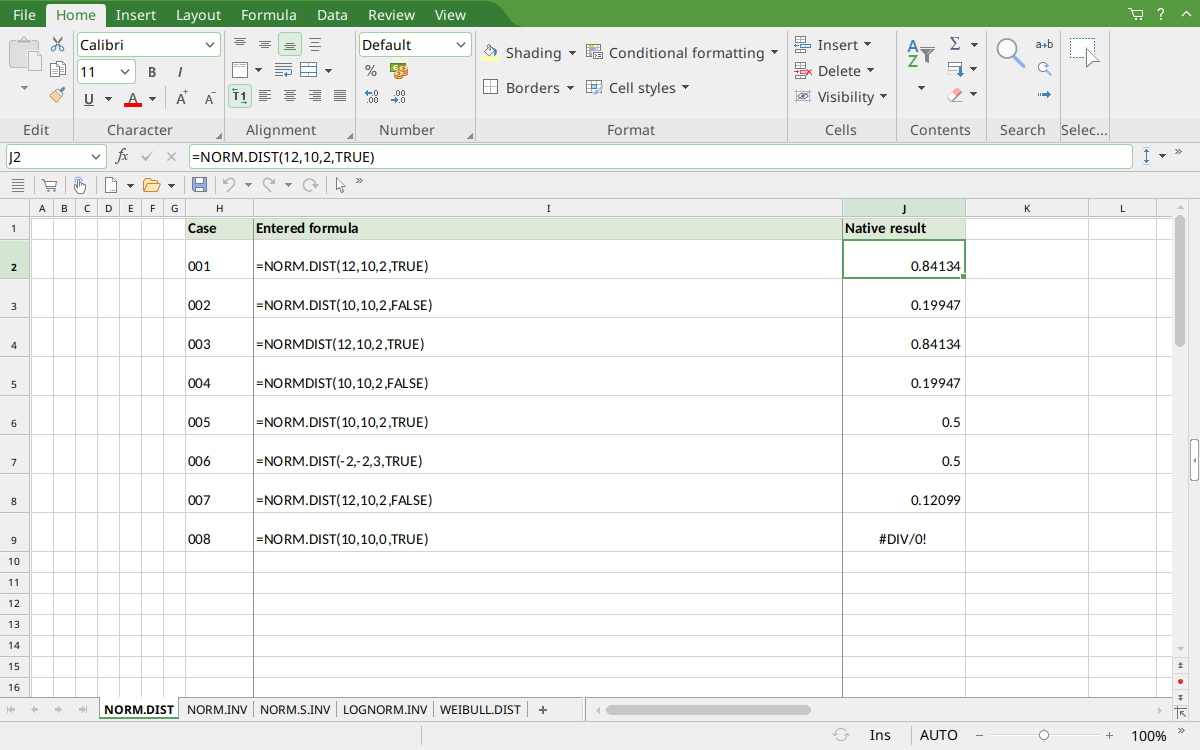
FreeOffice PlanMaker 2024 rev F1238.1005: selected cell J2 contains =NORM.DIST(12,10,2,TRUE) and displays 0.84134. The saved numeric results retain more digits than the screenshot display; the mathematical references and native approximations are distinguished above.
Version and evidence scope
Official FreeOffice PlanMaker 2024 references checked October 18, 2026: reference 1, reference 2. The first PlanMaker introduction release is unknown from these references. Documentation and the Excel compatibility note do not establish support in every edition or imply retirement of a legacy spelling.
The 8 selected formula cells for this function were tested on October 18, 2026 in FreeOffice PlanMaker 2024 rev F1238.1005, 64-bit, saved in native PMDX format, and reopened with their calculation meaning preserved. Paired legacy calls were included. Native results remain distinct from independent mathematical references, cell-reference teaching layouts, and advanced interval examples that were not each separately executed. The proprietary implementation has not been inspected; these bounded observations do not establish every tail, input type, edition, or export behavior.